· 5 min read

In large-scale data integration, the throughput bottleneck is often not the data pipeline itself, but the “metadata path”: loading connector JARs during startup, managing state and recovery during runtime, and fetching schemas/partitions from external systems (databases, Hive Metastore, etc.) while initializing jobs. Once job concurrency reaches thousands (or more), these seemingly small operations can easily turn into cluster-wide pressure.

Apache SeaTunnel Engine (Zeta) caches high-frequency, reusable, and expensive metadata on the engine side, and combines it with distributed storage and lifecycle cleanup. This is a key reason why the engine can run massive numbers of sync jobs concurrently with better stability.

Metadata flow in SeaTunnel’s distributed architecture

Why metadata becomes the bottleneck

When you start a huge number of small jobs in parallel, the most common metadata bottlenecks usually come from three areas:

  • Class loading and dependency isolation: creating a dedicated ClassLoader per job can repeatedly load the same connector dependencies and quickly raise JVM Metaspace pressure.
  • State and recoverability: checkpoints, runtime state, and historical job information can become heavy in both memory and IO without tiered storage and automatic cleanup.
  • External schema/catalog queries: repeated schema and partition lookups can overload databases or Hive Metastore and lead to instability.

Below is a practical breakdown of SeaTunnel’s approach, together with configuration tips you can apply in production.

1) ClassLoader caching to reduce Metaspace pressure

When many jobs reuse the same set of connectors, frequent creation/destruction of class loaders causes Metaspace churn and can even lead to metaspace-related OOMs. SeaTunnel Engine provides classloader-cache-mode to reuse class loaders across jobs and reduce repeated loads.

Enable it in seatunnel.yaml (it is enabled by default; re-enable it if you previously turned it off):

seatunnel:
engine:
classloader-cache-mode: true

When it helps most:

  • High job concurrency and frequent job starts, with a relatively small set of connector types.
  • You observe consistent Metaspace growth or class-loading related memory alerts.

Notes:

  • If your cluster runs with a highly diverse set of connectors, caching increases the amount of resident metadata in Metaspace. Monitor your Metaspace trend and adjust accordingly.

2) Distributed state and persistence for recoverability

SeaTunnel Engine’s fault tolerance is built on the Chandy–Lamport checkpoint idea. For both performance and reliability, it uses Hazelcast distributed data structures (such as IMap) for certain runtime information, and relies on external storage (shared/distributed storage) for durable recovery.

In practice, you will usually care about three sets of settings:

(1) Checkpoint parameters

seatunnel:
engine:
checkpoint:
interval: 300000
timeout: 10000

If your job config (env) specifies checkpoint.interval/checkpoint.timeout, the job config takes precedence.

For multi-node clusters, configure at least backup-count to reduce the risk of losing in-memory information when a node fails. If you want jobs to be automatically recoverable after a full cluster stop/restart, consider enabling external persistence for IMap as well.

For details, see:

  • /docs/seatunnel-engine/deployment
  • /docs/seatunnel-engine/checkpoint-storage

(3) Automatic cleanup of historical job information

SeaTunnel stores completed job status, counters, and error logs in IMap. As the number of jobs grows, memory usage will grow too. Configure history-job-expire-minutes so expired job information is evicted automatically (default is 1440 minutes, i.e., 1 day).

seatunnel:
engine:
history-job-expire-minutes: 1440

3) Catalog/schema metadata caching to reduce source-side pressure

When many jobs start concurrently, schema/catalog requests (table schema, partitions, constraints, etc.) can turn into a “silent storm”. SeaTunnel applies caching and reuse patterns in connectors/catalogs to reduce repeated network round-trips and metadata parsing overhead.

  • JDBC sources: startup typically fetches table schemas, types, and primary keys for validation and split planning. For large fan-out startups, avoid letting every job repeatedly fetch the same metadata (batch job starts or pre-warming can help).
  • Hive sources: Hive Metastore is often a shared and sensitive service. Reusing catalog instances and already-loaded database/table/partition metadata helps reduce Metastore pressure, especially for highly partitioned tables.

How this differs from Flink/Spark: optimized for “massive small jobs”

Flink is primarily designed for long-running streaming jobs and complex operator state; Spark is job/context oriented for batch processing. For the “tens of thousands of independent small jobs” goal, SeaTunnel Engine focuses on pushing reusable metadata down to the engine layer: minimizing repeated loads, minimizing repeated external queries, and managing the lifecycle of historical job metadata to keep the cluster stable under high concurrency.

Production checklist

  • Enable reasonable backups: in production, set backup-count >= 1 and evaluate IMap persistence if you need automatic recovery after full restarts.
  • Limit connector diversity: keeping connector combinations relatively stable improves the benefit of classloader-cache-mode.
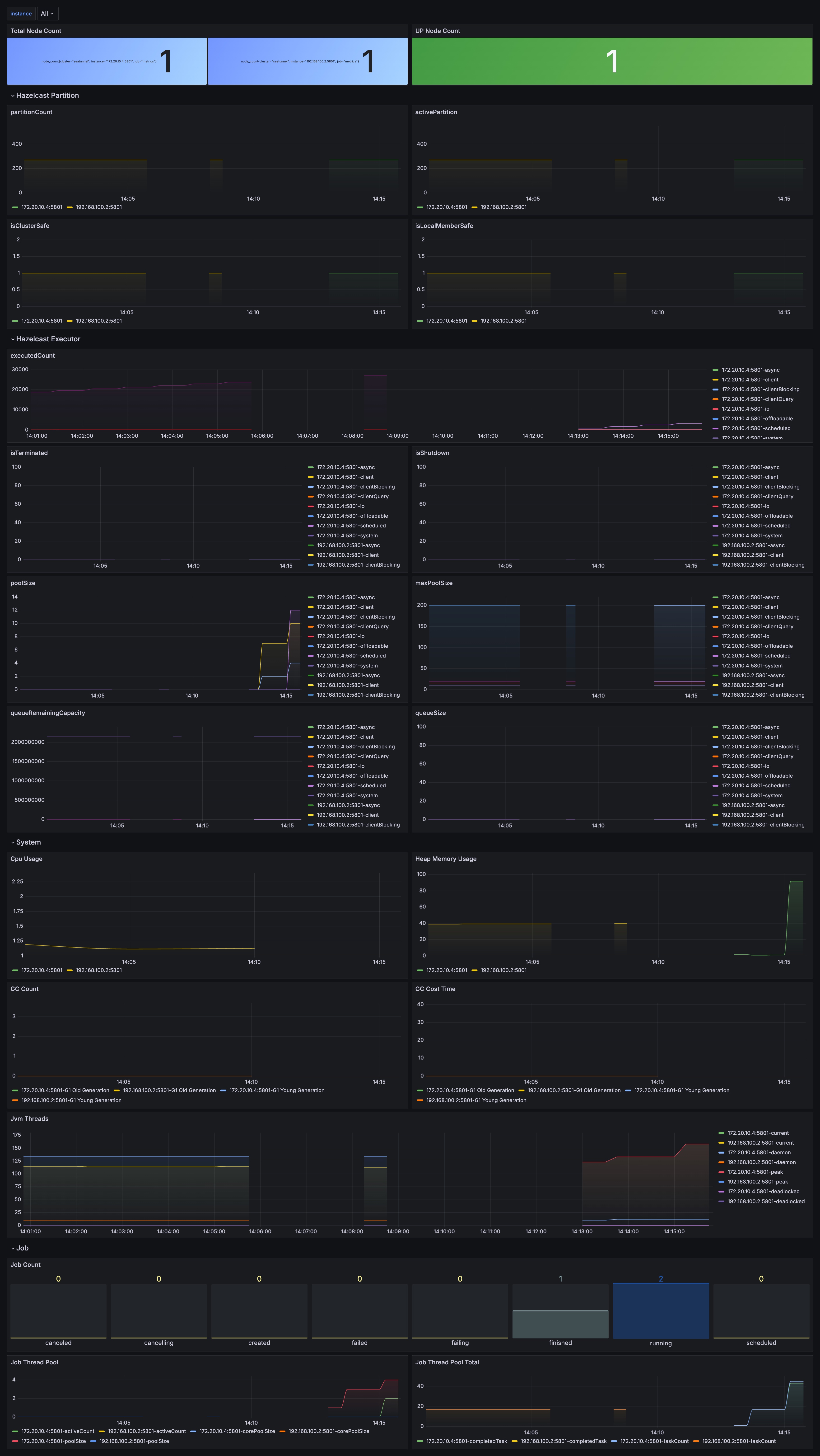
  • Monitor metadata-related signals: besides JVM metrics, watch checkpoint latency/failure rate, Hazelcast memory usage, IMap size and growth, and historical job accumulation.
  • Set eviction policies: tune history-job-expire-minutes to balance observability and long-term memory safety.

Example dashboard for metadata-related signals

· 10 min read

Introduction

With the development of big data technology, the demand for data integration and data stream processing is increasing. Apache SeaTunnel, as an open-source data integration framework, not only supports multiple data sources and targets but also provides flexible APIs to meet various complex business requirements.

This article will deeply analyze the Apache SeaTunnel API to help developers better understand its usage scenarios and implementation methods.

Understanding SeaTunnel from Interface Definitions

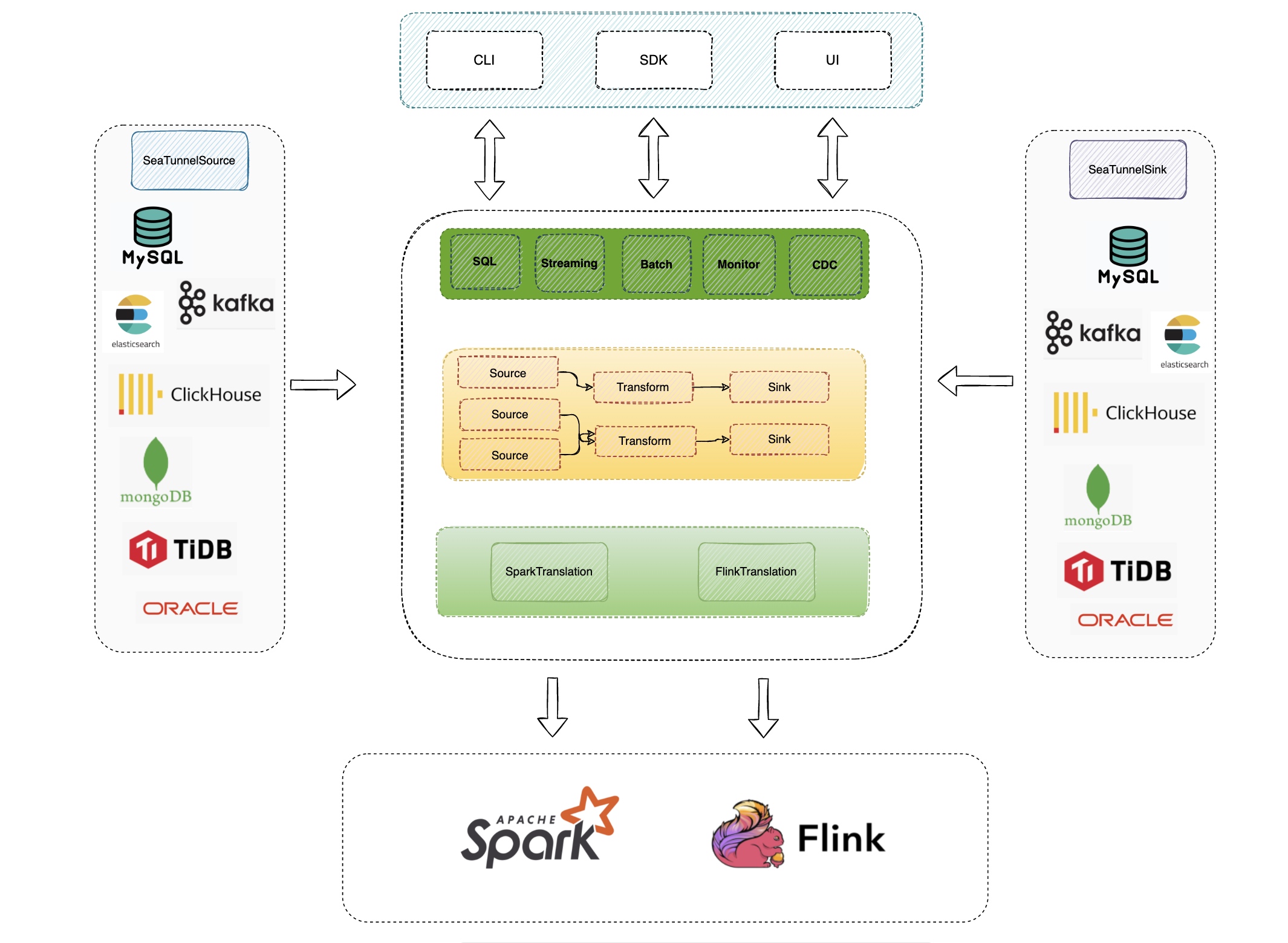
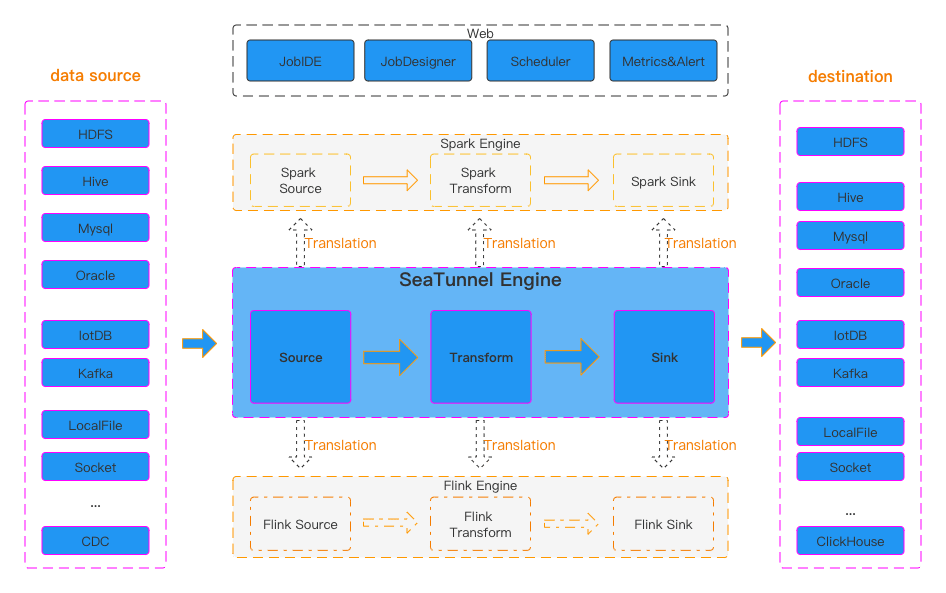
From the official diagram, we can see that SeaTunnel defines the following types:

  1. Source API: Used to define data input sources.
  2. Transform API: Used to process and transform data.
  3. Sink API: Used to define data output targets.

Three types of operators

image1.png

So I want to start by looking at Apache SeaTunnel's design philosophy from the interface definitions.

SeaTunnelSource

SeaTunnelSource is the interface definition for data reading. In this interface, it defines how to extract data from a data source.

public interface SeaTunnelSource<T, SplitT extends SourceSplit, StateT extends Serializable>  
extends Serializable,
PluginIdentifierInterface,
SeaTunnelPluginLifeCycle,
SeaTunnelJobAware {
/**
* Returns the type of current Source, whether it is [bounded batch data] or [unbounded stream data]
*/
Boundedness getBoundedness();

/**
* This method will be deprecated in the future
* Catalog will be used to represent data, allowing more metadata to describe the data
*/
default SeaTunnelDataType<T> getProducedType() {
return (SeaTunnelDataType) getProducedCatalogTables().get(0).getSeaTunnelRowType();
}

/**
* SeaTunnel currently supports multi-table reading, so this returns a list structure
* Each catalog contains metadata information about the table being read
*/
default List<CatalogTable> getProducedCatalogTables() {
throw new UnsupportedOperationException(
"getProducedCatalogTables method has not been implemented.");
}

/**
* Create Reader, which is the class that actually reads the data
*/
SourceReader<T, SplitT> createReader(SourceReader.Context readerContext) throws Exception;

/**
* These two methods are for creating/restoring SplitEnumerator
*/
SourceSplitEnumerator<SplitT, StateT> createEnumerator(
SourceSplitEnumerator.Context<SplitT> enumeratorContext) throws Exception;
SourceSplitEnumerator<SplitT, StateT> restoreEnumerator(
SourceSplitEnumerator.Context<SplitT> enumeratorContext, StateT checkpointState)
throws Exception;

/**
* These two methods are generally not modified, can be overridden if custom serialization is needed
*/
default Serializer<SplitT> getSplitSerializer() {
return new DefaultSerializer<>();
}
default Serializer<StateT> getEnumeratorStateSerializer() {
return new DefaultSerializer<>();
}

}

From this interface, we can see two main methods:

  • createReader
  • createEnumerator

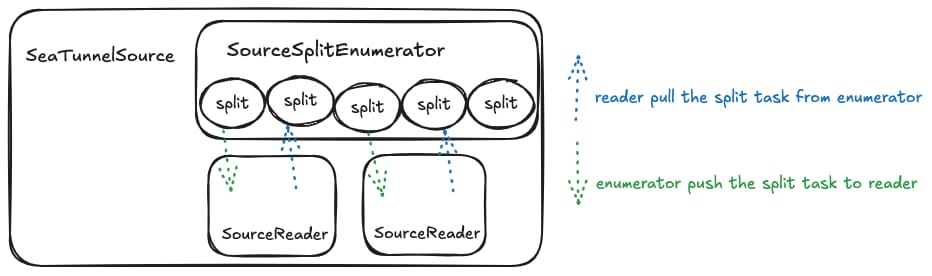
The SourceSplitEnumerator created by the createEnumerator method is responsible for splitting the data extraction tasks. The SourceReader created by the createReader method will perform the actual task reading based on these split tasks.

First, let's look at the code for SourceSplitEnumerator.

SourceSplitEnumerator

public interface SourceSplitEnumerator<SplitT extends SourceSplit, StateT> extends AutoCloseable, CheckpointListener {

void open();

void run() throws Exception;

@Override
void close() throws IOException;

void addSplitsBack(List<SplitT> splits, int subtaskId);

int currentUnassignedSplitSize();

void handleSplitRequest(int subtaskId);

void registerReader(int subtaskId);

StateT snapshotState(long checkpointId) throws Exception;

default void handleSourceEvent(int subtaskId, SourceEvent sourceEvent) {}

interface Context<SplitT extends SourceSplit> {

int currentParallelism();

Set<Integer> registeredReaders();

void assignSplit(int subtaskId, List<SplitT> splits);

default void assignSplit(int subtaskId, SplitT split) {
assignSplit(subtaskId, Collections.singletonList(split));
}

void signalNoMoreSplits(int subtask);

void sendEventToSourceReader(int subtaskId, SourceEvent event);

MetricsContext getMetricsContext();

EventListener getEventListener();
}

}

The SourceSplitEnumerator interface defines some methods and an inner class Context. First, let's look at its own methods. We can see there are 3 lifecycle-related methods: open(), run(), and close(). These methods require connectors to handle resource creation or cleanup based on their implementations.

  • registerReader(int subtaskId) method: reader actively registers with the split enumerator
  • handleSplitRequest(int subtaskId): reader actively requests from the split enumerator to get the extraction tasks it will execute.
    (However, looking at the code implementation, this approach is less common; most of the time, the enumerator actively pushes tasks to reader)
  • addSplitsBack(List<SplitT> splits, int subtaskId): When a reader encounters an exception, its running tasks need to be reassigned. At this point, these tasks need to be added back to the queue for reassignment to other nodes for fault tolerance.

In the Context interface definition, there are two key methods:

  • assignSplit(int subtaskId, List<SplitT> splits): split enumerator actively pushes tasks to a specific reader
  • signalNoMoreSplits(int subtaskId): split enumerator tells a specific reader that no more tasks will be assigned to it.

SourceReader

public interface SourceReader<T, SplitT extends SourceSplit>
extends AutoCloseable, CheckpointListener {

void open() throws Exception;

@Override
void close() throws IOException;

void pollNext(Collector<T> output) throws Exception;

List<SplitT> snapshotState(long checkpointId) throws Exception;

void addSplits(List<SplitT> splits);

void handleNoMoreSplits();

default void handleSourceEvent(SourceEvent sourceEvent) {}

interface Context {

int getIndexOfSubtask();

Boundedness getBoundedness();

void signalNoMoreElement();

void sendSplitRequest();

void sendSourceEventToEnumerator(SourceEvent sourceEvent);

MetricsContext getMetricsContext();

EventListener getEventListener();
}

}

In the Reader interface definition, there is also an inner class Context.

Let's look at some of the main methods:

  • pollNext(Collector<T> output): The main method for data extraction. In this method, each connector will implement extracting data from its corresponding data source, converting it to SeaTunnel's internal data structure SeaTunnelRow, and then adding it to the Collector
  • addSplits(List<SplitT> splits): reader's handling after receiving tasks assigned by the split enumerator
  • snapshotState(long checkpointId): This method is called during checkpoint, requiring the reader to record some state for subsequent fault tolerance

Summary with a Diagram

image2.png

Here, a Split represents a task for splitting data source reads. It can be a partition of a Hive table, a partition of Kafka, or a split of a JDBC query statement. In short, the core idea is to split data reading into multiple independent reading tasks that can be assigned to different reader instances for execution, thereby speeding up queries.

For example: In batch processing, data can be split into N parts, allowing data extraction to be executed in parallel to achieve speed improvement.

For stream processing, there are two approaches. One is to split data into limited unbounded data streams (e.g., Kafka splits by partition, one partition per task, each task being an unbounded data stream).

Another approach is to generate infinite bounded data streams (also using Kafka as an example, extracting part of the data from a partition each time, infinitely generating task definitions).

As for how many Splits a data reading task will ultimately be divided into and how to implement the splitting, it's up to each connector's implementation. Each connector can decide based on the actual partitions being read or parameters.

Next, let's look at the code related to Transform!

SeaTunnelTransform

public interface SeaTunnelTransform<T>  
extends Serializable, PluginIdentifierInterface, SeaTunnelJobAware {

default void open() {}

default void setTypeInfo(SeaTunnelDataType<T> inputDataType) {
throw new UnsupportedOperationException("setTypeInfo method is not supported");
}

// Get the data structure after Transform processing
CatalogTable getProducedCatalogTable();

// From this, we can see that Transform in SeaTunnel only supports map operations
// Operations like Join involving multiple data sources are not supported
T map(T row);

default void close() {}
}

In transform, there is one key method T map(T row), which performs map processing on an original data record to get a new data record. The structure of the new data is consistent with getProducedCatalogTable().

This code is based on version 2.3.6. The community is currently working on multi-table read/write functionality for Transform. Currently, only the map operator (one-to-one) is supported. I've seen the community also discussing whether to support the flatMap operator (one-to-many), which would allow data expansion operations during synchronization.

Now let's look at the Sink code!

SeaTunnelSink

public interface SeaTunnelSink<IN, StateT, CommitInfoT, AggregatedCommitInfoT>
extends Serializable,
PluginIdentifierInterface,
SeaTunnelPluginLifeCycle,
SeaTunnelJobAware {

@Deprecated
// These two methods are also marked as deprecated, will use Catalog for representation in the future
default void setTypeInfo(SeaTunnelRowType seaTunnelRowType) {
throw new UnsupportedOperationException("setTypeInfo method is not supported");
}
@Deprecated
default SeaTunnelDataType<IN> getConsumedType() {
throw new UnsupportedOperationException("getConsumedType method is not supported");
}

/**
* Create/restore SinkWriter, Writer is the class that actually performs data writing
*/
SinkWriter<IN, CommitInfoT, StateT> createWriter(SinkWriter.Context context) throws IOException;
default SinkWriter<IN, CommitInfoT, StateT> restoreWriter(
SinkWriter.Context context, List<StateT> states) throws IOException {
return createWriter(context);
}

default Optional<Serializer<StateT>> getWriterStateSerializer() {
return Optional.empty();
}

default Optional<SinkCommitter<CommitInfoT>> createCommitter() throws IOException {
return Optional.empty();
}

default Optional<Serializer<CommitInfoT>> getCommitInfoSerializer() {
return Optional.empty();
}

default Optional<SinkAggregatedCommitter<CommitInfoT, AggregatedCommitInfoT>
createAggregatedCommitter() throws IOException {
return Optional.empty();
}

default Optional<Serializer<AggregatedCommitInfoT>> getAggregatedCommitInfoSerializer() {
return Optional.empty();
}

}

In Sink, there are several key methods:

  • createWriter(SinkWriter.Context context): Create Writer instance. Similar to Source, the actual data writing is performed by the Writer.

  • createCommitter(): Optional. When two-phase commit is needed, create a SinkCommitter to complete the two-phase commit. This approach is no longer recommended; it's recommended to use createAggregatedCommitter() for two-phase commit.

  • createAggregatedCommitter(): Optional. Similar to SinkCommitter, used for two-phase commit during the commit phase.

    The difference is that SinkAggregatedCommitter runs as a single instance, not multiple instances, concentrating all commit tasks in one place for execution. So if a connector needs two-phase commit, it's recommended to use createAggregatedCommitter() to create it.

SinkWriter

public interface SinkWriter<T, CommitInfoT, StateT> {  

void write(T element) throws IOException;

default void applySchemaChange(SchemaChangeEvent event) throws IOException {}

Optional<CommitInfoT> prepareCommit() throws IOException;

default List<StateT> snapshotState(long checkpointId) throws IOException {
return Collections.emptyList();
}

void abortPrepare();

void close() throws IOException;

interface Context extends Serializable {

int getIndexOfSubtask();

default int getNumberOfParallelSubtasks() {
return 1;
}

MetricsContext getMetricsContext();

EventListener getEventListener();
}
}

We can see that the structure of SinkWriter is somewhat similar to SourceReader. Let's look at some key methods:

  • write(T element): Implementation of writing to the target database when receiving upstream data;

  • applySchemaChange(SchemaChangeEvent event): How downstream handles when upstream data table structure changes, such as adding/removing fields, modifying field names. But this depends on the specific implementation;

  • prepareCommit(): When two-phase commit is needed, generate information for this commit, which will be handed over to SinkCommitter/SinkAggregatedCommitter for two-phase commit. This method is called during checkpoint, meaning information is committed to the target connector only during each checkpoint;

  • snapshotState(): During checkpoint, store some state of the writer for subsequent fault tolerance;

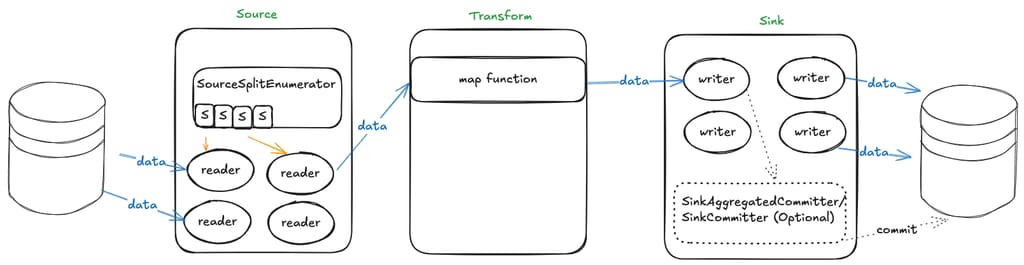
Summary with a Diagram

image3.png

When data needs to be read from a data source, SourceSplitEnumerator first splits the tasks, then SourceReader executes the split data reading tasks. During reading, raw data needs to be converted to SeaTunnel's internal SeaTunnelRow, then passed downstream to Transform for data transformation. After transformation, it's handed to SinkWriter to write the SeaTunnelRow data to the corresponding connector. If two-phase commit is needed during writing, additional SinkCommitter related classes need to be implemented.

Collector

In the previous sections, we've described the functionality of source, transform, and sink.

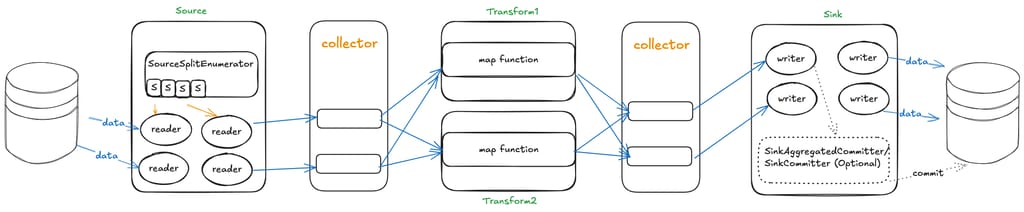
But how is data passed between source, transform, and sink? If a source has multiple downstream components, how are messages distributed to all downstream components? This is where the Collector interface comes in.

From the data flow direction, only source to downstream or transform to downstream passes data, so we can see there are two Collector interface definitions, located in the source and transform packages respectively.

First, let's look at the Collector definition in source:

public interface Collector<T> {  

void collect(T record);

default void markSchemaChangeBeforeCheckpoint() {}

default void collect(SchemaChangeEvent event) {}

default void markSchemaChangeAfterCheckpoint() {}

Object getCheckpointLock();

default boolean isEmptyThisPollNext() {
return false;
}

default void resetEmptyThisPollNext() {}
}

The Collector definition in transform is relatively simple:

public interface Collector<T> {     
void collect(T record);
void close();
}

Collector decouples multiple operators. Each operator only needs to focus on how to process data, without worrying about who to send the result data to.

Updating the previous diagram (adding another Transform to show the multi-downstream scenario):

image4.png

· 5 min read

Amazon Aurora DSQL is a distributed SQL database launched by Amazon Web Services in December 2024. It is designed for building applications with infinite scalability, high availability, and no infrastructure management, featuring high availability, serverless architecture, strong compatibility, fault tolerance, and high security levels.

Since Aurora DSQL's authentication mechanism is integrated with IAM, accessing the Aurora DSQL database requires generating a token via an IAM identity. This token is valid for only 15 minutes by default; therefore, some mainstream data synchronization tools currently do not support migrating data from other databases to Aurora DSQL.

In view of this situation, the author developed a Sink Connector specifically for Aurora DSQL based on the data synchronization tool Apache SeaTunnel, to meet the demand for migrating data from other databases to Aurora DSQL.

Introduction to SeaTunnel

SeaTunnel is a very easy-to-use, multi-modal, ultra-high-performance distributed data integration platform suited for data integration and data synchronization, mainly aiming to solve common problems in the field of data integration.

SeaTunnel Features

  • Rich and Extensible Connectors: Currently, SeaTunnel supports over 190 Connectors, and the number is increasing. Connectors for mainstream databases like MySQL, Oracle, SQLServer, and PostgreSQL are already supported. The plugin-based design allows users to easily develop their own Connectors and integrate them into the SeaTunnel project.
  • Batch-Stream Integration: Connectors developed based on the SeaTunnel Connector API are perfectly compatible with scenarios such as offline synchronization, real-time synchronization, full synchronization, and incremental synchronization. They greatly reduce the difficulty of managing data integration tasks.
  • Distributed Snapshot: Supports distributed snapshot algorithms to ensure data consistency.
  • Multi-Engine Support: SeaTunnel uses the SeaTunnel engine (Zeta) for data synchronization by default. SeaTunnel also supports using Flink or Spark as the execution engine for Connectors to adapt to existing enterprise technical components. SeaTunnel supports multiple versions of Spark and Flink.
  • JDBC Reuse & Multi-table Database Log Parsing: SeaTunnel supports multi-table or whole-database synchronization, solving the problem of excessive JDBC connections; it supports multi-table or whole-database log reading and parsing, solving the problem of repeated log reading and parsing in CDC multi-table synchronization scenarios.
  • High Throughput, Low Latency: SeaTunnel supports parallel reading and writing, providing stable, reliable, high-throughput, and low-latency data synchronization capabilities.
  • Comprehensive Real-time Monitoring: SeaTunnel supports detailed monitoring information for every step of the data synchronization process, allowing users to easily understand information such as the amount of data read and written, data size, and QPS of the synchronization task.

SeaTunnel Workflow

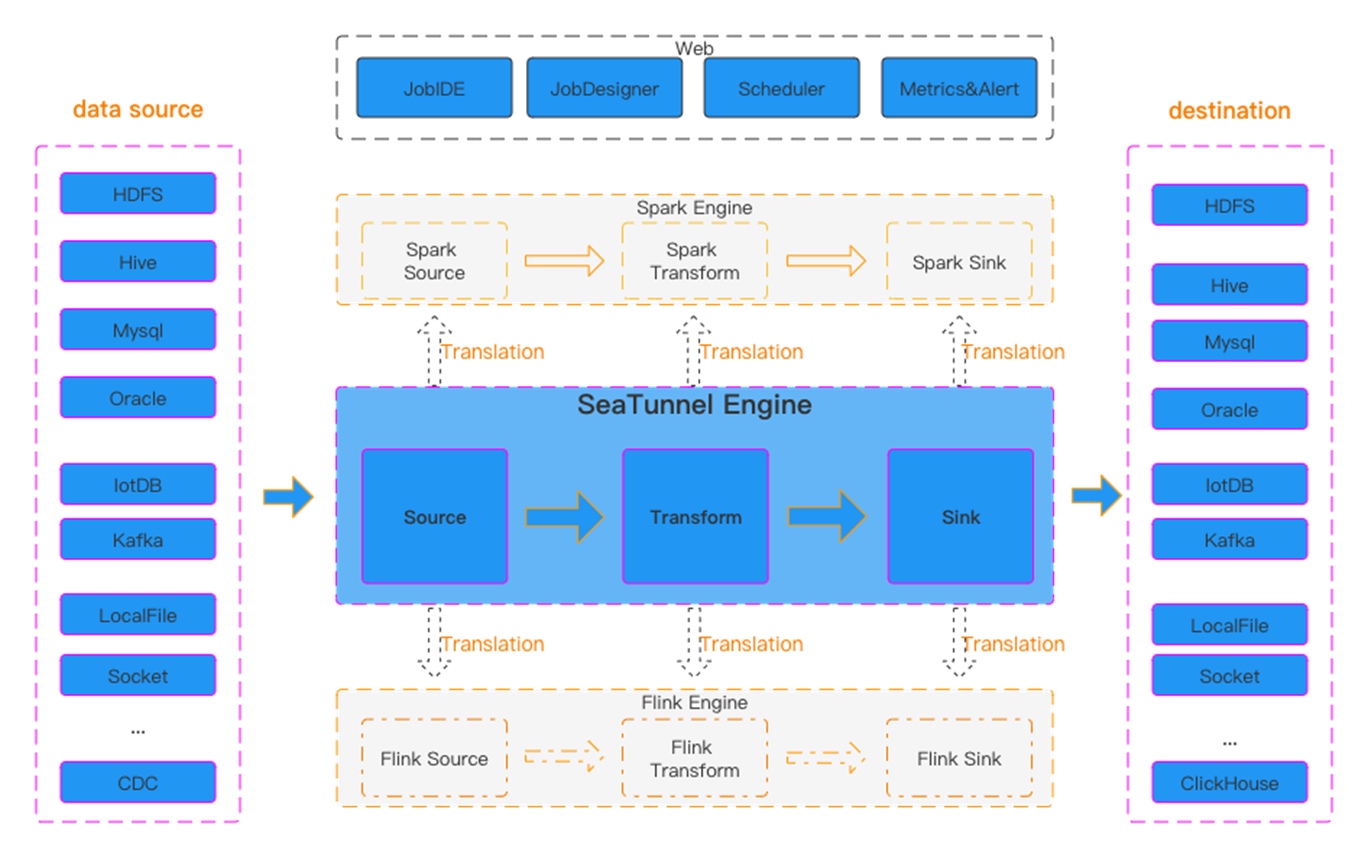
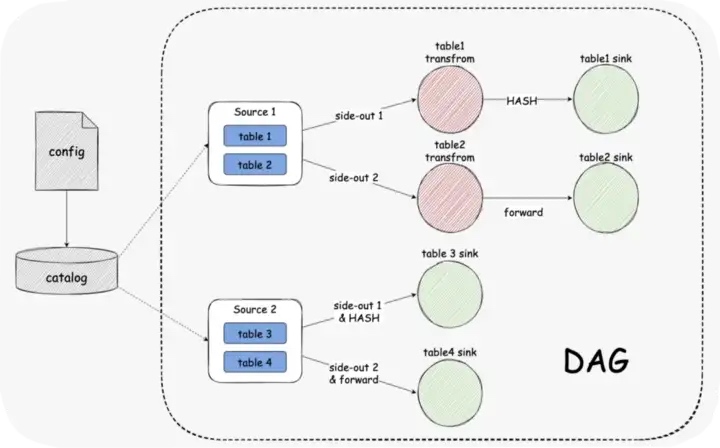
Figure 1 SeaTunnel Workflow

SeaTunnel's workflow is shown in the figure above. The user configures job information and selects the execution engine to submit the job. The Source Connector is responsible for reading source data in parallel and sending the data to the downstream Transform or directly to the Sink, and the Sink writes the data to the destination.

Build SeaTunnel from Source

git clone https://github.com/apache/seatunnel.git
cd seatunnel
sh ./mvnw clean install -DskipTests -Dskip.spotless=true
cp seatunnel-dist/target/apache-seatunnel-${version}-bin.tar.gz /The-Path-You-Want-To-Copy
cd /The-Path-You-Want-To-Copy
tar -xzvf "apache-seatunnel-${version}-bin.tar.gz"

After successfully building from source, all Connector plugins and some necessary dependencies (e.g., mysql driver) are included in the binary package. You can use the Connector plugins directly without installing them separately.

Configuration Example for Synchronizing MySQL Data to Aurora DSQL using SeaTunnel

env {
parallelism = 1
job.mode = "STREAMING"
checkpoint.interval = 6000
checkpoint.timeout = 1200000
}
source {
MySQL-CDC {
username = "user name"
password = "password"
table-names = ["db.table1"]
url = "jdbc:mysql://dbhost:3306/db?useSSL=false&allowPublicKeyRetrieval=true&serverTimezone=UTC&connectTimeout=120000&socketTimeout=120000&autoReconnect=true&failOverReadOnly=false&maxReconnects=10"
table-names-config = [
{
table = "db.table1"
primaryKeys = ["id"]
}
]
}
}
transform {

}
sink {
Jdbc {
url="jdbc:postgresql://<dsql_endpoint>:5432/postgres"
dialect="dsql"
driver = "org.postgresql.Driver"
username = "admin"
access_key_id = "ACCESSKEYIDEXAMPLE"
secret_access_key = "SECRETACCESSKEYEXAMPLE"
region = "us-east-1"
database = "postgres"
generate_sink_sql = true
primary_keys = ["id"]
max_retries="3"
batch_size =1000
}
}

Run Data Synchronization Task

Save the above configuration as a mysql-to-dsql.conf file (please note that the values in the example need to be replaced with real parameters), store it in the config directory of apache-seatunnel-${version}, and execute the following command:

cd "apache-seatunnel-${version}"
./bin/seatunnel.sh --config ./config/mysql-to-dsql.conf -m local

Figure 2 Data Synchronization Log Information

After the command is successfully executed, you can observe the task execution status through the newly generated logs. If an error occurs, you can also pinpoint it based on the exception information, such as database connection timeout or table not existing. Under normal circumstances, data will be successfully written to the target Aurora DSQL, as shown in the figure above.

Summary

Aurora DSQL is a highly secure, easily scalable, serverless infrastructure distributed database. Its authentication method combines with IAM identity, so currently, there is a lack of suitable tools to synchronize data to Aurora DSQL, especially in terms of real-time data synchronization. SeaTunnel is an excellent data integration and data synchronization tool. It currently supports data synchronization from a variety of data sources, and based on SeaTunnel, custom data synchronization requirements can be implemented very flexibly, such as full synchronization/incremental real-time synchronization. Based on this flexibility, the author developed a Sink Connector specifically for Aurora DSQL to meet the data synchronization needs for Aurora DSQL.

References

The aforementioned specific Amazon Web Services Generative AI-related services are currently available in Amazon Web Services overseas regions. Cloud services related to Amazon Web Services China Regions are operated by Sinnet and NWCD. Please refer to the official website of China Regions for specific information.

About the Author

Tan Zhiqiang, AWS Migration Solution Architect, is mainly responsible for enterprise customers' cloud migration or cross-cloud migration. He has more than ten years of experience in IT professional services and has served as a programmer, project manager, technical consultant, and solution architect.

· 9 min read

This article provides a detailed walkthrough of how to achieve full data synchronization from MySQL to PostgreSQL using Apache SeaTunnel 2.3.9. We cover the complete end-to-end process — from environment setup to production validation. Let’s dive into the MySQL-to-PostgreSQL synchronization scenario.

Version Requirements:

  • MySQL: MySQL 8.3
  • PostgreSQL: PostgreSQL 13.2
  • Apache SeaTunnel: Apache-SeaTunnel-2.3.9

Preliminaries

Verify Version Information

Run the following SQL command to check the version:

-- Check version information 
select version();

Enable Master-Slave Replication

-- View replication-related variables
show variables where variable_name in ('log_bin', 'binlog_format', 'binlog_row_image', 'gtid_mode', 'enforce_gtid_consistency');

For MySQL CDC data synchronization, SeaTunnel needs to read the MySQLbinlogand act as a slave node in the MySQL cluster.

Note: In MySQL 8.0+,binlogis enabled by default, but replication mode must be enabled manually.

-- Enable master-slave replication (execute in sequence)
-- SET GLOBAL gtid_mode=OFF;
-- SET GLOBAL enforce_gtid_consistency=OFF;
SET GLOBAL gtid_mode=OFF_PERMISSIVE;
SET GLOBAL gtid_mode=ON_PERMISSIVE;
SET GLOBAL enforce_gtid_consistency=ON;
SET GLOBAL gtid_mode=ON;

Grant Necessary User Permissions

A user must haveREPLICATION SLAVEandREPLICATION CLIENTprivileges:

-- Grant privileges to the user
CREATE USER 'test'@'%' IDENTIFIED BY 'password';
GRANT SELECT, RELOAD, SHOW DATABASES, REPLICATION SLAVE, REPLICATION CLIENT ON *.* TO 'test';
FLUSH PRIVILEGES;

SeaTunnel Cluster Setup

Cluster Logging

By default, SeaTunnel logs output to a single file. For production, it’s preferable to have separate log files per job. Update the logging configuration inlog4j2.properties

############################ log output to file #############################
# rootLogger.appenderRef.file.ref = fileAppender
# Change log output to use independent log files for each job
rootLogger.appenderRef.file.ref = routingAppender
############################ log output to file #############################

Client Configuration

For production clusters, it is recommended to install SeaTunnel under the/optdirectory and point theSEATUNNEL_HOMEenvironment variable accordingly.

If multiple versions exist, create a symbolic link to align with the server deployment directory:

# Create a symlink
ln -s /opt/apache-seatunnel-2.3.9 /opt/seatunnel
# Set environment variable
export SEATUNNEL_HOME=/opt/seatunnel

Environment Variables Configuration

For Linux servers, add the following lines to/etc/profile.d/seatunnel.sh

echo 'export SEATUNNEL_HOME=/opt/seatunnel' >> /etc/profile.d/seatunnel.sh
echo 'export PATH=$SEATUNNEL_HOME/bin:$PATH' >> /etc/profile.d/seatunnel.sh
source /etc/profile.d/seatunnel.sh

Job Configuration

Note: The configuration below does not cover all options but illustrates common production settings.

env {
job.mode = "STREAMING"
job.name = "DEMO"
parallelism = 3
checkpoint.interval = 30000 # 30 seconds
checkpoint.timeout = 30000 # 30 seconds

job.retry.times = 3
job.retry.interval.seconds = 3 # 3 seconds
}

The first step is setting up theenvmodule, which operates in a streaming mode. Therefore, it’s essential to specify the configuration mode asSTREAMING.

Task Naming and Management

Configuring a task name is crucial for identifying and managing jobs in a production environment. Naming conventions based on database or table names can help with monitoring and administration.

Parallelism Settings

Here, we set the parallelism to3, but this value can be adjusted based on the cluster size and database performance.

Checkpoint Configuration

  • Checkpoint Frequency: Set to 30 seconds. If higher precision is required, this can be reduced to 10 secondsor less.
  • Checkpoint Timeout: If a checkpoint takes too long, the job is considered failed. Set to30 seconds.
  • Automatic Retry: Configured to3 retries, with a retry interval of3 seconds(adjustable based on system requirements).
source {
MySQL-CDC {
base-url = "jdbc:mysql://192.168.8.101:3306/test?serverTimezone=Asia/Shanghai"
username = "test"
password = "123456"

database-names = ["test"]
# table-names = ["test.test_001","test.test_002"]
table-pattern = "test\\.test_.*" # The first dot is a literal character, requiring escaping; the second dot represents any single character.
table-names-config = [
{"table":"test.test_002","primaryKeys":["id"]}
]

startup.mode = "initial" # First sync all historical data, then incremental updates
snapshot.split.size = "8096"
snapshot.fetch.size = "1024"
server-id = "6500-8500"
connect.timeout.ms = 30000
connect.max-retries = 3
connection.pool.size = 20

exactly_once = false # In analytical scenarios, disabling exactly-once consistency allows some duplicates/losses for better performance.
schema-changes.enabled = true # Enable schema evolution to avoid frequent modifications; supports add, rename, drop operations.
}
}

Key MySQL CDC Configurations

  1. Time Zone Configuration: It’s recommended to specify the MySQL connection timezone to prevent discrepancies when extractingdatetimeortimestampdata.
  2. User Credentials
  • The username and password must have replication privileges , allowing access to the bin_log logs.
  • The account should be able to query all tables under the designated databases.

Database & Table Selection

Typically, each database is assigned to a separate task. Here, we specify only thetestdatabase.
Two methods can be used:

  1. Direct table name selection
  2. Regular expression-based table matching(recommended for large datasets or entire database synchronization).

Important:
When using regular expressions, both the database name and table name must be included. The.character, which separates them, must be escaped (\\.).

For example, to match tables prefixed withtest_, we use:

test\\.test_.*
  • The first dot (.) represents a literal separator, requiring escaping (\\.).
  • The second dot (.) representsany single characterin regex.

Additionally, for tables without primary keys, logical primary keys can be specified manually to facilitate data synchronization.

Startup Mode

The default startup mode isinitial, which means:

  1. Full historical data syncfirst
  2. Incremental updatesafterward

Sharding & Fetching

  • The default values for shard size and batch fetch size work well.
  • If the server has higher performance, these values can be increased.

Server ID

  • MySQL requires unique server IDs for replication nodes.
  • Apache SeaTunnel must masquerade as a MySQL replica.
  • If not configured, a default value is used, but manual specification is recommended to avoid conflicts.
  • The server ID range must be greater than the parallelism level, or errors may occur.

Timeouts & Retries

  • Connection Timeout: For large datasets, increase this value accordingly.
  • Auto-Retry Interval: If handling a high volume of tables, consider extending retry intervals.

Exactly-Once Consistency

For CDC-based data synchronization,exactly-once consistency is often not required in analytical scenarios.

  • Disablingit can significantly boost performance.
  • However, if strict consistency is required, it can be enabled at the cost of reduced performance.

Schema Evolution

It’s highly recommended to enable schema evolution, which:

  • Allows automatic table modifications (e.g., adding/removing fields)
  • Reduces the need for manual job updates when the schema changes

However,downstream tasks may fail if they rely on a field that was modified.
Supported schema changes:
✔️ADD COLUMN
✔️DROP COLUMN
✔️RENAME COLUMN
✔️MODIFY COLUMN

Note: Schema evolution does not supportCREATE TABLEorDROP TABLE.

Configuring the Sink (PostgreSQL)

The sink configuration inserts data into PostgreSQL.

sink {
jdbc {
url = "jdbc:postgresql://192.168.8.101:5432/test"
driver = "org.postgresql.Driver"
user = "postgres"
password = "123456"

generate_sink_sql = true
database = "test"
table = "${database_name}.${table_name}"
schema_save_mode = "CREATE_SCHEMA_WHEN_NOT_EXIST"
data_save_mode = "APPEND_DATA"
# enable_upsert = false
}
}

Key Considerations:

JDBC Connection

  • Specify PostgreSQL driver, user, and password.

Auto SQL Generation

  • Enabling generate_sink_sql lets SeaTunnel automatically create tables and generate INSERT,DELETE, andUPDATEstatements.

Schema Handling

  • PostgreSQL uses Database → Schema → Table, while MySQL has only Database → Table.
  • Ensure the schema is correctly mapped to avoid data mismatches.

User Permissions

  • The PostgreSQL user must have table creation permissions if using auto-schema generation.

For more details, refer to the official documentation:
🔗SeaTunnel MySQL-CDC Connector Docs

Using Placeholders in Sink Configuration

Apache SeaTunnel supports placeholders, which dynamically adjust table names based on the source data.

For example:

table = "${database\_name}.${table\_name}"
  • Ensures each table syncs correctly without manual specification.
  • Supports concatenation and dynamic formatting.

Schema Save Mode and Data Append Strategy

Theschema_save_modeparameter plays a crucial role in database-wide synchronization. It simplifies the process by automatically creating tables in the target database, eliminating the need for manual table creation steps.

Another key configuration isAPPEND_DATA, which is particularly useful when the target database already contains previously synchronized data. This setting prevents the accidental deletion of existing records , making it a safer choice for most scenarios. However, if your use case requires a different approach, you can modify this setting according to the official documentation guidelines.

Enable Upsert for Performance Optimization

Another important parameter isenable_upsert. If you can guarantee that the source data contains no duplicate records , disabling upsert (enable_upsert = false) can significantly enhance synchronization performance . This is because, without upsert, the system does not need to check for existing records before inserting new ones.

However, if there is a possibility of duplicate records in the source data, it is strongly recommended to keep Upsert enabled (enable_upsert = true). This ensures that records are inserted or updated based on their primary key** , preventing duplication issues.

For detailed parameter explanations and further customization options , please refer to the official Apache SeaTunnel documentation.

Task Submission and Monitoring

Once your configuration file is ready, submit the job using the SeaTunnel command-line tool:

./bin/start-seatunnel.sh --config /path/to/config.yaml --async

Key Parameters:

  • --config: Specifies the path to your configuration file.
  • --async: Submits the job asynchronously, allowing the command line to exit while the job continues in the background.

After submission, you can monitor the job via SeaTunnel’s cluster UI. In version 2.3.9, SeaTunnel provides a visual interface where you can view job logs, execution status, and data throughput details.

Data Synchronization Demonstration

For this demonstration, we created two tables (test_001andtest_002) and inserted sample data into MySQL. Using SeaTunnel's synchronization tasks, the data was successfully synchronized to PostgreSQL. The demonstration included insertions, deletions, updates, and even table schema modifications—all of which were reflected in real time on PostgreSQL.

Key Points:

  • Schema Synchronization:
    SeaTunnel supports automatic table schema synchronization. When the source MySQL table structure changes, the target PostgreSQL table automatically updates.
  • Data Consistency:
    SeaTunnel ensures data consistency by accurately synchronizing all insert, delete, and update operations to the target database.

About SeaTunnel

Apache SeaTunnel focuses on data integration and synchronization, addressing common challenges such as:

  • Diverse Data Sources:
    Supporting hundreds of data sources, even as new ones emerge.
  • Complex Sync Scenarios:
    Including full, incremental, CDC, real-time, and whole-database synchronizations.
  • High Resource Demands:
    Traditional tools often require extensive computing or JDBC resources for real-time sync of many small tables.
  • Monitoring and Quality:
    Sync processes can suffer from data loss or duplication, and effective monitoring is essential.
  • Complex Technology Stacks:
    Multiple sync programs may be needed for different systems.
  • Management Challenges:
    Offline and real-time sync are often developed and managed separately, increasing complexity.

· 5 min read

SeaTunnel version 2.3.1 was released recently. This is a high-profile release with many important function updates and optimizations. At the level of programming user experience, the new version improves the stability of SeaTunnel Zeta and CI/CD; at the level of connectors, the new version implements 7+ new connectors and fixes existing commonly used connectors bugs, and improved security. The community refactored multiple underlying base classes and added an important feature, AI Compatible. With the optimized API, users can use ChatGPT 4.0 to quickly build the SaaS Connector they need.

Major Feature update

01 SeaTunnel Zeta

The first version of the data integration engine-SeaTunnel Zeta is introduced in the SeaTunnel 2.3.0 release and has received feedback from numerous community users. In SeaTunnel version 2.3.1, we have fixed all the bugs reported by users, optimized the use of memory and threads, and greatly improved the stability of Zeta.

In version 2.3.1, the community also added several new Zeta features, including a dedicated JVM parameter configuration file, client output of job monitoring information, Rest API for Zeta cluster information and job information, etc.

At the checkpoint level, version 2.3.1 Zeta supports using OSS as checkpoint storage. It also supports savepoint running jobs and resuming jobs from savepoints.

In addition, version 2.3.1 also adds a set of Zeta’s Rest API, which can be used to obtain the list of jobs running on Zeta, the status information of jobs, and the monitoring indicators of Zeta cluster nodes. For specific usage methods, please refer to https:/ /seatunnel.apache.org/docs/seatunnel-engine/rest-api/

02 AI Compatible

In SeaTunnel 2.3.1, the HTTP interface and related APIs are reconstructed, and the SaaS Connector-related API and Connector construction process are simplified according to the existing xGPT level capabilities so that ChatGPT 4.0 can directly generate SaaS Connectors and quickly generate various SaaS Connector interfaces. Under normal circumstances, the results obtained by this method are 95% similar to the code written by open-source contributors (see appendix).

Of course, because ChatGPT4.0 will be updated in October 2021, it is necessary to provide some latest vectorized documents for the latest SaaS interface adaptation to have the latest interface adaptation. However, this refactored API and code framework allows users to generate Connectors more quickly and contribute to the open-source community, making the SeaTunnel interface more powerful.

Connector

01 7+ new connectors

While fixing the bugs of known connectors and optimizing the connectors, the community has added 7 new connectors including SAP HANA, Persistiq, TDEngine, SelectDB Cloud, Hbase, FieldMapper Transform, and SimpleSQL Transform.

02 Reimplement SQL Transform

Since the previous SQL Transform connector was defined based on Flink SQL and Spark SQL, SQL Transform cannot adapt to the execution of multiple engines, so we removed the SQL Transform function in version 2.3.0. In version 2.3.1, we reimplemented SQL Transform. SQL Transform is an API that does not depend on a task-specific execution engine and can perfectly run on three different engines: Flink/Spark/Zeta. Special thanks to contributor Ma Chengyuan (GitHub ID: rewerma) for leading and contributing this important Feature.

For the functions already supported by SQL Transform, please refer to https://seatunnel.apache.org/docs/2.3.1/transform-v2/sql-functions

03 New SQL Server CDC

At the CDC connector level, the community has newly added a SQL Server CDC connector, and made a lot of optimizations to MySQL CDC, improving the stability of MySQL CDC.

04 Added CDC connector to output debezium-json format function

In addition, version 2.3.1 also added the function of the CDC connector to output debezium-json format. Users can use MySQL CDC to read binlog and output data in debezium-json format to Kafka, so that users can create new synchronization tasks to read The data in debezium-json format in Kafka is synchronized to the target data source, or you can directly write other programs to read the data in debezium-json format in Kafka to perform some indicator calculations.

Safety

Before version 2.3.1, users need to configure the database username, password, and other information in plain text in the config file, which may cause some security problems. In version 2.3.1, we added the configuration file encryption function, and users can fill in the encrypted database username, password, and other information in the config file. When the job is running, SeaTunnel will decrypt the content in the config file based on the default encryption and decryption algorithm. At the same time, the encryption function provides SPI, by which users can customize the parameter list of encryption and decryption and the algorithm of encryption and decryption based on their own needs.

For how to use this function, please refer to https://seatunnel.apache.org/docs/2.3.1/connector-v2/Config-Encryption-Decryption

Third-party engine support

SeaTunnel version 2.3.1 supports Spark version 3.3, as well as Flink 1.14.6, Flink 1.15, Flink 1.16, and other versions, basically covering the mainstream versions of Spark and Flink.

Client

The new version introduces an SPI for job configuration. Previously, only hocon json configuration files were supported. Now SPI is opened to the users to customize the format of job configuration files to meet different business system integration requirements.

Optimization

SeaTunnel 2.1.3 version has made many important optimizations, including changes in core components, connector components, CI/CD, Zeta(ST-Engine), and E2E components, involving updating new functions, improving existing functions, and optimizing tests and deployment processes. Some notable changes include adding parallelism and column projection interfaces in Core API, introducing MySQL-CDC source factory in Connector-V2 and supporting only-once semantics for JDBC source connectors, improving CI/CD process and stability for E2E In Zeta (ST-Engine), the logic of restarting the job when all nodes are down is added, and the timeout period for writing data is configurable.

For a detailed list, see the Release Note [Improve] section.

Document

In addition, the new version also has a series of updates to the documentation, including adding transform v2 documentation and some hints, as well as improving the documentation of various connectors.

See the Release Note [Docs] section for details.

Document address: https://seatunnel.apache.org/versions/

Release Note

https://github.com/apache/incubator-seatunnel/blob/2.3.1/release-note.md

Acknowledgement to the contributors

contributors

· 3 min read

cover

SeaTunnel Zeta has been officially released with the joint efforts of the community. After comparing the performance of SeaTunnel with DataX and Airbyte, we also compared the performance of SeaTunnel with the popular data synchronization tool AWS GLUE.

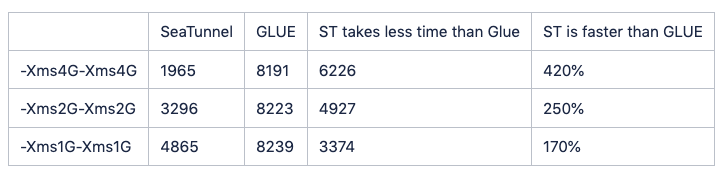
The results showed that SeaTunnel batch syncs MySQL data to MySQL 420% faster than GLUE.

To ensure the accuracy of the test, we took on the test under the same test environment: under the same resource conditions, we tested SeaTunnel and AWS GLUE to synchronize data from MySQL to MySQL in batches and compared the time required for the two tools.

1

We created a table in MySQL containing 31 fields, with the primary key selected as an incrementing ID, and all other fields generated randomly, without setting any indexes. The table creation statement is as follows:

create table test.type_source_table
(
id int auto_increment
primary key,
f_binary binary(64) null,
f_blob blob null,
f_long_varbinary mediumblob null,
f_longblob longblob null,
f_tinyblob tinyblob null,
f_varbinary varbinary(100) null,
f_smallint smallint null,
f_smallint_unsigned smallint unsigned null,
f_mediumint mediumint null,
f_mediumint_unsigned mediumint unsigned null,
f_int int null,
f_int_unsigned int unsigned null,
f_integer int null,
f_integer_unsigned int unsigned null,
f_bigint bigint null,
f_bigint_unsigned bigint unsigned null,
f_numeric decimal null,
f_decimal decimal null,
f_float float null,
f_double double null,
f_double_precision double null,
f_longtext longtext null,
f_mediumtext mediumtext null,
f_text text null,
f_tinytext tinytext null,
f_varchar varchar(100) null,
f_date date null,
f_datetime datetime null,
f_time time null,
f_timestamp timestamp null
);

SeaTunnel Task Configuration

In SeaTunnel, we split the data according to the ID field and process it in multiple sub-tasks. Here is the configuration file for SeaTunnel:

env {
job.mode = "BATCH"
checkpoint.interval = 300000
}
source {
Jdbc {
url = "jdbc:mysql://XXX:3306/test"
driver = "com.mysql.cj.jdbc.Driver"
user = "root"
password = "password"
connection_check_timeout_sec = 100
query = "select id, f_binary, f_blob, f_long_varbinary, f_longblob, f_tinyblob, f_varbinary, f_smallint, f_smallint_unsigned, f_mediumint, f_mediumint_unsigned, f_int, f_int_unsigned, f_integer, f_integer_unsigned, f_bigint, f_bigint_unsigned, f_numeric, f_decimal, f_float, f_double, f_double_precision, f_longtext, f_mediumtext, f_text, f_tinytext, f_varchar, f_date, f_datetime, f_time, f_timestamp from test"
partition_column = "id"
partition_num = 40
parallelism = 2
}
}
sink {
Jdbc {
url = "jdbc:mysql://XXX:3306/test"
driver = "com.mysql.cj.jdbc.Driver"
user = "root"
password = "password"
query = "insert into test_1 values (?,?,?,?,?,?,?,?,?,?,?,?,?,?,?,?,?,?,?,?,?,?,?,?,?,?,?,?,?,?,?)"
}
}

Under fixed JVM memory of 4G and parallelism of 2, SeaTunnel completed the synchronization in 1965 seconds. Based on this conclusion, we tested the speed of GLUE under the same memory and concurrency settings.

GLUE Task Configuration

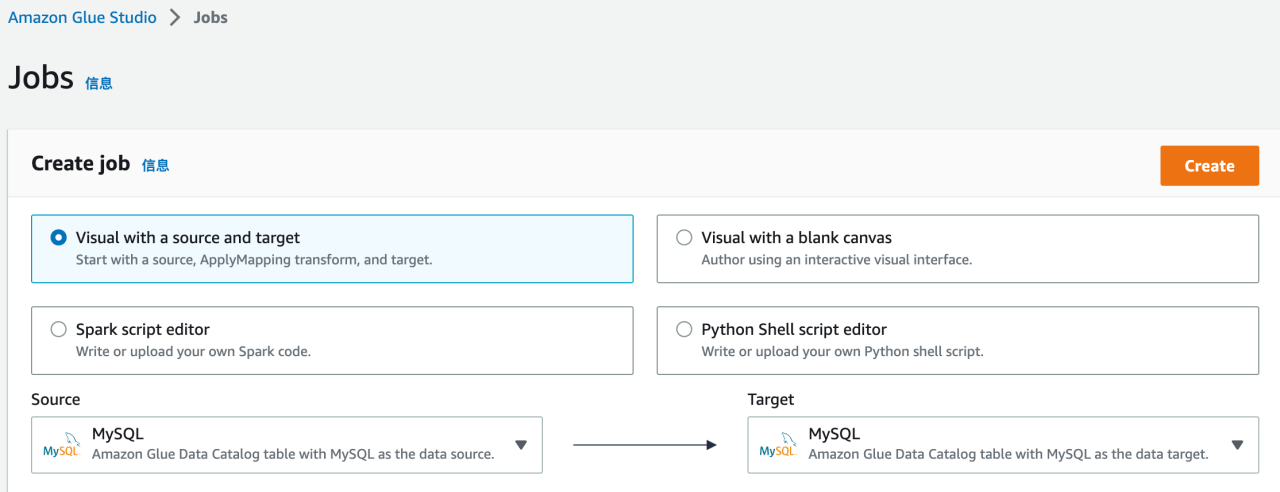
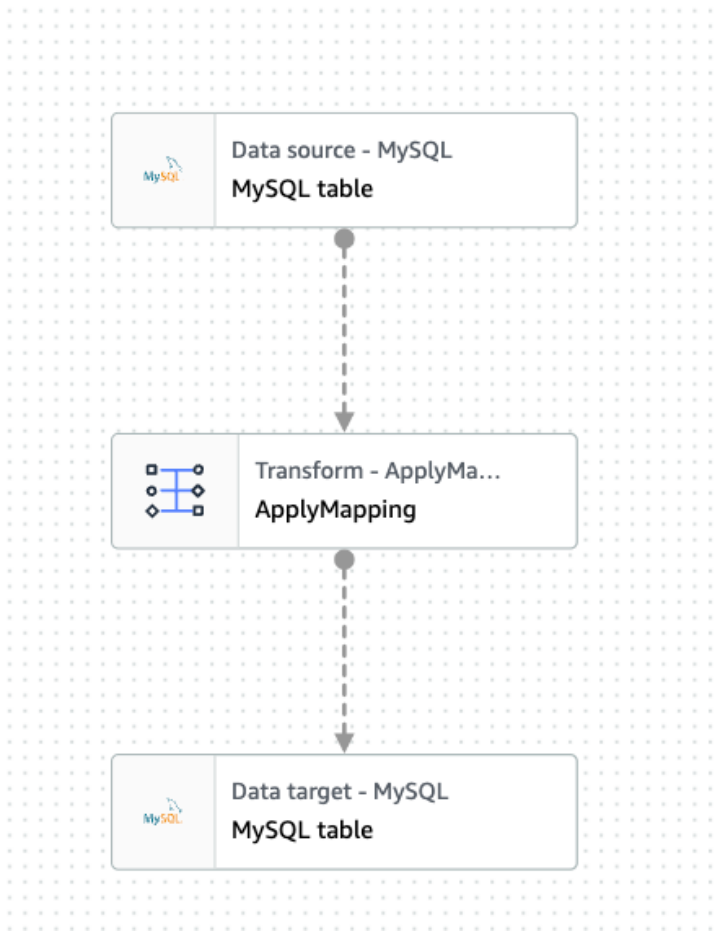
We created a MySQL-to-MySQL job as follows:

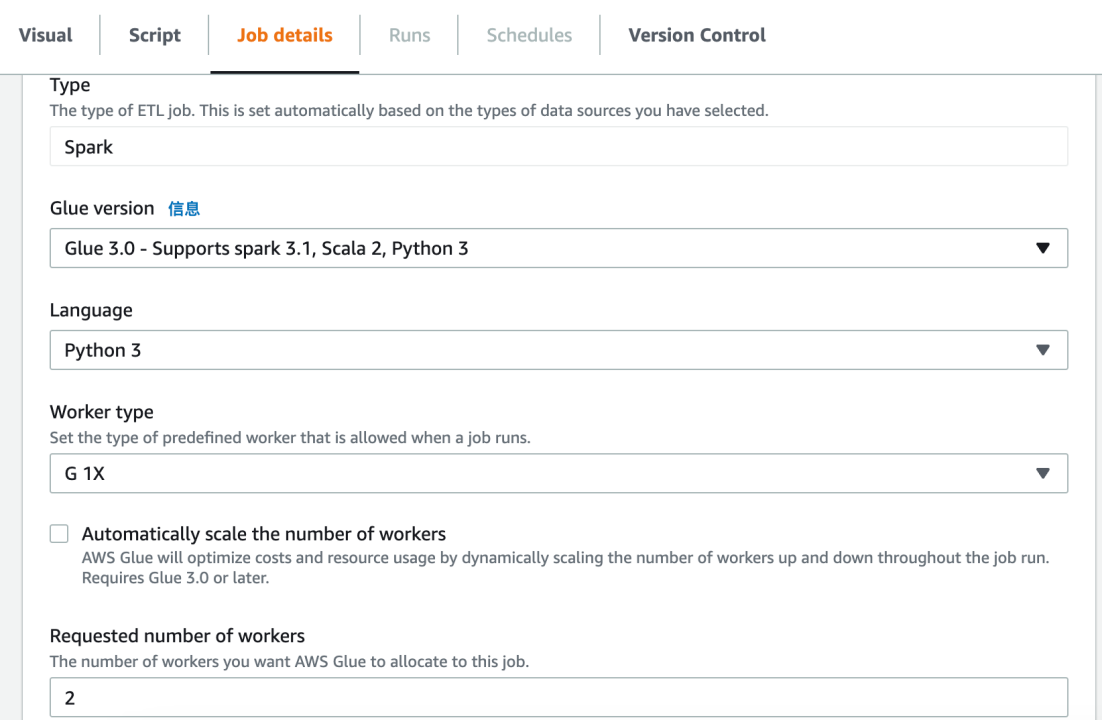
2

Configuration source connect with the target:

3

Job configuration:

4

5

Adjust the memory: job parameters configuration

6

— conf spark.yarn.executor.memory=4g

Under this configuration, GLUE took 8191 seconds to complete the synchronization.

Conclusion

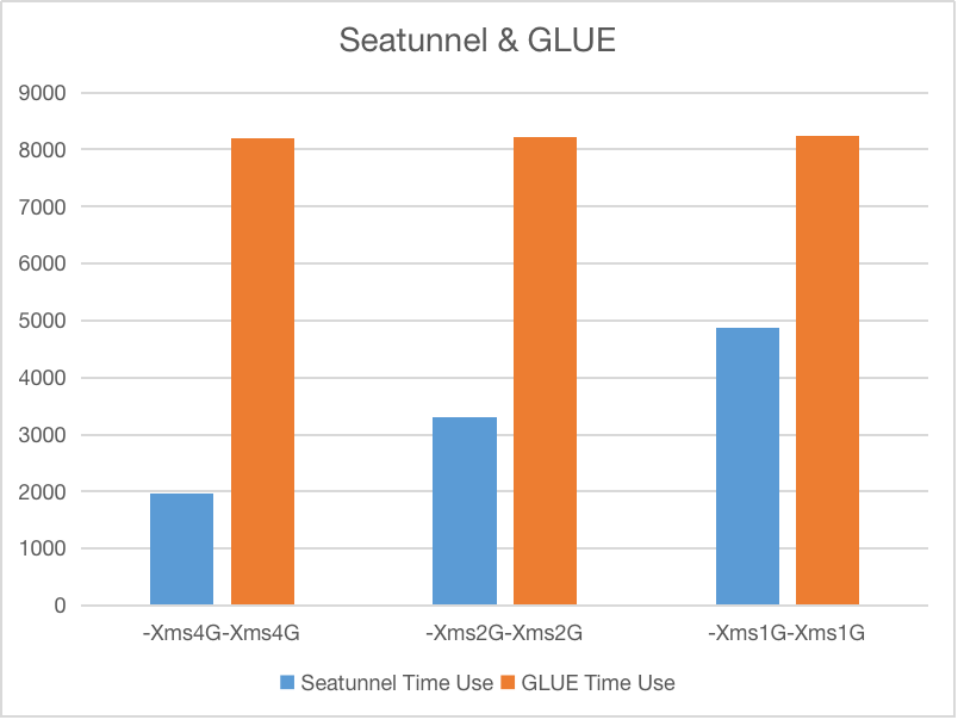
After comparing the best configurations, we conducted a more in-depth comparison for different memory sizes. The following chart shows the comparison results obtained through repeated testing under the same environment.

7

The unit is seconds.

8

Note: This comparison is based on SeaTunnel: commit ID f57b897, and we welcome to download and test it!

· 6 min read

Written by Wang Hailin, Apache SeaTunnel PPMC

Preface

Currently, SeaTunnel supports database change data capture (CDC https://github.com/apache/incubator-seatunnel/issues/3175), to transfer data changes to downstream systems in real time. SeaTunnel categorizes the captured data changes into the following 4 types:

  • INSERT: Data insertion
  • UPDATE_BEFORE: Historical value before data change
  • UPDATE_AFTER: New value after data change
  • DELETE: Data deletion

To handle the above data change operations, the Sink Connector needs to support writing behavior. This article will introduce how the ClickHouse Sink Connector supports writing these CDC types of data changes.

For CDC scenarios, the primary key is a necessary condition, so first, it needs to support the general requirements of INSERT, UPDATE, DELETE, etc. based on the primary key and ensure that the writing order is consistent with the CDC event order. In addition, considering the complexity of the data source in practice, it also needs to support UPSERT writing. Finally, according to the characteristics of ClickHouse itself, corresponding optimizations need to be made, such as UPDATE and DELETE being heavyweight operations in ClickHouse, which should be optimized based on the corresponding table engine's characteristics.

Overall design

The current ClickHouse Sink Connector is based on the JDBC Driver implementation, and a group of JDBC executors can be designed to encapsulate the processing of different types of data, making it convenient to switch or combine implementations based on actual scenarios and encapsulate implementation details.

JdbcBatchStatementExecutor is the top-level interface of the executor.

public interface JdbcBatchStatementExecutor extends AutoCloseable {

void prepareStatements(Connection connection) throws SQLException;

void addToBatch(SeaTunnelRow record) throws SQLException;

void executeBatch() throws SQLException;

void closeStatements() throws SQLException;

@Override
default void close() throws SQLException {
closeStatements();
}
}

JdbcBatchStatementExecutor has the following implementation classes:

SimpleBatchStatementExecutor // implements simple SQL Batch execution logic 
InsertOrUpdateBatchStatementExecutor // implements INSERT, UPDATE update, also supports UPSERT mode
ReduceBufferedBatchStatementExecutor // memory accumulation, when refreshing to the database, the data change type (INSERT, UPDATE, DELETE) is distributed to the specific execution executor

Handling of cases where the primary key is not specified

Currently, in CDC processing, the primary key is a necessary condition. If the Sink Connector is not specified in the primary key column configuration, it uses the append-only mode to write, calling SimpleBatchStatementExecutor directly.

CDC data process

We divide the execution logic of data processing as follows: different data types enter the corresponding Executor and are finally transformed into their respective SQL statements for execution, and Jdbc Batch batching is used during this process.

CDC Event
/ \
/ \
/ \
/ \
DELETE Executor INSERT OR UPDATE Executor
/ \
/ \
/ \
/ \
INSERT Executor UPDATE Executor

Maintaining the Order of CDC Data

CDC events are ordered, and writing must be processed in the order in which the events occur, otherwise data inconsistencies may occur.

In the previous logic, data of different types were distributed to their respective Executors and Jdbc Batch was used for batch submission to improve write performance, but categorizing batching can result in the order of submissions not being consistent with the CDC event order.

We can add an execution barrier marker, when the processed data row is of the same type as the previous data row, it can be batched, if not, the previous batch is first flushed to the database, ensuring that the data write order is strictly consistent with the CDC event order.

Example for InsertOrUpdateBatchStatementExecutor

public class InsertOrUpdateBatchStatementExecutor implements JdbcBatchStatementExecutor {
@Override
public void addToBatch(SeaTunnelRow record) throws SQLException {
boolean currentChangeFlag = hasInsert(record);
if (currentChangeFlag) {
if (preChangeFlag != null && !preChangeFlag) {
updateStatement.executeBatch();
updateStatement.clearBatch();
}
valueRowConverter.toExternal(record, insertStatement);
insertStatement.addBatch();
} else {
if (preChangeFlag != null && preChangeFlag) {
insertStatement.executeBatch();
insertStatement.clearBatch();
}
valueRowConverter.toExternal(record, updateStatement);
updateStatement.addBatch();
}
preChangeFlag = currentChangeFlag;
submitted = false;
}

@Override
public void executeBatch() throws SQLException {
if (preChangeFlag != null) {
if (preChangeFlag) {
insertStatement.executeBatch();
insertStatement.clearBatch();
} else {
updateStatement.executeBatch();
updateStatement.clearBatch();
}
}
submitted = true;
}
}

Of course, this will significantly slow down the batch processing, so we use ReduceBufferedBatchStatementExecutorto add a memory buffer layer, and when executing batch submissions, we distribute submissions to the database.

Example for ReduceBufferedBatchStatementExecutor

public class ReduceBufferedBatchStatementExecutor implements JdbcBatchStatementExecutor {
private final LinkedHashMap<SeaTunnelRow, Pair<Boolean, SeaTunnelRow>> buffer = new LinkedHashMap<>();

@Override
public void addToBatch(SeaTunnelRow record) throws SQLException {
buffer.put(record, ...);
}

@Override
public void executeBatch() throws SQLException {
Boolean preChangeFlag = null;
Set<Map.Entry<SeaTunnelRow, Pair<Boolean, SeaTunnelRow>>> entrySet = buffer.entrySet();
for (Map.Entry<SeaTunnelRow, Pair<Boolean, SeaTunnelRow>> entry : entrySet) {
Boolean currentChangeFlag = entry.getValue().getKey();
if (currentChangeFlag) {
if (preChangeFlag != null && !preChangeFlag) {
deleteExecutor.executeBatch();
}
insertOrUpdateExecutor.addToBatch(entry.getValue().getValue());
} else {
if (preChangeFlag != null && preChangeFlag) {
insertOrUpdateExecutor.executeBatch();
}
deleteExecutor.addToBatch(entry.getKey());
}
preChangeFlag = currentChangeFlag;
}

if (preChangeFlag != null) {
if (preChangeFlag) {
insertOrUpdateExecutor.executeBatch();
} else {
deleteExecutor.executeBatch();
}
}
buffer.clear();
}
}

Implementing a General UPSERT Write

In InsertOrUpdateBatchStatementExecutor, you can configure to turn on UPSERT, when processing INSERT or UPDATE data types, it will first use the primary key to query the data row to see if it already exists and then decide to use INSERT or UPDATE SQL for writing.

Note: This configuration is optional and will slow down the write speed, only opens when certain special scenarios are required.

Example for InsertOrUpdateBatchStatementExecutor

public class InsertOrUpdateBatchStatementExecutor implements JdbcBatchStatementExecutor {
@Override
public void addToBatch(SeaTunnelRow record) throws SQLException {
boolean currentChangeFlag = hasInsert(record);
...
}

private boolean hasInsert(SeaTunnelRow record) throws SQLException {
if (upsertMode()) {
return !exist(keyExtractor.apply(record));
}
switch (record.getRowKind()) {
case INSERT:
return true;
case UPDATE_AFTER:
return false;
default:
throw new UnsupportedOperationException();
}
}

private boolean exist(SeaTunnelRow pk) throws SQLException {
keyRowConverter.toExternal(pk, existStatement);
try (ResultSet resultSet = existStatement.executeQuery()) {
return resultSet.next();
}
}
}

Optimizing UPSERT for ReplacingMergeTree Engine

The ReplacingMergeTree table engine can configure an ORDER BY field, and when executing the INSERT INTO statement, it covers the records with the same ORDER BY field. We can also utilize this feature to implement UPSERT.

When the user writes to the ReplacingMergeTree table engine and the table's ORDER BY field is the same as the primary key field configured in the Sink Connector, both INSERT/UPDATE_AFTER data types are processed as INSERT to implement UPSERT.

Optimizing Updates for the MergeTree Engine

DELETE and UPDATE are heavyweight operations in ClickHouse, but there is an experimental lightweight deletion (https://clickhouse.com/docs/en/sql-reference/statements/delete) for MergeTree engine, which performs better than the heavyweight deletion. We allow the user to configure the lightweight deletion.

When the user writes to the MergeTree table engine and enables the lightweight deletion, we treat both DELETE/UPDATE_BEFORE data types as lightweight deletions, and treat both INSERT/UPDATE_AFTER data types as INSERTs, avoiding the UPDATE operation and using the lightweight deletion.

Contribution to improving the related functions is welcomed, if you have any questions, please raise an issue on SeaTunnel GitHub (https://www.github.com/apache/incubator-seatunnel), and we will reply as soon as possible.

Reference

· 12 min read

In the recently released SeaTunnel 2.3.0 official version, the community self-developed engine SeaTunnel Zeta which has been under preparation for more than a year——is officially released, and it will be used as the default engine of SeaTunnel in the future, providing users with high throughput, low latency, reliable consistent synchronization job operation guarantee.

Why does SeaTunnel develop its synchronization engine? What is the positioning of the SeaTunnel Engine? How is it different from traditional computing engines? What is the design idea? What is unique about the architectural design? These questions will be answered in this article.

  • Why develop our engine
  • SeaTunnel Engine Positioning
  • Design ideas
  • Architecture design
  • Unique advantages and features
  • Current basic functions and features
  • Future optimization plan

01 Why develop our engine

It was a year ago that the SeaTunnel community publicly stated for the first time that it would develop its engine. The reason why the team decided to develop a self-developed engine was that SeaTunnel's connector can run only on Flink or Spark, and Flink and Spark, as computing engines, have many unsolvable problems when integrating and synchronizing data.

Refer to: Why do we self-develop the big data synchronization engine SeaTunnel Zeta? https://github.com/apache/incubator-seatunnel/issues/1954

02 Design ideas

The general idea of engine design is as follows:

  1. Simple and easy to use, the new engine minimizes the dependence on third-party services, and can realize cluster management, snapshot storage, and cluster HA functions without relying on big data components such as Zookeeper and HDFS. This is very useful for users who do not have a big data platform or are unwilling to rely on a big data platform for data synchronization.
  2. More resource-saving, at the CPU level, Zeta Engine internally uses Dynamic Thread Sharing (dynamic thread sharing) technology. In the real-time synchronization scenario, if the number of tables is large but the amount of data in each table is small, Zeta Engine will Synchronous tasks run in shared threads, which can reduce unnecessary thread creation and save system resources. On the read and data write side, the Zeta Engine is designed to minimize the number of JDBC connections. In the CDC scenario, Zeta Engine will try to reuse log reading and parsing resources as much as possible.
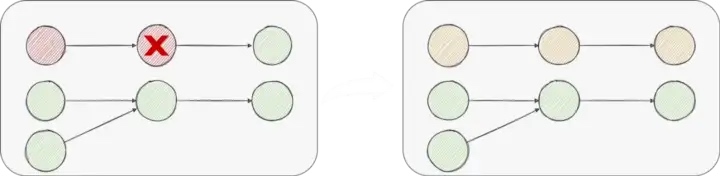
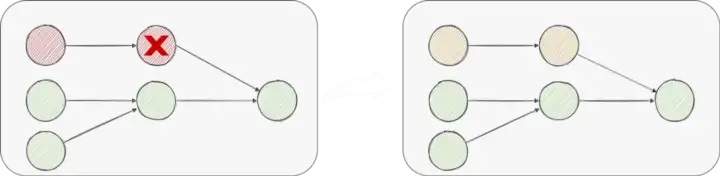
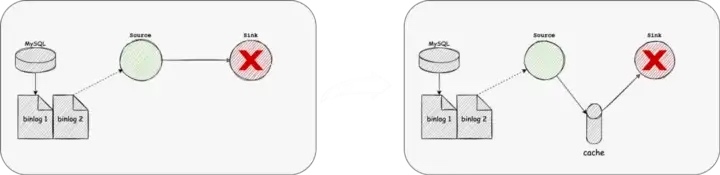
  3. More stable. In this version, Zeta Engine uses Pipeline as the minimum granularity of Checkpoint and fault tolerance for data synchronization tasks. The failure of a task will only affect the tasks that have upstream and downstream relationships with it. Try to avoid task failures that cause the entire Job to fail. or rollback. At the same time, for scenarios where the source data has a storage time limit, Zeta Engine supports enabling data cache to automatically cache the data read from the source, and then the downstream tasks read the cached data and write it to the target. In this scenario, even if the target end fails and data cannot be written, it will not affect the normal reading of the source end, preventing the source end data from being deleted due to expiration.
  4. Faster, Zeta Engine’s execution plan optimizer will optimize the execution plan to reduce the possible network transmission of data, thereby reducing the loss of overall synchronization performance caused by data serialization and deserialization, and completing faster Data synchronization operations. Of course, it also supports speed limiting, so that sync jobs can be performed at a reasonable speed.
  5. Data synchronization support for all scenarios. SeaTunnel aims to support full synchronization and incremental synchronization under offline batch synchronization, and support real-time synchronization and CDC.

03 Architecture design

SeaTunnel Engine is mainly composed of a set of APIs for data synchronization processing and a core computing engine. Here we mainly introduce the architecture design of the SeaTunnel Engine core engine. picture

SeaTunnel Engine consists of three main services: CoordinatorService, TaskExecutionService, and SlotService.

Coordinator Service

CoordinatorService is the Master service of the cluster, which provides the generation process of each job from LogicalDag to ExecutionDag, and then to PhysicalDag, and finally creates the JobMaster of the job for scheduling execution and status monitoring of the job. CoordinatorService is mainly composed of 4 large functional modules:

  1. JobMaster is responsible for the generation process from LogicalDag to ExecutionDag to PhysicalDag of a single job, and is scheduled to run by PipelineBaseScheduler.
  2. CheckpointCoordinator, responsible for the Checkpoint process control of the job.
  3. ResourceManager is responsible for the application and management of job resources. It currently supports Standalone mode and will support On Yarn and On K8s in the future.
  4. Metrics Service, responsible for the statistics and summary of job monitoring information.

TaskExecutionService

TaskExecutionService is the Worker service of the cluster, which provides the real runtime environment of each Task in the job. TaskExecutionService uses Dynamic Thread Sharing technology to reduce CPU usage.

SlotService

SlotService runs on each node of the cluster and is mainly responsible for the division, application, and recycling of resources on the node.

04 Unique advantages and features

Autonomous cluster

SeaTunnel Engine has realized autonomous clustering (no centralization). To achieve cluster autonomy and job fault tolerance without relying on third-party service components (such as Zookeeper), SeaTunnel Engine uses Hazelcast as the underlying dependency. Hazelcast provides a distributed memory network, allowing users to operate a distributed collection like a normal Java collection locally. SeaTunnel saves the status information of the job in the memory grid of Hazelcast. When the Master node switches, it can Job state recovery based on data in the Hazelcast in-memory grid. At the same time, we have also implemented the persistence of Hazelcast memory grid data, and persisted the job status information to the storage (database of JDBC protocol, HDFS, cloud storage) in the form of WAL. In this way, even if the entire cluster hangs and restarts, the runtime information of the job can be repaired.

Data cache

SeaTunnel Engine is different from the traditional Spark/Flink computing engine, it is an engine specially used for data synchronization. The SeaTunnel engine naturally supports data cache. When multiple synchronous jobs in the cluster share a data source, the SeaTunnel engine will automatically enable the data cache. The source of a job will read the data and write it into the cache, and all other jobs will no longer read data from the data source but are automatically optimized to read data from the Cache. The advantage of this is that it can reduce the reading pressure of the data source and reduce the impact of data synchronization on the data source.

Speed control

SeaTunnel Engine supports the speed limit during data synchronization, which is very useful when reading data sources with high concurrency. A reasonable speed limit can not only ensure that the data is synchronized on time, but also minimize the pressure on the data source.

Shared connection pool to reduce database pressure

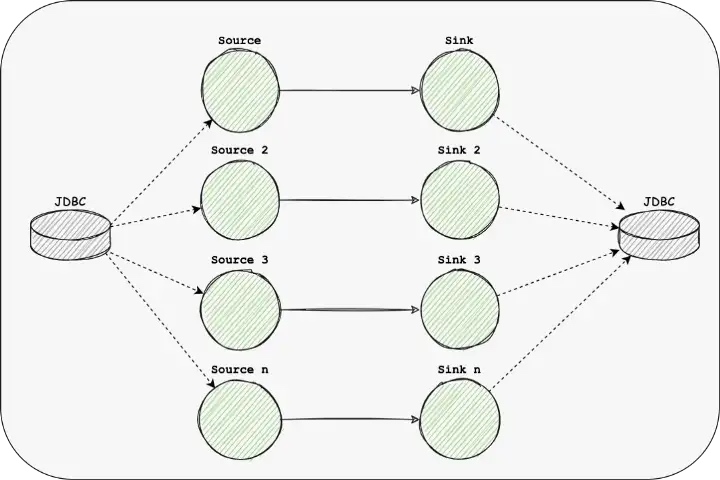
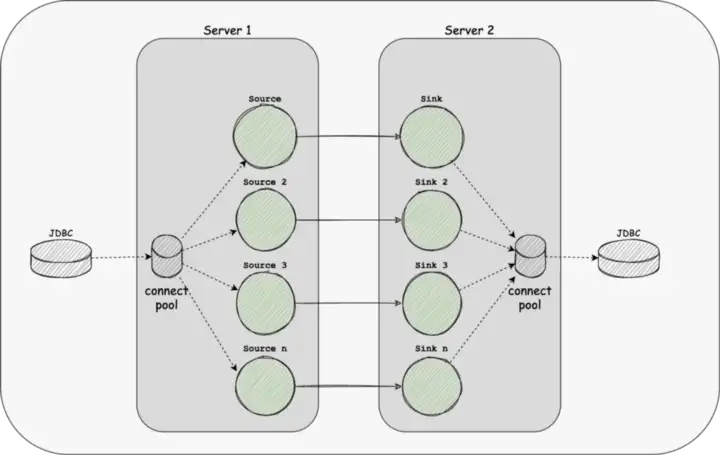
At present, the underlying operating tools and data synchronization tools provided by computing engines such as Spark/Flink cannot solve the problem that each table needs a JDBC connection when the entire database is synchronized. Database connections are resources for the database. Too many database connections will put great pressure on the database, resulting in a decrease in the stability of database read and write delays. This is a very serious accident for business databases. To solve this problem, SeaTunnel Engine uses a shared connection pool to ensure that multiple tables can share JDBC connections, thereby reducing the use of database connections.

Breakpoint resume (incremental/full volume)

SeaTunnel Engine supports resumed uploads under offline synchronization. When the amount of data is large, a data synchronization job often needs to run for tens of minutes or several hours. If the middle job hangs up and reruns, it means wasting time. SeaTunnel Engine will continue to save the state (checkpoint) during the offline synchronization process. When the job hangs up and reruns, it will continue to run from the last checkpoint, which effectively solves the data that may be caused by hardware problems such as node downtime. Delay.

The Schema revolution route

Schema evolution is a feature that allows users to easily change a table's current schema to accommodate data that changes over time. Most commonly, it is used when performing an append or overwrite operation, to automatically adjust the schema to include one or more new columns.

This capability is required in real-time data warehouse scenarios. Currently, the Flink and Spark engines do not support this feature.

Fine-grained fault-tolerant design

Flink's design is fault tolerance and rollback at the entire job level. If a task fails, the entire job will be rolled back and restarted. The design of SeaTunnel Engine takes into account that in the data synchronization scenario, in many q cases, the failure of a task should only need to focus on fault tolerance for tasks that have upstream and downstream relationships with it. Based on this design principle, SeaTunnel Engine will first generate a logical DAG according to the user-configured job configuration file, then optimize the logical DAG, and finally generate a pipeline (a connected subgraph in a job DAG) to call and execute jobs at the granularity. fault tolerance.

A typical usage scenario is:

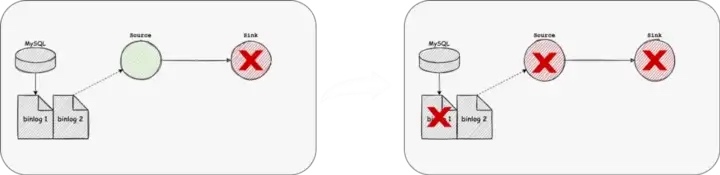
Use the CDC connector to read data from MySQL's binlog and write it to another MySQL. If you use Flink or Spark engine, once the target MySQL cannot write, it will cause the task of CDC to read the binlog to be terminated. If MySQL is set If the expiration time of the log is set, the problem of the target MySQL is solved, but the log of the source MySQL is cleared, which leads to data loss and other problems.

SeaTunnel Engine will automatically optimize this synchronization task, automatically add the source to the target Cache, and then further optimize this job into two Pipelines, pipeline#1 is responsible for reading data from the CDC and writing it to the SeaTunnel Cache, and pipeline#2 is responsible for reading data from the SeaTunnel Cache Cache reads data and writes to target MySQL. If there is a problem with the target MySQL and cannot be written, the pipeline#2 of this synchronization job will be terminated, and the pipeline#1 will still run normally. This design fundamentally solves the above problems and is more in line with the processing logic of the data synchronization engine.

Dynamically share threads to reduce resource usage

SeaTunnel Engine's Task design uses shared thread technology. Different from Flink/Spark, SeaTunnel Engine does not simply allow a Task to occupy a thread, but through a dynamic perception method - Dynamic Thread Sharing (Dynamic Thread Sharing) To judge whether a Task should share a thread with other Tasks or should monopolize a thread.

Compared with single-threaded serial computing, multi-threaded parallel computing has better performance advantages, but if each Task uses an independent thread to run, when there are many tables for data synchronization and the number of Tasks is large, it will be in the Worker node Start very many threads on it. When the number of CPU cores is fixed, the more threads, the better. When the number of threads is too large, the CPU needs to spend a lot of time on thread context switching, which will affect computing performance.

Flink/Spark usually limits the maximum number of tasks running on each node. In this way, it can avoid starting too many threads. To run more tasks on one node, SeaTunnel Engine can share thread technology. Let those tasks with a small amount of data share threads, and tasks with a large amount of data exclusively use threads. This method makes it possible for SeaTunnel Engine to run hundreds or thousands of table synchronization tasks on one node, with less resource occupation. Complete the synchronization of more tables.

05 Basic functions and features

2.3.0 is the first official version of SeaTunnel Engine, which implements some basic functions. For the detailed design, please refer to: https://github.com/apache/incubator-seatunnel/issues/2272

[ Cluster Management ]

  • Support stand-alone operation
  • Support cluster operation
  • Autonomous cluster (no centralization), no need to specify a Master node for the SeaTunnel Engine cluster, SeaTunnel Engine elects the Master node by itself during operation and automatically selects a new Master node after the Master node hangs up.
  • Automatic discovery of cluster nodes, the nodes with the same cluster_name will automatically form a cluster.

[ Core function ]

  • Supports running jobs in Local mode. The cluster is automatically destroyed after the job runs.
  • It supports running jobs in Cluster mode (single machine or cluster) and submitting jobs to the SeaTunnel Engine service through SeaTunnel Client. After the job is completed, the service continues to run and waits for the next job submission.
  • Support offline batch synchronization.
  • Support real-time synchronization.
  • Batch and flow integration, all SeaTunnel V2 version connectors can run in SeaTunnel Engine.
  • Supports distributed snapshot algorithm cooperates with SeaTunnel V2 connector to support two-phase commit, and ensures data exactly-once.
  • Supports job invocation at the Pipeline level to ensure that it can be started even when resources are limited.
  • Supports job fault tolerance at the Pipeline level. The failure of a Task only affects the Pipeline it is in, and only the Task under the Pipeline needs to be rolled back.
  • Supports dynamic thread sharing to achieve real-time synchronization of a large number of small data sets.

06 Future optimization plan

  • Support Cache mode, and first support Kafka as Cache
  • Support JobHistory, support the persistence of JobHistory.
  • Support indicator (Reader Rows, QPS, Reader Bytes) monitoring and indicator query
  • Support dynamic modification of the execution plan.
  • Support CDC.
  • Support whole database synchronization
  • Support multi-table synchronization
  • Support for Schema Revolution

· 12 min read

Apache IoTDB (Internet of Things Database) is a software system that integrates the collection, storage, management, and analysis of time series data of the Internet of Things, which can meet the needs of massive data storage, high-speed data reading, and complex data analysis in the field of Industrial Internet of Things. Currently, SeaTunnel already supports IoTDB Connector, realizing the connection of data synchronization scenarios in the IoT field.

At the SeaTunnel community online meeting in October this year, SeaTunnel Committer Wang Hailin introduced the implementation process of SeaTunnel’s access to IoTDB, allowing users to have a deeper understanding of the operation method and principle of IoTDB data synchronization.

The topic I’m sharing today is using SeaTunnel to play around with data synchronization in IoTDB.

This session is divided into 6 subsections. Firstly, we will have an understanding of the basic concept of SeaTunnel, and on this basis, we will focus on the functional features of IoTDB Connector, then we will analyze the data read and write functions of IoTDB Connector and the parsing of the implementation, and finally, we will show some typical usage scenarios and cases to let you understand how to use Finally, we will show some typical usage scenarios and cases to understand how to use the IoTDB Connector to implement into production environments. The last point is the community’s next steps for the IoTDB Connector and guidance on how to get involved in contributing.

Introduction to SeaTunnel basic concepts

This is the basic architecture of SeaTunnel, an engine built for data synchronization, with a set of abstract APIs for reading data from and writing to a variety of data sources.

The left-hand side briefly lists the Source scenarios, for example, we abstract the Source’s API, Type, and State, to read the data source, unifying the data types of the various data sources to the abstract type defined in it, and some state recovery and retention of the read location during the reading process.

This is an abstraction for Source, and we have done a similar abstraction for Sink, i.e. how data is written, and how the data type matches the real data source type, and how the state is restored and retained.

Based on these APIs, we will have a translation layer to translate these APIs to the corresponding execution engine. SeaTunnel currently supports three execution engines, Spark, Flink, and our own execution engine, SeaTunnel Engine, which will be released soon.

This is roughly what SeaTunnel does, SeaTunnel relies on Source and Sink to read and write data for data synchronization, we call them Connectors. The Connector consists of a Source and a Sink.

From the diagram above we see the different data sources, Source is responsible for reading data from the various data sources and transforming it into SeaTunnelRow abstraction layer and Type to form the abstraction layer, Sink is responsible for pulling data from the abstraction layer and writing it to the concrete data store to transform it into the store concrete format.

The combination of Source + Abstraction Layer + Sink enables the synchronization of data between multiple heterogeneous data sources.

I’ll use a simple example below to illustrate how SeaTunnel’s Source and Sink work.

We can specify the number of Sources, Sink configuration file combinations through the configuration file The commands in the toolkit provided by SeaTunnel take the configuration file with them and when executed enable data handling.

This is the Connector ecosystem that is currently supported by SeaTunnel, such as the data sources supported by JBDC, HDFS, Hive, Pulsar, message queues, etc. are currently supported.

The list in the picture is not exhaustive of the Connectors supported by SeaTunnel. Under the GitHub SeaTunnel project, you can see the Plugins directory, where supported Connector plugins are constantly being added and where you can see the latest access in real-time.

IoTDB Connector Features

Below is information about access to the IoTDB Connector.

Firstly, we would like to introduce the functional features of IoTDB, the IoTDB Connector integrated with SeaTunnel, and what exactly it supports for your reference.

Source Features

Firstly, there are the typical usage scenarios supported by Source, such as bulk reading of devices, field projection, data type mapping, parallel reading, etc.

As you can see above, IoTDB supports all features except once, exactly once and stream mode, such as batch reads, IoTDB has a SQL syntax similar to group by device, which allows you to read data from multiple devices in a single batch. For basic data type projection, the SQL in IoTDB will take time by default when looking up any metric, or group by the device will take the device column, and we also support projection onto SeaTunnel columns by default.

The only data type not supported is Victor, all others are supported.

For the parallel read piece, the IoTDB data is actually timestamped and we use timestamped ranges to achieve parallel reads.

The recovery of the state, since we have divided the time range read into different splits, can be done based on the Split location information.

Sink functional features

The diagram above shows the features already supported by SeaTunnel. Regarding metadata extraction, we support the extraction of metadata such as measurement, device, etc. from SeaTunnelRow and the extraction or use of current processing time from SeaTunnelRow. Batch commits and exception retries are also supported.

IoTDB data reading analysis

Next, we analyze the implementation and support for data reading.

Data type mapping

The first is the data type mapping, which actually reads the IoTDB data type to SeaTunnel, so it has to be converted to the SeaTunnel data type. The BOOLEAN, INT32, INT64, etc. listed here all have corresponding SeaTunnel data types. INT32 can be mapped according to the read type on the SeaTunnel, or to TINYINT, SMALLINT, or INT when the range of values is small.

The Vector type is not currently supported.

This is the corresponding example code showing how the mapping is done where the type conversion is done.

Field projection

The other is the field projection when reading, we can automatically map Time fields when reading IoTDB data, or we can choose to map some of the data to SeaTunnel, such as TIMESTAMP, or BIGINT.

The SQL extraction of column codes allows you to extract only some of the columns you need, and when used on SeaTunnel, you can specify the name, type, etc. of the column after it is mapped to SeaTunnel via fields. The final result of the data read on SeaTunnel is shown in the figure above.

We have just seen that we do not have the time column in the SQL, but the actual result is that there is this column, so we support the projection of the time column field, the time column can actually be projected into different data types, the user can convert according to their needs. The diagram above shows the implementation logic.

Batch read Device

This is a common requirement, as we are likely to synchronize data in large batches with the same data structure.

SeaTunnel supports the align-by-device syntax so that device columns can also be projected onto the SeaTunnelRow

Assuming there is a table in IoTDB, we project the device column onto SeaTunnel by making it data as well through syntax. After configuring the device name column and specifying the data type, we end up reading the data on SeaTunnel in the format shown above, containing the Time, device column, and the actual data value. This makes it possible to read data from the same device in bulk.

Parallel reading

The other is a parallel read.

  • Split We have scoped the table by the Time column and if we are reading in parallel we may want to scope the table to allow parallel threads/processes to read a specific range of data. By configuring the three parameters, the end result will be a query SQL, where the original SQL is divided into different splits with query conditions to achieve the actual read SQL.

  • Allocate Split to the reader Once the split is done, there is an allocation logic to follow in order to distribute it to each parallel reader.

This logic is based on the ID of the split to the reader, which may be more random, or more uniform if the ID of the split is more hashed, depending on the Connector.

The result achieved is shown in the picture.

Status recovery

There is also state recovery involved when reading because if the task is large, the reading will take longer, and if there is an error or exception in the middle, you have to consider how to recover the state from the point where the error occurred, and then read it again afterward.

SeaTunnel’s state recovery is mainly through the reader storing the unread Split information into the state, and then the engine will periodically take a snapshot of the state when reading so that we can restore the last snapshot when we recover and continue reading afterward.

IoTDB Connector Data Write Analysis

The next step is the parsing of the data writes.

Data type mapping

Data writing also involves data type mapping, but here, in contrast to data reading, it maps the SeaTunnel data types to the IoTDB data types. As IoTDB only has INT32, the writing process involves lifting the data types TINYINT and SMALLINT. All other data types can be converted one-to-one; ARRAY and VECTOR data types are not yet supported.

The above diagram shows the corresponding code, the implementation logic will need to be seen in our specific mapping.

Dynamic injection of metadata

SeaTunnel supports the dynamic injection of metadata.

When heterogeneous data sources are written to the IoTDB, device, measurement, and time are extracted from each row of data, either by serializing the SeaTunnelRow with a fixed column value as configured. Alternatively, the system time can be used as the time, or the current system time can be populated if no time column is specified, and the storage group can be configured to be automatically appended to the device prefix.

For example, suppose that the structure of a row in SeaTunnel reading the data format shown above can be configured to synchronize to the IoTDB and the result obtained is as follows.

The temperature and humidity columns we need were extracted, and ts and device names were extracted as the original data for the IoTDB.

Batch commits and exception retries

In addition, Sink needs to handle batch and retry when writing. For batches, we can configure the appropriate batch configuration, including support for configuring the number and interval of batch commits; if the data is cached to memory, you can enable a separate thread for timed commits.

For retries, SeaTunnel supports the configuration of the number of retries, the waiting interval and the maximum number of retries, as well as the possibility to end a retry if it encounters a non-recoverable error when it has finished.

IoTDB Connector Usage Examples

After the previous analysis of reading and writing data, let’s look at three typical examples of usage scenarios.

Exporting data from IoTDB

The first scenario is exporting data from the IoTDB, the example I have given here is reading data from the IoTDB to the Console.

  • Read in parallel, output to Console

Parallelism: 2

Number of batches: 24

Time frame: 2022–09–25 ~ 2022–09–26

Let’s assume that we have a data table in IoTDB and we want to export the data to the Console. The whole configuration is shown above and needs to map the columns of data we want to export and the time range to check.

This is the simplest example, but in practice, the Sink side may be more complex, so you will need to refer to the documentation of the corresponding data source for the appropriate configuration.

Importing data to IoTDB

  • Read database, batch write to IoTDB
    • Batch writing: one commit every 1024 entries or every 1000 ms
    • -Extracting metadata device, timestamp, measurement
    • -Specify the storage group: root.test_group

Another typical usage scenario is to import data from other data sources into IoTDB. suppose I have an external database table with columns like ts, temperature, humidity, etc. and we import it into IoTDB, requiring the columns of temperature and humidity, but the rest can be left out. The whole configuration is shown in the diagram above, you can refer to it.

On the Sink side, you mainly have to specify the Key of the device column, such as from which data the device is extracted, from which class the time is extracted, which columns to write to the IoTDB, etc.

As you can see, we can configure the storage group, which is the storage group of the IoTDB, which can be specified by the storage group.

Synchronizing data between IoTDB

The third scenario is to synchronize data between IoTDB and IoTDB and write to IoTDB in bulk, suppose there is a table in IoTDB that needs to be synchronized to another IoTDB, after synchronization the storage group has changed and the name of the indicator of the data column has also changed, then you can use projection to rewrite the indicator name and use SQL to rewrite the storage group.

How to get involved in contribution

Finally, a few words about the next steps for the IoTDB Connector and how you can get involved in improving the Connector and contributing new features that are needed.

Next steps for the IoTDB Connector

  • Support for reading and writing vector data types
  • Support for tsfile reads and writes
  • Support for writing tsfile and reloading to IoTDB

· 10 min read

Apache SeaTunnel Committer | Zongwen Li

Introduction to Apache SeaTunnel

Apache SeaTunnel is a very easy-to-use ultra-high-performance distributed data integration platform that supports real-time synchronization of massive data.

Apache SeaTunnel will try its best to solve the problems that may be encountered in the process of mass data synchronization, such as data loss and duplication, task accumulation and delay, low throughput, etc.

Milestones of SeaTunnel

SeaTunnel, formerly known as Waterdrop, was open-sourced on GitHub in 2017.

In October 2021, the Waterdrop community joined the Apache incubator and changed its name to SeaTunnel.

SeaTunnel Growth

When SeaTunnel entered the Apache incubator, the SeaTunnel community ushered in rapid growth.

As of now, the SeaTunnel community has a total of 151 contributors, 4314 Stars, and 804 forks.

Pain points of Existing engines

There are many pain points faced by the existing computing engines in the field of data integration, and we will talk about this first. The pain points usually lie in three directions:

  • The fault tolerance ability of the engine;
  • Difficulty in configuration, operation, and maintenance of engine jobs;
  • The resource usage of the engine.

fault tolerance

Global Failover Global-failover For distributed streaming processing systems, high throughput and low latency are often the most important requirements. At the same time, fault tolerance is also very important in distributed systems. For scenarios that require high correctness, the implementation of exactly once is often very important.

In a distributed streaming processing system, since the computing power, network, load, etc. of each node are different, the state of each node cannot be directly merged to obtain a true global state. To obtain consistent results, the distributed processing system needs to be resilient to node failure, that is, it can recover to consistent results when it fails.

Although it is claimed in their official blog that Spark’s Structured Streaming uses the Chandy-Lamport algorithm for Failover processing, it does not disclose more details.

Flink implemented Checkpoint as a fault-tolerant mechanism based on the above algorithm and published related papers: Lightweight Asynchronous Snapshots for Distributed Dataflows

In the current industrial implementation, when a job fails, all nodes of the job DAG need to failover, and the whole process will last for a long time, which will cause a lot of upstream data to accumulate.

Loss of Data

The previous problem will cause a long-time recovery, and the business service may accept a certain degree of data delay.

In a worse case, a single sink node cannot be recovered for a long time, and the source data has a limited storage time, such as MySQL and Oracle log data, which will lead to data loss.

Configuration is cumbersome

Single table Configuration

The previous examples are cases regarding a small number of tables, but in real business service development, we usually need to synchronize thousands of tables, which may be divided into databases and tables at the same time;

The status quo is that we need to configure each table, a large number of table synchronization takes a lot of time for users, and it is prone to problems such as field mapping errors, which are difficult to maintain.

Not supporting Schema Evolution

Not-supports-DDL Besides, according to the research report of Fivetran, 60% of the company’s schema will change every month, and 30% will change every week.

However, none of the existing engines supports Schema Evolution. After changing the Schema each time, the user needs to reconfigure the entire link, which makes the maintenance of the job very cumbersome.

The high volume of resource usage

The database link takes up too much

If our Source or Sink is of JDBC type, since the existing engine only supports one or more links per table, when there are many tables to be synchronized, more link resources will be occupied, which will bring a great burden to the database server.

Operator pressure is uncontrollable

In the existing engine, a buffer and other control operators are used to control the pressure, that is, the back pressure mechanism; since the back pressure is transmitted level by level, there will be pressure delay, and at the same time, the processing of data will not be smooth enough, increasing the GC time, fault-tolerant completion time, etc.

Another case is that neither the source nor the sink has reached the maximum pressure, but the user still needs to control the synchronization rate to prevent too much impact on the source database or the target database, which cannot be controlled through the back pressure mechanism.

Architecture goals of Apache SeaTunnel Engine

To solve these severe issues faced by computing engines, we self-developed our engine expertise in big data integration.

Firstly, let’s get through what goals this engine wants to achieve.

Pipeline Failover

In the data integration case, there is a possibility that a job can synchronize hundreds of sheets, and the failure of one node or one table will lead to the failure of all tables, which is too costly.

We expect that unrelated Job Tasks will not affect each other during fault tolerance, so we call a vertex collection with upstream and downstream relationships a Pipeline, and a Job can consist of one or more pipelines.

Regional Failover

Now if there is an exception in the pipeline, we still need to failover all the vertex in the pipeline; but can we restore only part of the vertex? For example, if the Source fails, the Sink does not need to restart. In the case of a single Source and multiple Sinks, if a single Sink fails, only the Sink and Source that failed will be restored; that is, only the node that failed and its upstream nodes will be restored.

Obviously, the stateless vertex does not need to be restarted, and since SeaTunnel is a data integration framework, we do not have aggregation state vertexes such as Agg and Count, so we only need to consider Sink;

  • Sink does not support idempotence & 2PC; no restart and restart will result in the same data duplication, which can only be solved by Sink without restarting;
  • Sink supports idempotence, but does not support 2PC: because it is idempotent writing, it does not matter whether the source reads data inconsistently every time, and it does not need to be restarted;
  • Sink supports 2PC:
  • If the Source supports data consistency, if an abort is not executed, the processed old data will be automatically ignored through the channel data ID, and at the same time, it will face the problem that the transaction session time may time out;
  • If the Source does not support data consistency, perform abort on the Sink to discard the last data, which has the same effect as restarting but does not require initialization operations such as re-establishing links;
  • That is, the simplest implementation is to execute abort. We use the pipeline as the minimum granularity for fault-tolerant management, and use the Chandy-Lamport algorithm to realize fault-tolerant distributed jobs.

Data Cache

For sink failure, when data cannot be written, a possible solution is to work two jobs at the same time.

One job reads the database logs using the CDC source connector and then writes the data to Kafka using the Kafka Sink connector. Another job reads data from Kafka using the Kafka source connector and writes data to the destination using the destination sink connector.

This solution requires users to have a deep understanding of the underlying technology, and both tasks will increase the difficulty of operation and maintenance. Because every job needs JobMaster, it requires more resources.

Ideally, the user only knows that they will be reading data from the source and writing data to the sink, and at the same time, during this process, the data can be cached in case the sink fails. The sync engine needs to automatically add caching operations to the execution plan and ensure that the source still works in the event of a sink failure. In this process, the engine needs to ensure that the data written to the cache and read from the cache are transactional, to ensure data consistency.

Sharding & Multi-table Sync

For a large number of table synchronization, we expect that a single Source can support reading multiple structural tables, and then use the side stream output to keep consistent with a single table stream.

The advantage of this is that it can reduce the link occupation of the data source and improve the utilization rate of thread resources.

At the same time, in SeaTunnel Engine, these multiple tables will be regarded as a pipeline, which will increase the granularity of fault tolerance; there are trade-offs, and the user can choose how many tables a pipeline can pass through.

Schema Evolution

Schema Evolution is a feature that allows users to easily change the current schema of a table to accommodate changing data over time. Most commonly, it is used when performing an append or overwrite operation, to automatically adjust the schema to include one or more new columns.

This feature is required for real-time data warehouse scenarios. Currently, the Flink and Spark engines do not support this feature.

In SeaTunnel Engine, we will use the Chandy-Lamport algorithm to send DDL events, make them flow in the DAG graph and change the structure of each operator, and then synchronize them to the Sink.

Shared Resource

Shared-resource The Multi-table feature can reduce the use of some Source and Sink link resources. At the same time, we have implemented Dynamic Thread Resource Sharing in SeaTunnel Engine, reducing the resource usage of the engine on the server.

Speed Control

As for the problems that cannot be solved by the back pressure mechanism, we will optimize the Buffer and Checkpoint mechanism:

  • Firstly, We try to allow Buffer to control the amount of data in a period;
  • Secondly, by the Checkpoint mechanism, the engine can lock the buffer after the Checkpoint reaches the maximum number of parallelism and executes an interval time, prohibiting the writing of Source data, achieving the result of taking the pressure proactively, avoiding issues like back pressure delay or failure to be delivered to Source. The above is the design goal of SeaTunnel Engine, hoping to help you better solve the problems that bother you in data integration. In the future, we will continue to optimize the experience of using SeaTunnel so that more people are willing to use it.

The future of Apache SeaTunnel

As an Apache incubator project, the Apache SeaTunnel community is developing rapidly. In the following community planning, we will focus on four directions:

Support more data integration scenarios (Apache SeaTunnel Engine) It is used to solve the pain points that existing engines cannot solve, such as the synchronization of the entire database, the synchronization of table structure changes, and the large granularity of task failure;

Guys who are interested in the engine can pay attention to this Umbrella: https://github.com/apache/incubator-seatunnel/issues/2272

Expand and improve Connector & Catalog ecology Support more Connector & Catalog, such as TiDB, Doris, Stripe, etc., and improve existing connectors, improve their usability and performance, etc.; Support CDC connector for real-time incremental synchronization scenarios.

Guys who are interested in connectors can pay attention to this Umbrella: https://github.com/apache/incubator-seatunnel/issues/1946

Support for more versions of the engines Such as Spark 3.x, Flink 1.14.x, etc.

Guys who are interested in supporting Spark 3.3 can pay attention to this PR: https://github.com/apache/incubator-seatunnel/pull/2574

Easier to use (Apache SeaTunnel Web) Provides a web interface to make operations more efficient in the form of DAG/SQL Simple and more intuitive display of Catalog, Connector, Job, etc.; Access to the scheduling platform to make task management easier

Guys who are interested in Web can pay attention to our Web sub-project: https://github.com/apache/incubator-seatunnel-web

· 19 min read

Bo Bi, data engineer at Mafengwo

During the joint Apache SeaTunnel & IoTDB Meetup on October 15, Bo Bi, the data engineer at a leading Chinese travel-social e-commerce platform Mafengwo, introduced the basic principles of SeaTunnel and related enterprise practice thinking, the pain points and optimization thinking in typical scenarios of Mafengwo’s big data development and scheduling platform, and shared his experience of participating in community contributions. We hope to help you understand SeaTunnel and the paths and skills of community building at the same time.

Introduction to the technical principle of SeaTunnel

SeaTunnel is a distributed, high-performance data integration platform for the synchronization and transformation of large volumes of data (offline and real-time)

The diagram above shows the workflow of SeaTunnel, which in simple terms consists of 3 parts: input, transformation, and output; more complex data processing is just a combination of several actions.

In a synchronization scenario, such as importing Kafka to Elasticsearch, Kafka is the Source of the process and Elasticsearch is the Sink of the process.

If, during the import process, the field columns do not match the external data columns to be written and some column or type conversion is required, or if you need to join multiple data sources and then do some data widening, field expansion, etc., then you need to add some Transform in the process, corresponding to the middle part of the picture.

This shows that the core of SeaTunnel is the Source, Transform and Sink process definitions.

In Source we can define the data sources we need to read, in Sink, we can define the data pipeline and eventually write the external storage, and we can transform the data in between, either using SQL or custom functions.

SeaTunnel Connector API Version V1 Architecture Breakdown

For a mature component framework, there must be something unique about the design pattern of the API design implementation that makes the framework scalable.

The SeaTunnel architecture consists of three main parts.

1、SeaTunnel Basic API.

  1. the implementation of the SeaTunnel base API.

  2. SeaTunnel’s plug-in system.

SeaTunnel Basic API

The above diagram shows the definition of the interface, the Plugin interface in SeaTunnel abstracts the various actions of data processing into a Plugin.

The five parts of the diagram below, Basesource, Basetransfform, Basesink, Runtimeenv, and Execution, all inherit from the Plugin interface.

As a process definition plug-in, Source is responsible for reading data, Transform is responsible for transforming, Sink is responsible for writing and Runtimeenv is setting the base environment variables.

The overall SeaTunnel base API is shown below

Execution, the data flow builder used to build the entire data flow based on the first three, is also part of the base API

SeaTunnel Base API Implementation

Based on the previous basic APIs, SeaTunnel has been implemented in separate packages for different computing engines, currently the Spark API abstraction and the Flink API abstraction, which logically completes the process of building the data pipeline.

Due to space constraints, we will focus on Spark batch processing. Based on the wrapped implementation of the previous base Api, the first is that Base spark source implements Base source, base Spark transform implements Base transform and Base Spark sink implements Base sink.

The method definition uses Spark’s Dataset as the carrier of the data, and all data processing is based on the Dataset, including reading, processing and exporting.

The SparkEnvironment, which internally encapsulates Spark’s Sparksession in an Env, makes it easy for individual plugins to use.

The Spark batch process ends with SparkBatchExecution (the data stream builder), which is the core code snippet used to functionally build our data stream Pipeline, the most basic data stream on the left in the diagram below.

The user-based definition of each process component is also the configuration of Source Sink, Transform. More complex data flow logic can be implemented, such as multi-source Join, multi-pipeline processing, etc., all of which can be built through Execution.

SeaTunnel Connector V1 API Architecture Summary

SeaTunnel’s API consists of three main parts.

The first part is the SeaTunnel base API, which provides the basic abstract interfaces such as Source, Sink, Transform, and Plugin.

The second part is based on a set of interfaces Transform, Sink, Source, Runtime, and Execution provided by the SeaTunnel base API, which is wrapped and implemented on the Flink and Spark engines respectively, i.e. Spark engine API layer abstraction and Flink engine API layer abstraction.

Both Flink and Spark engines support stream and batch processing, so there are different ways to use streams/batches under the Flink API abstraction and Spark abstraction APIs, such as Flinkstream and Flinkbatch under the Flink abstraction API, and Sparkbatch and Sparkstreaming under the Spark abstraction API.

The third part is the plug-in system, based on Spark abstraction and Flink API abstraction, SeaTunnel engine implements rich connectors and processing plug-ins, while developers can also be based on different engine API abstractions, and extensions to achieve their own Plugin.

SeaTunnel Implementation Principle Currently, SeaTunnel offers a variety of ways to use Flink, Spark, and FlinkSQL. Due to space limitations, we will introduce the execution principles of the Spark method.

First, the entry starts the command Start-seatunnel-spark.sh via the shell, which internally calls Sparkstarter’s Class, which parses the parameters passed by the shell script, and also parses the Config file to determine which Connectors are defined in the Config file, such as Fake, Console, etc. Then find the Connector path from the Connector plugin directory and stitch it into the Spark-submit launch command with — jar, so that the found Plugin jar package can be passed to the Spark cluster as a dependency.

For Connector plugins, all Spark Connectors are packaged in the plugin directory of the distribution (this directory is managed centrally).

After Spark-submit is executed, the task is submitted to the Spark cluster, and the Main class of the Spark job’s Driver builds the data flow Pipeline through the data flow builder Execution, combined with Souce, Sink, and Transform so that the whole chain is connected.

SeaTunnel Connector V2 API Architecture

In the latest community release of SeaTunnel 2.2.0-beta, the refactoring of the Connectorapi, now known as the SeaTurnelV2 API, has been completed!

Why do we need to reconfigure?

As the Container is currently a strongly coupled engine, i.e. Flink and Spark API, if the Flink or Spark engine is upgraded, the Connector will also have to be adjusted, possibly with changes to parameters or interfaces.

This can lead to multiple implementations for different engines and inconsistent parameters to develop a new Connector. Therefore, the community has designed and implemented the V2 version of the API based on these pain points.

SeaTunnel V2 API Architecture

SeaTunnel V2 API Architecture

1.Table API

·DataType: defines SeaTunnel’s data structure SeaTunnelRow, which is used to isolate the engine

·Catalog: used to obtain Table Scheme, Options, etc..

·Catalog Storage: used to store user-defined Table Schemes etc. for unstructured engines such as Kafka.

·Table SPI: mainly used to expose the Source and Sink interfaces as an SPI

2. Source & Sink API

Define the Connector’s core programming interface for implementing the Connector

3.Engine API

·Translation: The translation layer, which translates the Source and Sink APIs implemented by the Connector into a runnable API inside the engine.

·Execution: Execution logic, used to define the execution logic of Source, Transform, Sink and other operations within the engine.

The Source & Sink API is the basis for the implementation of the connector and is very important for developers.

The design of the v2 Source & Sink API is highlighted below

SeaTunnel Connector V2 Source API

The current version of SeaTunnel’s API design draws on some of Flink’s design concepts, and the more core classes of the Source API are shown below.

The core Source API interaction flow is shown above. In the case of concurrent reads, the enumerator SourceSplitEnumerator is required to split the task and send the SourceSplit down to the SourceReader, which receives the split and uses it to read the external data source.

In order to support breakpoints and Eos semantics, it is necessary to preserve and restore the state, for example by preserving the current Reader’s Split consumption state and restoring it after a failure in each Reader through the Checkpoint state and Checkpoint mechanism, so that the data can be read from the place where it failed.

SeaTunnel Connector V2 Sink API

The overall Sink API interaction flow is shown in the diagram below. The SeaTunnel sink is currently designed to support distributed transactions, based on a two-stage transaction commit.

First SinkWriter continuously writes data to an external data source, then when the engine does a checkpoint, it triggers a first-stage commit.

SinkWriter needs to do a Prepare commit, which is the first stage of the commit.

The engine will determine if all the Writer's first stage succeeds, and if they all succeed, the engine will combine the Subtask’s Commit info with the Commit method of the Committer to do the actual commit of the transaction and operate the database for the Commit, i.e. the second stage of the commit. This is the second stage of commit.

For the Kafka sink connector implementation, the first stage is to do a pre-commit by calling KafkaProducerSender.prepareCommit().

The second commit is performed via Producer.commitTransaction();.

flush(); flushes the data from the Broker’s system cache to disk.

Finally, it is worth noting!

Both SinkCommitter and SinkAggregatedCommitter can perform a second stage commit to replace the Committer in the diagram. The difference is that SinkCommitter can only do a partial commit of a single Subtask’s CommitInfo, which may be partially successful and partially unsuccessful, and cannot be handled globally. The difference is that the SinkCommitter can only do partial commits of a single Subtask’s CommitInfo, which may be partially successful and partially unsuccessful.

SinkAggregatedCommitter is a single parallel, aggregating the CommitInfo of all Subtask, and can do the second stage commit as a whole, either all succeed or all fail, avoiding the problem of inconsistent status due to partial failure of the second stage.

It is therefore recommended that the SinkAggregatedCommitter be used in preference.

Comparison of SeaTunnel V1 and V2 API processing flows

We can look at the changes before and after the V1 V2 upgrade from a data processing perspective, which is more intuitive, Spark batch processing as an example: SeaTunnel V1: The entire data processing process is based on the Spark dataset API, and the Connector and the compute engine are strongly coupled.

SeaTunnel V2: Thanks to the work of the engine translator, the Connector API, and the SeaTunnelRow, the data source of the SeaTunnel internal data structures accessed through the Connector, are translated by the translation layer into a runnable Spark API and spark dataset that is recognized inside the engine during data transformation.

As data is written out, the Spark API and Spark dataset are translated through the translation layer into an executable connector API inside the SeaTunnel connector and a data source of internal SeaTunnel structures that can be used.

Overall, the addition of a translation layer at the API and compute engine layers decouples the Connector API from the engine, and the Connector implementation no longer depends on the compute engine, making the extension and implementation more flexible.

In terms of community planning, the V2 API will be the main focus of development, and more features will be supported in V2, while V1 will be stabilized and no longer maintained.

Practice and reflections on our off-line development scheduling platform

Practice and reflections on our off-line development scheduling platform

Hornet’s Nest Big Data Development Platform, which focuses on providing one-stop big data development and scheduling services, helps businesses solve complex problems such as data development management, task scheduling and task monitoring in offline scenarios.

The offline development and scheduling platform plays the role of the top and the bottom. The top is to provide open interface API and UI to connect with various data application platforms and businesses, and the bottom is to drive various computations and storage, and then run in an orderly manner according to the task dependency and scheduling time.

Platform Capabilities

Data development

Task configuration, quality testing, release live

·Data synchronisation

Data access, data processing, data distribution

·Scheduling capabilities

Supports timed scheduling, triggered scheduling

·Operations and Maintenance Centre Job Diagnosis, Task O&M, Instance O&M

·Management

Library table management, permission management, API management, script management

In summary, the core capabilities of the offline development scheduling platform are openness, versatility, and one-stop shopping. Through standardized processes, the entire task development cycle is managed and a one-stop service experience is provided.

The architecture of the platform

The Hornet’s Nest Big Data Development and Scheduling Platform consists of four main modules: the task component layer, the scheduling layer, the service layer, and the monitoring layer.

The service layer is mainly responsible for job lifecycle management (e.g. job creation, testing, release, offline); Airflow dagphthon file building and generating, task bloodline dependency management, permission management, API (providing data readiness, querying of task execution status).

The scheduling layer is based on Airflow and is responsible for the scheduling of all offline tasks.

A task component layer that enables users to develop data through supported components that include tools such as SparkSQL/, HiveSQ, LMR), StarRocks import, etc., directly interfacing with underlying HDFS, MySQL, and other storage systems.

The monitoring layer is responsible for all aspects of monitoring and alerting on scheduling resources, computing resources, task execution, etc.

Open Data Sync Capability Scenarios

Challenges with open capabilities: Need to support multiple business scenarios and meet flexible data pipeline requirements (i.e. extend to support more task components such as hive2clickhourse, clickhourse2mysql, etc.)

Extending task components based on Airflow: higher maintenance costs for extensions, need to reduce costs and increase efficiency (based on the limited provider's Airflow offers, less applicable in terms of usage requirements, Airflow is a Python technology stack, while our team is mainly based on the Java technology stack, so the technology stack difference brings higher iteration costs)

Self-developed task components: the high cost of platform integration, long development cycle, high cost of the configuration of task components. (Research or implement task components by yourself, different ways of adapting the parameters of the components in the service layer, no uniform way of parameter configuration)

We wanted to investigate a data integration tool that, firstly, supported a rich set of components, provided out-of-the-box capabilities, was easy to extend, and offered a uniform configuration of parameters and a uniform way of using them to facilitate platform integration and maintenance.

  • Selection of data integration tools To address the pain points mentioned above, we actively explored solutions and conducted a selection analysis of several mainstream data integration products in the industry. As you can see from the comparison above, Datax and SeaTunnel both offer good scalability, and high stability, support rich connector plugins, provide scripted, uniformly configurable usage, and have active communities.

However, Datax is limited by being distributed and is not well suited to massive data scenarios.

In contrast, SeaTunnel offers the ability to provide distributed execution, distributed transactions, scalable levels of data handling, and the ability to provide a unified technical solution in data synchronization scenarios.

In addition to the advantages and features described above and the applicable scenarios, more importantly, the current offline computing resources for big data are unified and managed by yarn, and for the subsequently extended tasks we also wish to execute on Yarn, we finally prefer SeaTunnel for our usage scenarios.

Further performance testing of SeaTunnel and the development of an open data scheduling platform to integrate SeaTunnel may be carried out at a later stage, and its use will be rolled out gradually.

Outbound scenario: Hive data sync to StarRocks

To briefly introduce the background, the Big Data platform has now completed the unification of the OLAP engine layer, using the StarRocks engine to replace the previous Kylin engine as the main query engine in OLAP scenarios.

In the data processing process, after the data is modelled in the data warehouse, the upper model needs to be imported into the OLAP engine for query acceleration, so there are a lot of tasks to push data from Hive to StarRocks every day. task (based on a wrapper for the StarRocks Broker Load import method) to a StarRocks-based table.

The current pain points are twofold.

·Long data synchronization links: Hive2StarRocks processing links, which require at least two tasks, are relatively redundant.

·Outbound efficiency: From the perspective of outbound efficiency, many Hive models themselves are processed by Spark SQL, and based on the processing the Spark Dataset in memory can be pushed directly to StarRocks without dropping the disk, improving the model’s regional time.

StarRocks currently also supports Spark Load, based on the Spark bulk data import method, but our ETL is more complex, needs to support data conversion multi-table Join, data aggregation operations, etc., so temporarily can not meet.

We know from the SeaTunnel community that there are plans to support the StarRocks Sink Connector, and we are working on that part as well, so we will continue to communicate with the community to build it together later.

How to get involved in community building

SeaTunnel Community Contribution

As mentioned earlier, the community has completed the refactoring of the V1 to V2 API and needs to implement more connector plug-ins based on the V2 version of the connector API, which I was lucky enough to contribute to.

I am currently responsible for big data infrastructure work, which many mainstream big data components big data also use, so when the community proposed a connector issue, I was also very interested in it.

As the platform is also investigating SeaTunnel, learning and being able to contribute pr to the community is a great way to learn about SeaTunnel.

I remember at first I proposed a less difficult pr to implement the WeChat sink connector, but in the process of contributing I encountered many problems, bad coding style, code style did not take into account the rich output format supported by the extension, etc. Although the process was not so smooth, I was really excited and accomplished when the pr was merged. Although the process was not so smooth, it was very exciting and rewarding when the pr was merged.

As I became more familiar with the process, I became much more efficient at submitting pr and was confident enough to attempt difficult issues.

How to get involved in community contributions quickly

  • Good first issue Good first issue #3018 #2828

If you are a first-time community contributor, it is advisable to focus on the Good first issue first, as it is basically a relatively simple and newcomer-friendly issue.

Through Good first issue, you can get familiar with the whole process of participating in the GitHub open source community contribution, for example, first fork the project, then submit the changes, and finally submit the pull request, waiting for the community to review, the community will target to you to put forward some suggestions for improvement, directly will leave a comment below, until when your pr is merged in, this will have completed a comp

  • Subscribe to community mailings Once you’re familiar with the pr contribution process, you can subscribe to community emails to keep up to date with what’s happening in the community, such as what features are currently being worked on and what’s planned for future iterations. If you’re interested in a feature, you can contribute to it in your own situation!
  • Familiarity with git use The main git commands used in development are git clone, git pull, git rebase and git merge. git rebase is recommended in the community development specification and does not generate additional commits compared to git merge.
  • Familiarity with GitHub project collaboration process Open source projects are developed collaboratively by multiple people, and the collaboration method on GitHub is at its core outlined in fork For example, the apache st project, which is under the apache space, is first forked to our own space on GitHub

Then modify the implementation, mention a pull request, and submit the pull request to be associated with the issue, in the commit, if we change a long time, in the upward commit, then the target branch has a lot of new commits exhausted this time we need to do a pull& merge or rebase.

  • Source code compilation project It is important to be familiar with source compilation, as local source compilation can prove that the code added to a project can be compiled, and can be used as a preliminary check before committing to pr. Source compilation is generally slow and can be speeded up by using mvn -T for multi-threaded parallel compilation.
  • Compilation checks Pre-compilation checks, including Licence header, Code checkstyle, and Document checkstyle, will be checked during Maven compilation, and if they fail, the CI will not be passed. So it is recommended to use some plug-in tools in the idea to improve the efficiency, such as Code checkstyle has a plug-in to automatically check the code specification, Licence header can add code templates in the idea, these have been shared by the community before how to do!
  • Add full E2E

Add full E2E testing and ensure that the E2E is passed before the Pull request.

Finally, I hope more students will join the SeaTunnel community, where you can not only feel the open-source spirit and culture of Apache but also understand the management process of Apache projects and learn good code design ideas.

We hope that by working together and growing together, we can build SeaTunnel into a top-notch data integration platform.

· 13 min read

SeaTunnel Connector Acess Plan

During the recent live event of the SeaTunnel Connector Access Plan, Beluga open source engineer Wang Hailin shared the “SeaTunnel Connector Access Plan and Development Guide to Avoiding Pit,” and taught everyone how to develop a connector from scratch, including the whole process — from preparation to testing, and final PR.

Speaker

Wang Hailin

Wailin Hailin is an open-source enthusiast, SkyWalking Committer, DolphinScheduler, and SeaTunnel contributor. His current work focuses on performance monitoring, data processing, and more. He likes to study related technical implementations and participate in community exchanges and contributions.

This presentation is divided into 5 parts:

  1. About the connector access incentive program
  2. Preparation before claiming/developing connector
  3. Small things in development
  4. Considerations for writing E2E Tests
  5. Preparations to submit a PR

1. About the Connector Access Incentive Plan

Firstly, let me introduce the SeaTunnel Connector Access Incentive Program, and the steps to develop a connector from start to finish (even for novices). This includes the whole process of preparation for development, testing, and final PR.

The SeaTunnel community released a new connector API not long ago, which supports running on various engines, including Flink, Spark, and more. This eliminates the need for repeated development of the old version.

After the new API is released, the old connector needs to be migrated, or the new connector should be supported.

In order to motivate the community to actively participate in the SeaTunnel Connector Access work and help build SeaTunnel into a more efficient data integration platform, the SeaTunnel community-initiated activities, sponsored by Beluga Open Source.

The activities have three modes: simple, medium, and hard for the task of accessing the connector. The threshold is low.

You can see which tasks need to be claimed on the activity issue list, as well as segmentation based on difficulty and priority. You can choose the activity you are comfortable with. You can start contributing based on the difficulty level.

The ecological construction of SeaTunnel can become more complete and advanced only with the help of your contributions. You are welcome to participate actively.

In order to express our gratitude, our event has set up a link where points can be exchanged for physical prizes. The more points you get, the more prized you can win!

Presently, we’ve seen many small partners participate in the event and submit their connectors. It’s not too late to join as there is still a significant period of time before the event ends. Based on the difficulty of the activity, the deadline may be relaxed or extended.

2. Preparations Before Claiming/Developing Connectors

So, how do you get involved with this amazing activity?

By first getting to know the basics of a connector.

01. What is a connector?

A connector is composed of Source and SInk (Source + Sink).

In the above figure, the connectors are connected to various data sources at the upper and lower layers. The source is responsible for reading data from external data sources, while the sink is responsible for writing data to external sources.

There is also an abstraction layer between the source and the sink.

Through this abstraction later, the data types of various data sources can be uniformly converted into the data format of SeaTunnelRow. This allows users to arbitrarily assemble various sources and sinks, so as to realize the integration of heterogeneous data sources, and data synchronization between multiple data sources.

02. How to claim a connector

After understanding the basic concepts, the next step is to claim the connector.

GitHub link: https://github.com/apache/incubator-seatunnel/issues/1946

You can use the above-mentioned GitHub link to see our plans for connecting to the connector. You can make any additions at any time.

First, find a connector that has not been claimed. To avoid conflicts, search the entire issue to see if anyone has submitted a PR.

After claiming the connector, we suggest that you create an issue of the corresponding feature, synchronize the problems you encountered in the development, and discuss the design of your solution.

If you encounter any problems and need help, you can describe them in the issue, and the community can take it up together. Participate in the discussions to help solve the problem. This is also added to the record of the function implementation process, which makes it easy to refer to when maintaining and modifying in the future.

03. Compile the project

After claiming the connector, it’s time to prepare the development environment.

First, fork the SeaTunnel project to the local development environment and compile it.

Here’s the compilation reference documentation: https://github.com/apache/incubator-seatunnel/blob/dev/docs/en/contribution/setup.md

Run the testcase in the documentation after the compilation is successful. You might encounter some issues/problems during the first contact compilation process, such as the following compilation errors:

The solution to the above exceptions:

rm {your_maven_dir}/repository/org/apache/seatunnel
./mvnw clean
Recompile it

The success of project compilation means that the development environment is ready. Next, let’s take a look at the project code structure and API interface structure of the connector.

Engineering Code structure

After the project is compiled, there are three parts related to the connector. The first part is the code implementation and dependency management of the new connector module.

  • seatunnel-connectors-v2 stores the connector submodule
  • seatunnel-connectors-v2-dist manages connectors-v2 maven dependencies

The second part is the example. When testing locally, you can build a corresponding case on the example to test the connector.

  • seatunnel-flink-connector-v2-example example running on Flink
  • seatunnel-spark-connector-v2-example example running on Spark

The third part is the E2E-testcase: adding targeted test cases on the respective running engines of Spark or Flink, and verifying the functional logic of the connector through automated testing.

  • seatunnel-flink-connector-v2-e2e testcase running on Flink
  • seatunnel-spark-connector-v2-e2e testcase running on Spark

Code structure (interfaces, base classes)

The public interfaces and base classes used in the development are fully described in our readme. For example, API function usage scenarios.

Here’s the link: https://github.com/apache/incubator-seatunnel/blob/dev/seatunnel-connectors-v2/README.en.md

05. See how other people develop connectors

After going through the above steps, don’t rush to start the work. Instead, first, check out how others do it.

We strongly recommend you check out the connector novice development tutorial shared on the community's official account:

  • [SeaTunnel Connector Minimalist Development Process]
  • [New API Connector Development Analysis]
  • [The way of decoupling Apache SeaTunnel (Incubating) and the computing engine — what we’ve done to reconstruct the API]

In addition, you can refer to the merged Connector code to see the scope of changes, the public interfaces and dependencies used, and the test cases.

3. Small Issues/Tasks During Development

Next, you have to officially enter the connector development process. What problems may be encountered during the development process?

The connector is divided into the source and sink ends — you can choose either one or both.

The first thing to pay attention to when developing a source is to determine the reading mode of the source: is it streaming or batch? Is support still required?

Use the Source#getBoundedness interface to mark the modes supported by the source.

For example, Kafka naturally supports streaming reading, but it can also support batch mode reading by obtaining lastOffset in the source.

Another question to be aware of: does the source require concurrent reads? If it is single concurrency, after the source is started, a reader will be created to read the data from the data source.

If you want to achieve multi-concurrency, you need to implement an enumerator interface through which data blocks are allocated to readers, and the readers each read their allocated data blocks.

For example, the Kafka source uses partition sharding, and the jdbc source uses fields for range query sharding. It should be noted here that if it is a concurrent reading method, the stability of the data block distribution rules must be ensured.

This is because currently, the connector has a corresponding enumerator on each shard in actual operation, and it is necessary to ensure that the enumerator has data in each shard.

Thirdly, does the source need to support resumable transfer/state restoration?

If you want to support this, you need to implement:

  • Source#restoreEnumerator: restore state
  • Enumerator#snapshotState: storage shard allocation
  • Reader#snapshotState: stores the read position

If the sink is a common sink implementation, use Sink#createWriter to write our data according to the concurrency of the source.

If you need to support failure recovery, you need to implement:

  • Sink#restoreWriter: restore state
  • Writer#snapshotState: snapshot state

If you want to support a two-phase commit, you need to implement the following interfaces:

  • Sink#createCommitter
  • Writer#prepareCommit: pre-commit
  • Committer#commit: abort Phase 2 commit

Next, let’s take a look at some of the general problems, especially when the first contribution is made with different styles for each environment, there are often various problems. Therefore, it is recommended that you import tools/checkstyle/checkStyle.xml from the project during development, and use a unified coding format.

Whether it is a source or a sink, it will involve defining the data format. The community is pushing for a unified data format definition.

To define Schema, please refer to PR: https://github.com/apache/incubator-seatunnel/pull/2392 To define the Format, please refer to PR: https://github.com/apache/incubator-seatunnel/pull/2435

If you feel that the compilation speed is slow, you can temporarily annotate the old version of the connector-related module in order to speed up both development and debugging.

04. How to seek help

When you encounter problems during development and need help, you can:

  • Describe the problem in your Issue and call active contributors
  • Discuss on mailing lists and Slack
  • Communicate through the WeChat group (if you have not joined, please follow the SeaTunnel official account to join the group, and add a small assistant WeChat seatunnel1)
  • There may be a community docking group for docking third-party components (allowing you to do more with less)

4. Notes on Writing E2E Tests

E2E testing is very important. It is often called the gatekeeper of connector quality.

This is because, if the connector you wrote is not tested, it could be difficult for the community to judge whether there are problems with the implementation of the static code.

Therefore, E2E testing is not only functional verification but also a process of checking data logic, which can reduce the pressure on the community to review code and ensure basic functional correctness.

In E2E testing, these are some of the problems that may be encountered:

01. E2E Failed — Test Case Network Address Conflict

Because the E2E network deployment structure has the following characteristics:

  • External components that Spark, Flink, and e2e-test case depend on (for example, MySQL), use the container networkAliases(host) as the access address
  • e2e-test case on both sides of Spark and Flink may run in parallel under the same host
  • External components that e2e-test case depends on, need to map ports to hosts for e2e-test case to access

Therefore, E2E has to pay attention to:

  • The external components e2e-test case depends on the ports mapped to the external networkAliases, and so cannot be the same in the test cases on both sides of Spark and Flink
  • e2e-test case uses localhost, the above-mapped port, to access external components
  • e2e’s configuration file uses networkAliases(host), the external components that depend on port access in the container

Here’s the E2E Testcase reference PR: https://github.com/apache/incubator-seatunnel/pull/2429

02. E2E failure — Spark jar package conflict

Spark uses the parent first-class loader by default, which may conflict with the package referenced by the connector. For this, the userClassPathFirst classloader can be configured in the Connector environment.

However, the current packaging structure of SeaTunnel will cause userClassPathFirst to not work properly, so we created an issue, https://github.com/apache/incubator-seatunnel/pull/2474, to track this issue. Everyone is welcome to contribute solutions.

Currently, this can only be resolved by replacing conflicting packages in the spark jars directory with the documentation.

03. E2E failure — Connector jar package conflict

Both the old and new versions of Connector are dependent on the E2E project and cause conflicts.

PR https://github.com/apache/incubator-seatunnel/pull/2414 has resolved this issue.

Version conflict between Connector-v2:

  • Mainly occurs during E2E, because the E2E project depends on all Connectors
  • We may plan to provide a separate test project for each Connector (or version) in the future

04. Insufficient E2E — Sink Logic Verification

The FakeSource of the Connector-v2 version can only generate random data of a few fixed columns at present, and the community partners are optimizing it to make it better. https://github.com/apache/incubator-seatunnel/pull/2406 That said, we can temporarily solve this problem by simulating the data of the specified content through Transform sql:

05. Insufficient E2E — Source validation data

The Assert Sink can configure column rules, but cannot do row-level value checking. For this problem, you can temporarily use other connector sinks with external storage for query verification data.

06. E2E stability improvement

In many cases, when E2E starts, you might use Thread.sleep to wait for resource initialization. Here, sleep will cause fewer initialization failures but more time-wasting issues.

In addition, due to the instability of resources, network, and other issues, you might be able to run it now but not later. To avoid this problem, Thread.sleep can be replaced with Awaitility.

07. A method to speed up E2E

At present, I see that most people run E2E tests separately for both source and sink. If you want to speed up the PR process, it is recommended that you combine both the sink and source into one E2E testcase for verification, and run the testcase only once.

5. Checks Before Submitting a PR

After completing the previous steps, please make sure you do some checks before submitting PR — including the following aspects:

Complete recompile project:

  • Codestyle validation, dependency validation
  • The successful compilation before does not mean that it can be compiled successfully now

Running E2E locally succeeds:

  • Both Flink and Spark are verified

Supplement or change the document and review it again before submitting:

  • Review for places not covered by tests
  • Places that hav been reviewed before and needs to be checked again
  • Review for including all files, not just code

The above operations and steps can greatly save CI resources, speed up PR Merged, and reduce the costs of community reviews.

· 10 min read

At the Apache SeaTunnel&Apache Doris Joint Meetup held on July 24, Liu Li — senior engineer of WhaleOps and contributor to Apache SeaTunnel — mentioned an easy way to develop a connector in SeaTunnel quickly.

We’ll divide it into four key parts:

● The definition of a Connector

● How to access data sources and targets

● Code to demonstrate how to implement a Connector

● Sources and targets that are currently supported

Definition of a Connector

The Connector consists of Source and Sink and is a concrete implementation of accessing data sources.

Source: The Source is responsible for reading data from sources such as MySQLSource, DorisSource, HDFSSource, TXTSource, and more.

Sink: The Sink is responsible for writing read data to the target, including MySQLSink, ClickHouseSink, HudiSink, and more. Data transfer, and more specifically, data synchronization is completed through the cooperation between the Source and Sink.

Of course, different sources and sinks can cooperate with each other.

For example, you can use MySQL Source, and Doris Sink to synchronize data from MySQL to Doris, or even read data from MySQL Source and write to HDFS Sink.

How to access data sources and targets

How to access Source

Firstly, let’s take a look at how we can access the Source. To elaborate, let’s dive in and check out how we can implement a source and the core interfaces that need to be implemented to access the Source.

The simplest Source is a single concurrent Source. However, if a source does not support state storage and other advanced functions, what interfaces should we implement in these simple single concurrent sources?

Firstly, we need to use getBoundedness in the Source to identify whether the Source supports real-time or offline, or both.

createReader creates a Reader whose main function is to read the specific implementation of data. A single concurrent source is really simple as we only need to implement one method, pollNext, through which the read data is sent.

If concurrent reading is required, what additional interfaces should we implement?

For concurrent reading, we’ll introduce a new member, called the Enumerator.

We implement createEnumerator in Source, and the main function of this member is to create an Enumerator to split the task into segments and then send it to the Reader.

For example, a task can be divided into 4 splits.

If it is concurrent twice, it’ll correspond to two Readers. Two of the four splits will be sent to Reader1, and the other two will be sent to Reader2.

If the number of concurrencies is more — for example, let’s say there are four concurrences, then you have to create four Readers. You have to use the corresponding four splits for concurrent reading for improved efficiency.

A corresponding interface in the Enumerator called the addSplitsBack sends the splits to the corresponding Reader. Through this method, the ID of the Reader can be specified.

Similarly, there is an interface called the addSplits in the Reader to receive the splits sent by the Enumerator for data reading.

In a nutshell, for concurrent reading, we need an Enumerator to implement task splitting and send the splits to the reader. Also, the reader receives the splits and uses them for reading.

In addition, if we need to support resuming and exactly-once semantics, what additional interfaces should we implement?

If the goal is to resume the transfer from a breakpoint, we must save the state and restore it. For this, we need to implement a restoreEnumerator in Source.

The restoreEnumerator method is used to restore an Enumerator through the state and restore the split.

Correspondingly, we need to implement a snapshotState in this enumerator, which is used to save the state of the current Enumerator and perform failure recovery during checkpoints.

At the same time, the Reader will also have a snapshotState method to save the split state of the Reader.

In the event of a failed restart, the Enumerator can be restored through the saved state. After the split is restored, reading can be continued from the place of failure, including fetching and incoming data.

The exact one-time semantics actually requires the source to support data replays, such as Kafka, Pulsar, and others. In addition, the sink must be submitted in two phases, i.e., the precise one-time semantics can be achieved with the cooperation of these two sources and sinks.

How to access Sink

Now, let’s take a look at how to connect to the Sink. What interfaces does the Sink need to implement?

Truth be told, Sink is relatively simple. For concurrent sinks, when state storage and two-phase commit are not supported, the Sink is simple.

To elaborate, the Sink does not distinguish between stream synchronization and batch synchronization as the Sink — and the entire SeaTunnel API system — supports Unified Stream and Batch Processing.

Firstly, we need to implement createWriter. A Writer is used for data writing.

You need to implement a writer method in Writer through which data is written to the target library.

As shown in the figure above, if two concurrencies are set, the engine will call the createWriter method twice in order to generate two Writers. The engine will feed data to these two writers, which will write the data to the target through the write method.

For a more advanced setup, for example, we need to support two-phase commit and state storage.

Here, what additional interfaces should we implement?

First, let’s introduce a new member, the Committer, whose main role is for the second-stage commit.

Since Sink is stored in state, it is necessary to restore Writer through the state. Hence, restoreWriter should be implemented.

Also, since we have introduced a new member, the Committer, we should also implement a createCommitter in the sink. We can then use this method to create a Committer for the second-stage commit or rollback.

In this case, what additional interfaces does Writer need to implement?

Since it is a two-phase commit, the first-phase commit is done in the Writer through the implementation of the prepareCommit method — which is mainly used for the first-phase commit.

In addition, state storage and failure recovery is also supported, meaning we need snapshotState to take snapshots at checkpoints. This saves the state for failure recovery scenarios.

The Committer is the core here. It is mainly used for rollback and commit operations in the second phase.

For the corresponding process, we need to write data to the database. Here, the engine will trigger the first stage commit during the checkpoint, and then the Writer needs to prepare a commit.

At the same time, it will return commitInfo to the engine, and the engine will judge whether the first stage commits of all writers are successful.

If they are indeed successful, the engine will use the commit method to actually commit.

For MySQL, the first-stage commit just saves a transaction ID and sends it to the commit. The engine determines whether the transaction ID is committed or rolled back.

How to implement the Connector

We’ve taken a look at Source and Sink; let’s now look at how to access the data source and implement your own Connector.

Firstly, we need to build a development environment for the Connector.

The necessary environment

  1. Java 1.8\11, Maven, IntelliJ IDEA

  2. Windows users need to additionally download gitbash (https://gitforwindows.org/)

  3. Once you have these, you can download the SeaTunnel source code by cloning the git.

  4. Download SeaTunnel source code 1, git clone https://github.com/apache/incubator-seatunnel.git2, cd incubator-seatunnel

SeaTunnel Engineering Structure

We then open it again through the IDE, and see the directory structure as shown in the figure:

The directory is divided into several parts:

  1. Connector — v2

Specific implementation of the new Connector(Connector — v2) will be placed in this module.

  1. connector-v2-dist

The translation layer of the new connector translates into specific engine implementation — instead of implementing under corresponding engines such as Spark, Flink, and ST-Engine. ST-Engine is the “important, big project” the community is striving to implement. This project is worth the wait.

  1. examples

This package provides a single-machine local operation method, which is convenient for debugging while implementing the Connector.

  1. e2e

The e2e package is for e2e testing of the Connector.

Next, let’s check out how a Connector can be created (based on the new Connector). Here is the step-by-step process:

  1. Create a new module in the seatunnel-connectors-v2 directory and name it this way: connector-{connector name}.

  2. The pom file can refer to the pom file of the existing connector and add the current child model to the parent model’s pom file.

  3. Create two new packages corresponding to the packages of Source and Sink, respectively:

a. org.apache.seatunnel.connectors.seatunnel.{connector name}.source

b. org.apache.seatunnel.connectors.seatunnel.{connector name}.sink

Take this mysocket example shown in the figure:

To do some implementation, develop the connector. During implementation, you can use the example module for local debugging if you need to debug. That said, this module mainly provides the local running environment of Flink and Spark.

As you can see in the image, there are numerous examples under the “Example” module — including seatunnel-flink-connector-v2-example.

So how do you use them?

Let’s take an example. The debugging steps on Flink are as follows (these actions are under the seatunnel-flink-connector-v2-example module:

  1. Add connector dependencies in pom.xml

  2. Add the task configuration file under resources/examples

  3. Configure the file in the SeaTunnelApiExample main method

  4. Run the main method

Code Demo

This code demonstration is based on DingTalk.

Here’s a reference( 19:35s–37:10s):

https://weixin.qq.com/sph/A1ri7B

New Connectors supported at this stage

As of July 14, contributions and statistics for the completed connectors are welcome. You are more than welcome to try them out, and raise issues in our community if you find bugs.

The Connector shared below have already been claimed and developed:

Also, we have Connectors in the roadmap — the connectors we want to support in the near future. To foster the process, the SeaTunnel Community initiated SeaTunnel Connector Access Incentive Plan, you are more than welcome to contribute to the project.

SeaTunnel Connector Access Incentive Plan: https://github.com/apache/incubator-seatunnel/issues/1946

You can claim tasks that haven’t been marked in the comment area, and take a spree home! Here is part of the connectors that need to be accessed as soon as possible: In fact, the implementations of Connectors like Feishu, DingTalk, and Facebook messenger are quite simple as the connectors do not need to carry a large amount of data (just a simple Source and Sink). This is in sharp contrast to Hive and other databases that need to consider transaction consistency or concurrency issues.

We welcome everyone to make contributions and join our Apache SeaTunnel family!

About SeaTunnel

SeaTunnel (formerly Waterdrop) is an easy-to-use, ultra-high-performance distributed data integration platform that supports the real-time synchronization of massive amounts of data and can synchronize hundreds of billions of data per day stably and efficiently.

Why do we need SeaTunnel?

SeaTunnel does everything it can to solve the problems you may encounter in synchronizing massive amounts of data.

  • Data loss and duplication
  • Task buildup and latency
  • Low throughput
  • Long application-to-production cycle time
  • Lack of application status monitoring

SeaTunnel Usage Scenarios

  • Massive data synchronization
  • Massive data integration
  • ETL of large volumes of data
  • Massive data aggregation
  • Multi-source data processing

Features of SeaTunnel

  • Rich components
  • High scalability
  • Easy to use
  • Mature and stable

· 2 min read

As SeaTunnel gets popular around the world, it is attracting more and more contributors from overseas to join the open-source career. Among them, a big data platform engineer at Kakao enterprise corp., Namgung Chan has recently contributed the Neo4j Sink Connector for the SeaTunnel. We have a talk with him to know why SeaTunnel is attractive to him, and how he thinks SeaTunnel should gain popularity in the South Korean market.

Personal Profile

Namgung Chan, South Korea, Big Data Platform Engineer at Kakao enterprise corp.

Blog (written in Korean): https://getchan.github.io/ GitHub ID: https://github.com/getChan LinkedIn : https://www.linkedin.com/in/namgung-chan-6a06441b6/

Contributions to the community

He writes the Neo4j Sink Connector code for the new SeaTunnel Connector API.

How to know SeaTunnel for the first time?

It’s the first time Namgung Chan to engage in open source. He wants to learn technical skills by contributing, at the same time experience the open-source culture.

For him, an open source project which is written by java lang, and made for data engineering, has many issues of ‘help wanted’ or ‘good first issue’ is quite suitable. Then he found SeaTunnel on the Apache Software Foundation project webpage.

The first impression of SeaTunnel Community

Though it was his first open source experience, he felt it was comfortable and interesting to go to the community. He also felt very welcome, because there are many ‘good first issue, and ‘volunteer wanted’ tagged issues and will get a quick response of code review.

With gaining knowledge of Neo4j, he grows much more confident in open source contribution.

Research and comparison

Before knowing about SeaTunnel, Namgung Chan used Spring Cloud Data Flow for data integration. While after experiencing SeaTunnel, he thinks the latter is more lightweight than SCDF, because in SCDF, every source, processor, and sink component are individual applications, but SeaTunnel is not.

Though hasn’t used SeaTunnel in his working environment yet, Namgung Chan said he would like to use it positively when he is in need, especially for data integration for various data storage.

Expectations for SeaTunnel

The most exciting new features or optimizations for Namgung Chan are:

Data Integration for various data storage. Strict data validation. monitoring extension Low computing resource exactly-once data processing In the future, Namgung Chan plans to keep contributing from light issues to heavy ones, and we hope he will have a good time here!

· 3 min read

More than a month after the release of Apache SeaTunnel(Incubating) 2.1.2, we have been collecting user and developer feedback to bring you version 2.1.3. The new version introduces the Assert Sink connector, which is an inurgent need in the community, and two Transforms, NullRate and Nulltf. Some usability problems in the previous version have also been fixed, improving stability and efficiency.

This article will introduce the details of the update of Apache SeaTunnel(Incubating) version 2.1.3.

Major feature updates

Introduces Assert Sink connector

Assert Sink connector is introduced in SeaTunnel version 2.1.3to verify data correctness. Special thanks to Lhyundeadsoul for his contribution.

Add two Transforms

In addition, the 2.1.3 version also adds two Transforms, NullRate and Nulltf, which are used to detect data quality and convert null values ​​in the data to generate default values. These two Transforms can effectively improve the availability of data and reduce the frequency of abnormal situations. Special thanks to wsyhj and Interest1-wyt for their contributions.

At present, SeaTunnel has supported 9 types of Transforms including Common Options, Json, NullRate, Nulltf, Replace, Split, SQL, UDF, and UUID, and the community is welcome to contribute more Transform types.

For details of Transform, please refer to the official documentation: https://seatunnel.apache.org/docs/2.1.3/category/transform

ClickhouseFile connector supports Rsync data transfer method now

At the same time, SeaTunnel 2.1.3 version brings Rsync data transfer mode support to ClickhouseFile connector, users can now choose SCP and Rsync data transfer modes. Thanks to Emor-nj for contributing to this feature.

Specific feature updates:

Optimization

  • Refactored Spark TiDB-related parameter information
  • Refactor the code to remove redundant code warning information
  • Optimize connector jar package loading logic
  • Add Plugin Discovery module
  • Add documentation for some modules
  • Upgrade common-collection from version 4 to 4.4
  • Upgrade common-codec version to 1.13

Bug Fix

In addition, in response to the feedback from users of version 2.1.2, we also fixed some usability issues, such as the inability to use the same components of Source and Sink, and further improved the stability.

  • Fixed the problem of Hudi Source loading twice
  • Fix the problem that the field TwoPhaseCommit is not recognized after Doris 0.15
  • Fixed abnormal data output when accessing Hive using Spark JDBC
  • Fix JDBC data loss when partition_column (partition mode) is set
  • Fix KafkaTableStream schema JSON parsing error
  • Fix Shell script getting APP_DIR path error
  • Updated Flink RunMode enumeration to get correct help messages for run modes
  • Fix the same source and sink registered connector cache error
  • Fix command line parameter -t( — check) conflict with Flink deployment target parameter
  • Fix Jackson type conversion error problem
  • Fix the problem of failure to run scripts in paths other than SeaTunnel_Home

Acknowledgment

Thanks to all the contributors (GitHub ID, in no particular order,), it is your efforts that fuel the launch of this version, and we look forward to more contributions to the Apache SeaTunnel(Incubating) community!

leo65535, CalvinKirs, mans2singh, ashulin, wanghuan2054, lhyundeadsoul, tobezhou33, Hisoka-X, ic4y, wsyhj, Emor-nj, gleiyu, smallhibiscus, Bingz2, kezhenxu94, youyangkou, immustard, Interest1-wyt, superzhang0929, gaaraG, runwenjun

· 4 min read

After days of community development, the preliminary development of the new Connector API of SeaTunnel is completed. The next step is to adapt this new connector. In order to aid the developers to use this connector, this article provides guide to develop a new API.

Priliminary Setup

  • Environment configuration: JDK8 and Scala2.11 are recommended.

  • As before, we need to download the latest code locally through git and import it into the IDE, project address: https://github.com/apache/incubator-seatunnel . At the same time, switch the branch to api-draft, and currently use this branch to develop the new version of the API and the corresponding Connector. The project structure is as follows:

    Project Structure

Prerequisites

  • At present, in order to distinguish different Connectors, we put the connectors that support

    • Flink/Spark under the seatunnel-connectors/seatunnel-connectors-flink(spark) module.
    • New version of the Connector is placed under the seatunnel-connectors/seatunnel-connectors-seatunnel module.

    As we can see from the above figure, we have implemented Fake, Console, Kafka Connector, and Clickhouse Connector is also being implemented.

  • At present, the data type we support is SeaTunnelRow, so no matter the type of data generated by the Source or the type of data consumed by the Sink, it should be SeaTunnelRow.

Development of Connector

Taking Fake Connector as an example, let's introduce how to implement a new Connector:

  • Create a corresponding module with a path under seatunnel-connectors-seatunnel, which is at the same level as other new connectors.

  • Modify the seatunnel-connectors-seatunnel/pom.xml file, add a new module to modules, modify seatunnel-connectors-seatunnel/seatunnel-connector-seatunnel-fake/pom.xml, add seatunnel-api dependencies, and correct parent Quote. The resulting style is as follows:

    Style

  • The next step is to create the corresponding package and related classes, create FakeSource, and need to inherit SeaTunnel Source.

    • Note : The Source of SeaTunnel adopts the design of stream and batch integration. The Source of SeaTunnel determines whether current Source is a stream or batch through attribute getBoundedness.

    So you can specify a Source as a stream or batch by dynamic configuration (refer to the default method). The configuration defined by the user in the configuration file can be obtained through the prepare method to realize the customized configuration.

    Then create FakeSourceReader, FakeSource SplitEnumerator, and FakeSourceSplit to inherit the corresponding abstract classes (which can be found in the corresponding classes). As long as we implement the corresponding methods of these classes, then our SeaTunnel Source Connector is basically completed.

  • Next, just follow the existing example to write the corresponding code. The most important one is the FakeSource Reader, which defines how we obtain data from the outside, which is the most critical part of the Source Connector. Every time a piece of data is generated, we need to place it in the collector as shown:

    Source

  • After the code development is complete, we need to configure the configuration file plugin-mapping.properties located under seatunnel-connectors/modules. Adding a seatunnel .source.FakeSource = seatunnel-connector-fake means that SeaTunnel can find the jar package corresponding to the project by looking for a Source named FakeSource. This allows the Connector to be used in the normal configuration file.

  • For a detailed description of writing Source and Sink and SeaTunnel API, please refer to the introduction at seatunnel-connectors/seatunnel-connectors-seatunnel/ README.zh.md.

Connector Testing

  • For testing, we can find the seatunnel-flink(spark)-new-connector-example module in seatunnel-examples, and test it against different engines to ensure that the performance of the Connector is as consistent as possible. If you find any discrepancies, you can mark them in the document, modify the configuration file under resource, add our Connector to the configuration, and introduce seatunnel-flink(spark)-new-connector-example/pom.xml dependency, you can execute SeaTunnelApiExample to test.
  • The default is stream processing mode, and the execution mode is switched to batch mode by modifying job.mode=BATCH in the environment of the configuration file.

Submit PR

When our Connector is ready, we can submit PR to github. After reviewing by other partners, our contributed Connector will become part of SeaTunnel!

· 12 min read

Translator | Critina

In the May joint Meetup between Apache SeaTunnel and Apache Inlong, Li Zongwen, a senior engineer at WhaleOps, shared his experiences about finding and refactoring of the the four major problems with Apache SeaTunnel (Incubating).i.e. the connectors of SeaTunnel have to be implemented many times,the inconsistent parameters, SeaTunnel is not supportive of multiple versions of the engine, and it’s difficult to upgrade the engine. In order to solve these problems, Li Zongwen aimed to decouple Apache SeaTunnel (Incubating) from thw computing engines, and re-factor the Source and Sink apis to improve the development experience.

This speech mainly consists of five parts.The first part is about Apache SeaTunnel (Incubator) refactoring background and motivation. The second part introduces Apache SeaTunnel (Incubating) Target for refactoring.The third part discusses Apache SeaTunnel (Incubating) overall design for refactoring. The last two parts is about Apache SeaTunnel (Incubating) Source API design and Apache SeaTunnel (Incubating) Sink API design.

01 Background and motivation for refactoring

Those of you who have used Apache SeaTunnel (Incubator) or developers should know that Apache SeaTunnel (Incubator) is now fully coupled with the engine, which is entirely based on Spark or Flink, and so are the configuration file parameters. From the perspective of contributors and users, we can find they face some problems.

In the view of the contributors, repeated implementing connector is meaningless and it is unable for potential contributors to contribute to the community due to inconsistent engine versions.

At present, many companies use Lambda architecture, Spark is used for offline operations and Flink is used for real-time operations. In the view of the users, it can be found that Spark may have the Connector of SeaTunnel, but Flink does not, and the parameters of the two engines for the Connector of the same storage engine are not unified, thus resulting a high cost of and deviating from its original intention of being easy to use. And some users question that Flink version 1.14 is not supported nowadays. While with the current SeaTunnel architecture, we must discard the previous version in order to support Flink version 1.14, which will bring great trouble for early version users.

As a result, it was difficult for us to either upgrade engine or support more versions.

In addition, Spark and Flink both adopt the Checkpoint fault-tolerant mechanism implemented by Chandy-Lamport algorithm and internally unify DataSet and DataStream. On this premise, we believe decoupling is feasible.

02 Apache SeaTunnel (Incubating) decouples with computing engine

Therefore, in order to solve the problems raised above, we set the following goals.

  1. Connector is only implemented once. To solve the problems that parameters are not unified and Connector is implemented for too many times, we hope to achieve a unified Source and Sink API;

  2. Multiple versions of Spark and Flink engines are supported. A translation layer above the Source and Sink API is added to support multiple versions of Spark and Flink engines.

  3. The logic for parallel shard of Source and the Sink submission should be clarified. We must provide a good API to support Connector development.

  4. The full database synchronization in real-time scenarios should be supported. This is a derivative requirement that many users have mentioned for CDC support. I once participated the Flink CDC community before and many users pointed out that in the CDC scenario, if you wanted to use the Flink CDC directly, each table would have a link and there would be thousands of links for thousands of tables when you need to synchronize the whole library, which was unacceptable for both the database and the DBA. To solve this problem, the simplest way was to introduce Canal、Debezium or other components, which were used to pull incremental data to Kafka or other MQ for intermediate storage, and then we could use Flink SQL for synchronization. This actually contradicted the original idea of the Flink CDC to reduce links. However, the Flink CDC aimed only a Connector and was unable to deal with the whole link, so the proposal was not seen in the SeaTunnel community. By the chance of the reconstruction, we submitted the proposal to the SeaTunnel community.

  5. Automatic discovery and storage of meta information are realized. The users should have awful experience due to the storage engines such as Kafka lacking of record of the data structure, when we need to read structured data, the user must define the topic of structured data types before read one topic at a time . We hope once the configuration is completed, there is no need to do any redundant work again.

Some people may wonder why we don’t use Apache Beam directly. That is because Beam sources are divided into BOUNDED and UNBOUNDED sources, which means it needs to be implemented twice. Moreover, some features of Source and Sink are not supported, which will be mentioned later.

03 Apache SeaTunnel(Incubating) overall design for refactoring

The Apache SeaTunnel(Incubating) API architecture is described in the picture above.

The Source & Sink API is one of the core APIS of data integration, which defines the logic for parallel shard of Source and the commitment of Sink to realize the Connector.

The Engine API includes the translation and the execution layers. The translation is used to translate Souce and Sink API of SeaTunnel into connectors that can be run inside the engine.

The execution defines the execution logic of Source, Transform, Sink and other operations in the engine.

The Table SPI is mainly used to expose the interface of Source and Sink in SPI mode, and to specify mandatory and optional parameters of Connector etc.

The DataType includes SeaTunnel data structure used to isolate engines and declare Table schema.

The Catalog is Used to obtain Table schemes and Options, etc. The Catalog Storage is used to store Table Schemes defined by unstructured engines such as Kafka.

The execution flow we assumed nowadays can be see in the above picture.

  1. Obtain task parameters from configuration files or UI.

  2. Obtain the Table Schema, Option and other information by analyzing the parameters from Catalog.

  3. Pull up the Connector of SeaTunnel in SPI mode and inject Table information.

  4. Translate the Connector from SeaTunnel into the Connector within the engine.

  5. Execute the operation logic of the engine. The multi-table distribution in the picture only exists in the synchronization of the whole database of CDC, while other connectors are single tables and do not need the distribution logic.

It can be seen that the hardest part of the plan is to translate Source and Sink into an internal Source and Sink in the engine.

Many users today use Apache SeaTunnel (Incubating) not only as a data integration tool but also as a data storage tool, and use a lot of Spark and Flink SQLs. We want to preserve that SQL capability for users to upgrade seamlessly.

According to our research, the feature above shows the ideal execution logic of Source and Sink. Since SeaTunnel is incubated as WaterDrop, the terms in the figure are tended towards Spark.

Ideally, the Source and Sink coordinators can be run on the Driver, and the Source Reader and Sink Writer will run on the Worker. In terms of the Source Coordinator, we expect it to support several features.

The first capability is that the slicing logic of data can be dynamically added to the Reader.

The second is that the coordination of Reader can be supported. Source Reader is used to read data, and then send the data to the engine, and finally to the Source Writer for data writing. Meanwhile, Writer can support the two-phase transaction submission, and the coordinator of Sink supports the aggregation submission requirements of Connector such as Iceberg.

04 Source API

After research, we found the following features that are required by Source.

  1. Unified offline and real-time API , which supports that source is implemented only once and supports both offline and real-time API;

  2. Supportive of parallel reading. For example that Kafka generates a reader for each partition and execute in parallel.

  3. Supporting dynamic slice-adding. For example, Kafka defines a regular topic, when a new topic needs to be added due to the volume of business, the Source API allows to dynamically add the slice to the job.

  4. Supporting the work of coordinating reader, which is currently only needed in the CDC Connector. CDC is currently supported by NetFilx’s DBlog parallel algorithms, which requires reader coordination between full synchronization and incremental synchronization.

  5. Supporting a single reader to process multiple tables, i.e. to allows the whole database synchronization in the real-time scenario as mentioned above.

Based on the above requirements, we have created the basic API as shown in the figure above. And the code has been submitted to the API-Draft branch in the Apache SeaTunnel(Incubator) community. If you’re interested, you can view the code in detail.

Flink and Spark unify the API of DataSet and DataStream, and they can support the first two features. Then, for the remaining three features, how do we

  • Support dynamic slice-adding?
  • Support the work of coordinating reader?
  • Support a single reader to process multiple tables?

Let's review the design with questions.

We found that other connectors do not need coordinators, except for CDC. For those connectors that do not need coordinators, we have a Source that supports parallel execution and engine translation.

As shown in the figure above, there is a slice enumerator on the left, which can list which slices the source needs and show what there are. After enumerating slices in real time, each slice would be distributed to SourceReader, the real data reading module. Boundedness marker is used to differentiate offline and real-time operations. Connector can mark whether there is a stop Offset in a slice. For example, Kafka can support real-time and offline operations. The degree of parallelism can be set for the ParallelSource in the engine to support parallel reading.

As shown in the figure above, in a scenario where a coordinator is required, Event transmission is done between the Reader and Enumerator. Enumerator coordinates events by the Event sent by the Reader. The Coordinated Source needs to ensure single parallelism at the engine level to ensure data consistency. Of course, this does not make good use of the engine’s memory management mechanism, but trade-offs are necessary.

For the last question, how can we support a single reader to process multiple tables? This involves the Table API layer. Once all the required tables have been read from the Catalog, some of the tables may belong to a single job and can be read by a link, and some may need to be separated, depending on how Source is implemented. Since this is a special requirement, we want to make it easier for the developers. In the Table API layer, we will provide a SupportMultipleTable interface to declare that Source supports multiple Table reads. The Source is implemented based on the corresponding deserializer of multiple tables. As for how to separate derived multi-table data, Flink will adopt Side Output mechanism, while Spark is going to use Filter or Partition mechanism.

5 Sink API

At present, there are not many features required by Sink, but three mojor requirements are considerable according to our research.

The first is about idempotent writing, which requires no code and depends on whether the storage engine can support it.

The second is about distributed transactions. The mainstream method is two-phase commitments, such as Kafka etc.

The third is about the submission of aggregation. For Storage engines like Iceberg and Hoodie, we hope there is no issues triggered by small files, so we expect to aggregate these files into a single file and commit it as a whole.

Based on these three requirements, we built three APIS: SinkWriter, SinkCommitter, and SinkAggregated Committer. SinkWriter plays a role of writing, which may or may not be idempotent. SinkCommitter supports for two-phase commitments. SinkAggregatedCommitter supports for aggregated commitments.

Ideally, AggregatedCommitter runs in Driver in single or parallel, and Writer and Committer run in Worker with multiple parallels, with each parallel carrying its own pre-commit work and then send Aggregated messages to Aggregated committers.

Current advanced versions of Spark and Flink all support AggregatedCommitter running on the Driver(Job Manager) and Writer and Committer running on the worker(Task Manager).

However, for the lower versions of Flink, AggregatedCommitter cannot be supported to run in JM, so we are also carrying translation adaptation. Writer and Committer will act as pre-operators, packaged by Flink’s ProcessFunction, supports concurrent pre-delivery and write, and implement two-phase commitment based on Flink’s Checkpoint mechanism. This is also the current 2PC implementation of many of Flink connectors. The ProcessFunction can send messages about pre-commits to downstream Aggregated committers, which can be wrapped around operators such as SinkFunction or ProcessFunction. Of course, We need to ensure that only one single parallel will be started by the AggregatedCommitter in case of the broken of the logic of the aggregated commitment.

Thank you for watching. If you’re interested in the specific implementations mentioned in my speech, you can refer to the Apache SeaTunnel (Incubating) community and check out the API-Draft branch code. Thank you again.

· 8 min read

Author | Fan Jia, Apache SeaTunnel(Incubating) Contributor Editor | Test Engineer Feng Xiulan

For importing billions of batches of data, the traditional JDBC approach does not perform as well as it should in some massive data synchronization scenarios. To write data faster, Apache SeaTunnel (Incubating) has just released version 2.1.1 to provide support for ClickhouseFile-Connector to implement Bulk load data writing.

Bulk load means synchronizing large amounts of data to the target DB. SeaTunnel currently supports data synchronization to ClickHouse.

At the Apache SeaTunnel (Incubating) April Meetup, Apache SeaTunnel (Incubating) contributor Fan Jia shared the topic of "ClickHouse bulk load implementation based on SeaTunnel", explaining in detail the implementation principle and process of ClickHouseFile for efficient processing of large amounts of data.

Thanks to the test engineer Feng Xiulan for the article arrangement!

This presentation contains seven parts.

  • State of ClickHouse Sink
  • Scenarios that ClickHouse Sink isn't good at
  • Introduction to the ClickHouseFile plugin
  • ClickHouseFile core technologies
  • Analysis of ClickHouseFile plugin implementation
  • Comparison of plug-in capabilities
  • Post-optimization directions

Fan Jia, Apache SeaTunnel (Incubating) contributor, Senior Enginee of WhaleOps.

01 Status of ClickHouse Sink

At present, the process of synchronizing data from SeaTunnel to ClickHouse is as follows: as long as the data source is supported by SeaTunnel, the data can be extracted, converted (or not), and written directly to the ClickHouse sink connector, and then written to the ClickHouse server via JDBC.

However, there are some problems with writing to the ClickHouse server via traditional JDBC.

Firstly, the tool used now is the driver provided by ClickHouse and implemented via HTTP, however, HTTP is not very efficient to implement in certain scenarios. The second is the huge amount of data, if there is duplicate data or a large amount of data written at once, it needs to generate the corresponding insert statement and send it via HTTP to the ClickHouse server-side by the traditional method, where it is parsed and executed item by item or in batches, which does not allow data compression.

Finally, there is the problem we often encounter, i.e. too much data may lead to an OOM on the SeaTunnel side or a server-side hang due to too much data being written to the server-side too often.

So we thought, is there a faster way to send than HTTP? If data pre-processing or data compression could be done on the SeaTunnel side, then the network bandwidth pressure would be reduced and the transmission rate would be increased.

02 Scenarios that ClickHouse Sink isn't good at

  1. If the HTTP transfer protocol is used, HTTP may not be able to handle it when the volume of data is too large and the batch is sending requests in micro-batches.
  2. Too many INSERT requests may put too much pressure on the server. The bandwidth can handle a large number of requests, but the server-side is not always able to carry them. The online server not only needs data inserts but more importantly, the query data can be used by other business teams. If the server cluster goes down due to too much-inserted data, it is more than worth the cost.

03 ClickHouse File core technologies

In response to these scenarios that ClickHouse is not good at, we wondered is there a way to do data compression right on the Spark side, without increasing the resource load on the Server when writing data, and with the ability to write large amounts of data quickly? So we developed the ClickHouseFile plugin to solve the problem.

The key technology of the ClickHouseFile plugin is ClickHouse -local. ClickHouse-local mode allows users to perform fast processing of local files without having to deploy and configure a ClickHouse Server. C lickHouse-local uses the same core as ClickHouse Server, so it supports most features as well as the same format and table engine.

These two features mean that users can work directly with local files without having to do the processing on the ClickHouse Server side. Because it is the same format, the data generated by the operations we perform on the remote or SeaTunnel side is seamlessly compatible with the server-side and can be written to using ClickHouse local. ClickHouse local is the core technology for the implementation of ClickHouseFile, which allows for implementing the ClickHouse file connector.

ClickHouse local core is used in the following ways.

First line: pass the data to the test_table table of the ClickHouse-local program via the Linux pipeline.

Lines two to five: create a result_table for receiving data.

The sixth line: pass data from test_table to the result_table.

Line 7: Define the disk path for data processing.

By calling the Clickhouse-local component, the Apache SeaTunnel (Incubating) is used to generate the data files and compress the data. By communicating with the Server, the generated data is sent directly to the different nodes of Clickhouse and the data files are then made available to the nodes for the query.

Comparison of the original and current implementations.

Originally, the data, including the insert statements was sent by Spark to the server, and the server did the SQL parsing, generated and compressed the table data files, generated the corresponding files, and created the corresponding indexes. If we use ClickHouse local technology, the data file generation, file compression and index creation are done by SeaTunnel, and the final output is a file or folder for the server-side, which is synchronized to the server and the server can queries the data without additional operations.

04 Core technical points

The above process makes data synchronization more efficient, thanks to three optimizations we have made to it.

Firstly, the data is transferred from the pipeline to the ClickHouseFile by the division, which imposes limitations in terms of length and memory. For this reason, we write the data received by the ClickHouse connector, i.e. the sink side, to a temporary file via MMAP technology, and then the ClickHouse local reads the data from the temporary file to generate our target local file, in order to achieve the effect of incremental data reading and solve the OM problem.

Secondly, it supports sharding. If only one file or folder is generated in a cluster, the file is distributed to only one node, which will greatly reduce the performance of the query. Therefore, we carry out slicing support. Users can set the key for slicing in the configuration folder, and the algorithm will divide the data into multiple log files and write them to different cluster nodes, significantly improving the read performance.

The third key optimization is file transfer. Currently, SeaTunnel supports two file transfer methods, one is SCP, which is characterized by security, versatility, and no additional configuration; the other is RSYNC, which is somewhat fast and efficient and supports breakpoint resume, but requires additional configuration, users can choose between the way suits their needs.

05 Plugin implementation analysis

In summary, the general implementation process of ClickHouseFile is as follows.

1.caching data to the ClickHouse sink side. 2.calling ClickHouse-local to generate the file. 3.sending the data to the ClickHouse server. 4.Execution of the ATTACH command.

With the above four steps, the generated data reaches a queryable state.

06 Comparison of plug-in capabilities

(a) In terms of data transfer, ClickHouseFile is more suitable for massive amounts of data, with the advantage that no additional configuration is required and it is highly versatile, while ClickHouseFile is more complex to configure and currently supports fewer engines.

In terms of environmental complexity, ClickHouse is more suitable for complex environments and can be run directly without additional configuration.

In terms of versatility, ClickHouse, due to being an officially supported JDBC diver by SeaTunnel, basically supports all engines for data writing, while ClickHouseFile supports relatively few engines.

In terms of server pressure, ClickHouseFile's advantage shows when it comes to massive data transfers that don't put too much pressure on the server.

However, the two are not in competition and the choice needs to be based on the usage scenario.

07 Follow-up plans

Although SeaTunnel currently supports the ClickHouseFile plugin, there are still many defects that need to be optimized, mainly including

  • Rsync support.
  • Exactly-Once support.
  • Zero Copy support for transferring data files.
  • More Engine support.

Anyone interested in the above issues is welcome to contribute to the follow-up plans, or tell me your ideas!

· 10 min read

At the Apache SeaTunnel (Incubating) Meetup in April, Yuan Hongjun, a big data expert and OLAP platform architect at Kidswant, shared a topic of SeaTunnel Application and Refactoring at Kidswant.

The presentation contains five parts.

  • Background of the introduction of Apache SeaTunnel (Incubating) by Kidswant
  • A comparison of mainstream tools for big data processing
  • The implementation of Apache SeaTunnel (Incubating)
  • Common problems in Apache SeaTunnel (Incubating) refactoring
  • Predictions on the future development of Kidswant

Yuan Hongjun, Big data expert, OLAP platform architect of Kidswant. He has many years of experience in big data platform development and management, and has rich research experience in data assets, data lineage mapping, data governance, OLAP, and other fields.

01 Background

At present, Kidswant’s OLAP platform consists of seven parts: metadata layer, task layer, storage layer, SQL layer, scheduling layer, service layer, and monitoring layer. This sharing focuses on offline tasks in the task layer.

In fact, Kidswant had a complete internal collection and push system, but due to some historical legacy issues, the company’s existing platform could not quickly support the OLAP platform getting online, so at that time the company had to abandon its own platform and start developing a new system instead. There were three options in front of OLAP at the time.

1, Re-develop the collection and push system.

2、Self-R&D.

3, Participate in open source projects.

02 Big data processing mainstream tools comparison

These three options have their own pros and cons. Carrying re-research and development based on the collection and push system is convenient for us to take advantage of the experience of previous results and avoid repeatedly stepping into the pit. But the disadvantage is that it requires a large amount of code, time, a longer research period, and with less abstract code and lots of customized functions bound to the business, it’s difficult to do the re-development.

If completely self-developed, though the development process is autonomous and controllable, some engines such as Spark can be done to fit our own architecture, while the disadvantage is that we may encounter some unknown problems.

For the last choice, if we use open-source frameworks, the advantage is that there is more abstract code, and the framework can be guaranteed in terms of performance and stability after verification by other major companies. Therefore Kidswant mainly studied three open-source data synchronization tools, DATAX, Sqoop, and SeaTunnel in the early stages of OLAP data synchronization refactoring.

From the diagram we can see that Sqoop’s main function is data synchronization for RDB, and its implementation is based on MAP/REDUCE. Sqoop has rich parameters and command lines to perform various operations. The advantage of Sqoop is that it fits Hadoop ecology, and already supports most of the conversion from RDB to HIVE arbitrary source, with a complete set of commands and APIs.

The disadvantages are that Sqoop only supports RDB data synchronization and has some limitations on data files, and there is no concept of data cleansing yet.

DataX mainly aims at synchronizing data from any source by configurable files + multi-threading, which runs three main processes: Reader, Framework, and Writer, where Framework mainly plays the role of communication and leaving empty space.

The advantage of DataX is that it uses plug-in development, has its own flow control and data control, and is active in the community, with DataX’s official website offering data pushes from many different sources. The disadvantage of DataX, however, is that it is memory-based and there may be limitations on the amount of data available.

Apache SeaTunnel (Incubating) also does data synchronization from any source and implements the process in three steps: source, transform and sink based on configuration files, Spark or Flink.

The advantage is that the current 2.1.0 version has a very large number of plug-ins and source pushes, based on the idea of plug-ins also makes it very easy to extend and embrace Spark and Flink while with a distributed architecture. The only downside to Apache SeaTunnel (Incubating) is probably the lack of IP calls at the moment and the need to manage the UI interface by yourself.

In summary, although Sqoop is distributed, it only supports data synchronization between RDB and HIVE, Hbase and has poor scalability, which is not convenient for re-development. DataX is scalable and stable overall, but because it is a standalone version, it cannot be deployed in a distributed cluster, and there is a strong dependency between data extraction capability and machine performance. SeaTunnel, on the other hand, is similar to DataX and makes up for the flaw of non-distributed DataX. It also supports real-time streaming, and the community is highly active as a new product. We chose SeaTunnel based on a number of factors such as whether it supported distributed or not, and whether it needed to be deployed on a separate machine.

03 Implementation

On the Apache SeaTunnel (Incubating) website, we can see that the basic process of Apache SeaTunnel (Incubating) consists of three parts: source, transform and sink. According to the guidelines on the website, Apache SeaTunnel (Incubating) requires a configuration script to start, but after some research, we found that the final execution of Apache SeaTunnel (Incubating) is bansed on an application submitted by spark-submit that relies on the config file.

This initialization, although simple, has the problem of having to rely on the config file, which is generated and then cleared after each run, and although it can be dynamically generated in the scheduling script, it raises two questions: 1) whether frequent disk operations make sense; and 2) whether there is a more efficient way to support Apache SeaTunnel (Incubating).

With these considerations in mind, we added a Unified Configuration Template Platform module to the final design solution. Scheduling is done by initiating a commit command, and Apache SeaTunnel (Incubating) itself pulls the configuration information from the unified configuration template platform, then loads and initializes the parameters.

The diagram above shows the business process for Kidswant’s OLAP, which is divided into three sections. The overall flow of data from Parquet, i.e. Hive, through the Parquet tables to KYLIN and CK source.

This is the page where we construct the model, which is generated mainly through drag and drop, with some transactional operations between each table, and micro-processing for Apache SeaTunnel (Incubating) on the right.

So we end up submitting the commands as above, where the first one marked in red is [-conf customconfig/jars], referring to the fact that the user can then unify the configuration template platform for processing, or specify it separately when modeling. The last one marked in red is [421 $start_time $end_time $taskType] Unicode, which is a unique encoding.

Below, on the left, are the 38 commands submitted by our final dispatch script. Below, on the right, is a modification made for Apache SeaTunnel (Incubating), and you can see a more specific tool class called WaterdropContext. It can first determine if Unicode exists and then use Unicode_code to get the configuration information for the different templates, avoiding the need to manipulate the config file.

In the end, the reportMeta is used to report some information after the task is completed, which is also done in Apache SeaTunnel (Incubating).

In the finalized config file as above, it is worth noting that in terms of transforms, Kidswant has made some changes. The first is to do desensitization for mobile phones or ID numbers etc. If the user specifies a field, they do it by field, if not they will scan all fields and then desensitize and encrypt them according to pattern matching.

Second, transform also supports custom processing, as mentioned above when talking about OLAP modeling. With the addition of HideStr, the first ten fields of a string of characters can be retained and all characters at the back encrypted, providing some security in the data.

Then, on the sink side, we added pre_sql in order to support the idempotency of the task, which is mainly done for tasks such as data deletion, or partition deletion, as the task cannot be run only once during production, and this design needed to account for the data deviation and correctness once operations such as reruns or complement occur.

On the right side of the diagram, on the Sink side of a Clickhouse, we have added an is_senseless_mode, which forms a read/write senseless mode, where the user does not perceive the whole area when querying and complementing but uses the CK partition conversion, i.e. the command called MOVE PARTITION TO TABLE to operate.

A special note here is the Sink side of KYLIN. KYLIN is a very special source with its own set of data entry logic and its monitoring page, so the transformation we have done on KYLIN is simply a call to its API operation and a simple API call and constant polling of the state when using KYLIN, so the resources for KYLIN are limited in the Unified Template Configuration platform.

04 Common problems about the Apache SeaTunnel (Incubating) transformation

01 OOM & Too Many Parts

The problem usually arises during the Hive to Hive process, even if we go through automatic resource allocation, but there are cases where the data amount suddenly gets bigger, for example after holding several events. Such problems can only be avoided by manually and dynamically tuning the reference and adjusting the data synchronization batch time. In the future, we may try to control the data volume to achieve fine control.

02 Field and type inconsistency issues

When the model runs, the user will make some changes to the upstream tables or fields that the task depends on, and these changes may lead to task failure if they are not perceived. The current solution is to rely on data lineage+ snapshots for advance awareness to avoid errors.

03 Custom data sources & custom separators

If the finance department requires a customized separator or jar information, the user can now specify the loading of additional jar information as well as the separator information themselves in the unified configuration template platform.

04 Data skewing issues

This may be due to users setting their parallelism but not being able to do so perfectly. We haven’t finished dealing with this issue yet, but we may add post-processing to the Source module to break up the data and complete the skew.

05 KYLIN global dictionary lock problem

As the business grows, one cube will not be able to meet the needs of the users, so it will be necessary to create more than one cube. If the same fields are used between multiple cubes, the problem of KYLIN global dictionary lock will be encountered. The current solution is to separate the scheduling time between two or more tasks, or if this is not possible, we can make a distributed lock control, where the sink side of KYLIN has to get the lock to run.

05 An outlook on the future of Kidswant

  1. Multi-source data synchronization, maybe processing for RDB sources
  2. Real-time Flink-based implementation
  3. Take over the existing collection and scheduling platform (mainly to solve the problem of splitting library and tables)
  4. Data quality verification, like some null values, the vacancy rate of the whole data, main time judgment, etc.

This is all I have to share, I hope we can communicate more with the community in the future and make progress together, thanks!

· 4 min read

1

As we know, only manageable, callable, computable, and magnetizable data resources can be deposited as assets. The interconnection of information systems has created a huge demand for multi-source and multidimensional data integration, which imposes strict requirements on data processing and integration tools.

In the era of intelligence, under the trends of “smart city”, “smart governance”, and “intelligent products”, enterprises are mostly faced with the challenge of how to achieve efficient data push, improve platform quality, and ensure data security. Only by choosing the right data integration tools and platforms can data play a key role.

As a next-generation high-performance, distributed, and massive data integration framework, Apache SeaTunnel is committed to making data synchronization simpler and more efficient and accelerating the implementation of distributed data processing capabilities in the production environment.

At the Apache SeaTunnel Meetup (April 16, 2022), the community will invite experienced Apache SeaTunnel users to share the best practices of the project in intelligent production environments. In addition, there will be contributors to analyze the source code of Apache SeaTunnel, guiding you to have a comprehensive and in-depth understanding of this powerful data integration tool.

Whether you are a beginner who is interested in Apache SeaTunnel or users who encounter complex and difficult deployment problems in daily practice, you can come here to communicate with our instructors and get the answers you want.

01 Sign up

Apache SeaTunnel Meetup | April online live registration has been started, hurry up and register!

Time: 2022–4–16 14:00–17:00

Format: live online

Click the link to register (free): https://www.slidestalk.com/m/780

Join Slack:

https://join.slack.com/t/apacheseatunnel/shared_invite/zt-10u1eujlc-g4E~ppbinD0oKpGeoo_dAw

02 Highlights

  • Detailed case study
  • Feature Analysis
  • Tips to avoid stepping into the pit from enterprises
  • Open-source community growth strategy
  • Face-to-face Q&A with industry technical experts
  • Surprise gifts

03 Event Agenda

On the day of the event, big data engineers from Kidswant and oppo will share the front-line practical experience, and senior engineers from WhaleOps will give a “hard-core” explanation of the important function updates of Apache SeaTunnel.

2

Yuan Hongjun, Kidswant Big Data Expert, OLAP Platform Architect

Years of experience in R&D and management of big data platforms, rich research experience in data assets, data linkage, data governance, OLAP, and other fields

Time: 14:00–14:40

Topic: Application Practice of Apache SeaTunnel in Kidswant

Speech outline: How to push data efficiently? How to improve the quality of the platform? How to ensure data security? What changes did Kidswant make to Apache SeaTunnel?

3

Fan Jia, WhaleOps Senior Engineer

Time: 14:40–15:20

Topic: Clickhouse Bulk Load Implementation Based on Apache SeaTunnel

Speech outline: How to implement the bulk load data synchronization function of Clickhouse by extending the Connector of Apache SeaTunnel?

4

Wang Zichao, Oppo Senior Backend Engineer

Time: 15:50–16:30

Topic: The technological innovation of oppo intelligent recommendation sample center based on Apache SeaTunnel

Speech outline: Introduce the evolution of oppo’s intelligent recommendation machine learning sample dealing process and the role of Apache SeaTunnel in it.

In addition to the wonderful speeches, a number of lucky draw sessions were also set up on the meetup. Anyone participating in the lucky draw will have the opportunity to win exquisite customized gifts from Apache SeaTunnel, so stay tuned~

About SeaTunnel

SeaTunnel (formerly Waterdrop) is an easy-to-use, ultra-high-performance distributed data integration platform that supports real-time synchronization of massive amounts of data and can synchronize hundreds of billions of data per day in a stable and efficient manner.

Why do we need SeaTunnel?

SeaTunnel does everything it can to solve the problems you may encounter in synchronizing massive amounts of data.

  • Data loss and duplication
  • Task buildup and latency
  • Low throughput
  • Long application-to-production cycle time
  • Lack of application status monitoring

SeaTunnel Usage Scenarios

  • Massive data synchronization
  • Massive data integration
  • ETL of large volumes of data
  • Massive data aggregation
  • Multi-source data processing

Features of SeaTunnel

  • Rich components
  • High scalability
  • Easy to use
  • Mature and stable

How to get started with SeaTunnel quickly?

Want to experience SeaTunnel quickly? SeaTunnel 2.1.0 takes 10 seconds to get you up and running.

https://seatunnel.apache.org/docs/2.1.0/developement/setup

How can I contribute?

We invite all partners who are interested in making local open-source global to join the SeaTunnel contributors family and foster open-source together!

Submit an issue:

https://github.com/apache/incubator-seatunnel/issues

Contribute code to:

https://github.com/apache/incubator-seatunnel/pulls

Subscribe to the community development mailing list :

dev-subscribe@seatunnel.apache.org

Development Mailing List :

dev@seatunnel.apache.org

Join Slack:

https://the-asf.slack.com/archives/C053HND1D6X

Follow Twitter:

https://twitter.com/ASFSeaTunnel

Come and join us!

· 6 min read

On December 9, 2021, Apache SeaTunnel(Incubating) entered the Apache Incubator, and after nearly four months of endeavor by the community contributors, we passed the first Apache version control in one go and released it on March 18, 2022. This means that version 2.1.0 is an official release that is safe for corporate and individual users to use, which has been voted on by the Apache SeaTunnel(Incubating) community and the Apache Incubator.

Note:software license is a legal instrument governing the use or redistribution of software. A typical software license grants the licensee, typically an end-user, permission to use one or more copies of the software in ways where such a use would otherwise potentially constitute copyright infringement of the software owner's exclusive rights under copyright. Effectively, a software license is a contract between the software developer and the user that guarantees the user will not be sued within the scope of the license.

Before and after entering the incubator, we spent a lot of time sorting through the external dependencies of the entire project to ensure compliance. It is important to note that the choice of License for open source software does not necessarily mean that the project itself is compliant. While the stringent version control process of ASF ensures compliance and legal distribution of the software license maximumly.

Release Note

We bring the following key featuresto this release:

  1. The kernel of the microkernel plug-in architecture is overall optimized, which is mainly in Java. And a lot of improvements are made to command line parameter parsing, plug-in loading, etc. At the same time, the users (or contributors) can choose the language to develop plug-in extensions, which greatly reduces the development threshold of plug-ins.
  2. Overall support for Flink, while the users are free to choose the underlying engine. This version also brings a large number of Flink plug-ins and welcomes anyone to contribute more.
  3. Provide local development fast startup environment support (example), allow contributors or users quickly and smoothly start without changing any code to facilitate rapid local development debugging. This is certainly exciting news for contributors or users who need to customize their plugins. In fact, we've had a large number of contributors use this approach to quickly test the plugin in our pre-release testing.
  4. With Docker container installation provided, users can deploy and install Apache SeaTunnel(Incubating) via Docker extremely fast, and we will iterate around Docker & K8s in the future, any interesting proposal on this is welcomed.

Specific release notes:

[Features]

  • Use JCommander to do command line parameter parsing, making developers focus on the logic itself.
  • Flink is upgraded from 1.9 to 1.13.5, keeping compatibility with older versions and preparing for subsequent CDC.
  • Support for Doris, Hudi, Phoenix, Druid, and other Connector plugins, and you can find complete plugin support here plugins-supported-by-seatunnel.
  • Local development extremely fast starts environment support. It can be achieved by using the example module without modifying any code, which is convenient for local debugging.
  • Support for installing and trying out Apache SeaTunnel(Incubating) via Docker containers.
  • SQL component supports SET statements and configuration variables.
  • Config module refactoring to facilitate understanding for the contributors while ensuring code compliance (License) of the project.
  • Project structure realigned to fit the new Roadmap.
  • CI&CD support, code quality automation control (more plans will be carried out to support CI&CD development).

Acknowledgments

Thanks to the following contributors who participated in this version release (GitHub IDs, in no particular order).

Al-assad, BenJFan, CalvinKirs, JNSimba, JiangTChen, Rianico, TyrantLucifer, Yves-yuan, ZhangchengHu0923, agendazhang, an-shi-chi-fan, asdf2014, bigdataf, chaozwn, choucmei, dailidong, dongzl, felix-thinkingdata, fengyuceNv, garyelephant, kalencaya, kezhenxu94, legendtkl, leo65535, liujinhui1994, mans2singh, marklightning, mosence, nielifeng, ououtt, ruanwenjun, simon824, totalo, wntp, wolfboys, wuchunfu, xbkaishui, xtr1993, yx91490, zhangbutao, zhaomin1423, zhongjiajie, zhuangchong, zixi0825.

Also sincere gratitude to our Mentors: Zhenxu Ke, Willem Jiang, William Guo, LiDong Dai, Ted Liu, Kevin, JB for their help!

Planning for the next few releases:

  • CDC support.
  • Support for the monitoring system.
  • UI system support.
  • More Connector and efficient Sink support, such as ClickHouse support will be available in the next release soon. The follow-up Features are decided by the community consensus, and we sincerely appeal to more participation in the community construction.

We need your attention and contributions:)

Community Status

Recent Development

Since entering the Apache incubator, the contributor group has grown from 13 to 55 and continues to grow, with the average weekly community commits remaining at 20+.

Three contributors from different companies (Lei Xie, HuaJie Wang, Chunfu Wu) have been invited to become Committers on account of their contributions to the community.

We held two Meetups, where instructors from Bilibili, OPPO, Vipshop, and other companies shared their large-scale production practices based on SeaTunnel in their companies (we will hold one meetup monthly in the future, and welcome SeaTunnel users or contributors to come and share their stories about SeaTunnel).

Users of Apache SeaTunnel(Incubating)

Note: Only registered users are included.

Registered users of Apache SeaTunnel(Incubating) are shown below. If you are also using Apache SeaTunnel(Incubating), too, welcome to register on Who is using SeaTunne!

PPMC's Word

LiFeng Nie, PPMC of Apache SeaTunnel(Incubating), commented on the first Apache version release.

From the first day entering Apache Incubating, we have been working hard to learn the Apache Way and various Apache policies. Although the first release took a lot of time (mainly for compliance), we think it was well worth it, and that's one of the reasons we chose to enter Apache. We need to give our users peace of mind, and Apache is certainly the best choice, with its almost demanding license control that allows users to avoid compliance issues as much as possible and ensure that the software is circulating reasonably and legally. In addition, its practice of the Apache Way, such as public service mission, pragmatism, community over code, openness and consensus decision-making, and meritocracy, can drive the Apache SeaTunnel(Incubating) community to become more open, transparent, and diverse.

· 6 min read

ClickHouse is a distributed columnar DBMS for OLAP. Our department has now stored all log data related to data analysis in ClickHouse, an excellent data warehouse, and the current daily data volume has reached 30 billion.

The experience of data processing and storage introduced earlier is based on real-time data streams. The data is stored in Kafka. We use Java or Golang to read, parse, and clean the data from Kafka and write it into ClickHouse, so that the data can be stored in ClickHouse. Quick access. However, in the usage scenarios of many students, the data is not real-time, and it may be necessary to import the data in HDFS or Hive into ClickHouse. Some students implement data import by writing Spark programs, so is there a simpler and more efficient way?

At present, there is a tool Seatunnel in the open source community, the project address https://github.com/apache/incubator-seatunnel, can quickly Data in HDFS is imported into ClickHouse.

HDFS To ClickHouse

Assuming that our logs are stored in HDFS, we need to parse the logs and filter out the fields we care about, and write the corresponding fields into the ClickHouse table.

Log Sample

The log format we store in HDFS is as follows, which is a very common Nginx log

10.41.1.28 github.com 114.250.140.241 0.001s "127.0.0.1:80" [26/Oct/2018:03:09:32 +0800] "GET /Apache/Seatunnel HTTP/1.1" 200 0 "-" - "Dalvik/2.1.0 (Linux; U; Android 7.1.1; OPPO R11 Build/NMF26X)" "196" "-" "mainpage" "443" "-" "172.16.181.129"

ClickHouse Schema

Our ClickHouse table creation statement is as follows, our table is partitioned by day

CREATE TABLE cms.cms_msg
(
date Date,
datetime DateTime,
url String,
request_time Float32,
status String,
hostname String,
domain String,
remote_addr String,
data_size Int32,
pool String
) ENGINE = MergeTree PARTITION BY date ORDER BY date SETTINGS index_granularity = 16384

Seatunnel with ClickHouse

Next, I will introduce to you in detail how we can meet the above requirements through Seatunnel and write the data in HDFS into ClickHouse.

Seatunnel

Seatunnel is a very easy-to-use, high-performance, real-time data processing product that can deal with massive data. It is built on Spark. Seatunnel has a very rich set of plugins that support reading data from Kafka, HDFS, Kudu, performing various data processing, and writing the results to ClickHouse, Elasticsearch or Kafka.

Prerequisites

First we need to install Seatunnel, the installation is very simple, no need to configure system environment variables

  1. Prepare the Spark environment
  2. Install Seatunnel
  3. Configure Seatunnel

The following are simple steps, the specific installation can refer to Quick Start

cd /usr/local

wget https://archive.apache.org/dist/spark/spark-2.2.0/spark-2.2.0-bin-hadoop2.7.tgz
tar -xvf https://archive.apache.org/dist/spark/spark-2.2.0/spark-2.2.0-bin-hadoop2.7.tgz

wget https://github.com/InterestingLab/seatunnel/releases/download/v1.1.1/seatunnel-1.1.1.zip

unzip seatunnel-1.1.1.zip

cd seatunnel-1.1.1
vim config/seatunnel-env.sh

# Specify the Spark installation path
SPARK_HOME=${SPARK_HOME:-/usr/local/spark-2.2.0-bin-hadoop2.7}

seatunnel Pipeline

We only need to write a configuration file of seatunnel Pipeline to complete the data import.

The configuration file consists of four parts, Spark, Input, filter and Output.

Spark

This part is the related configuration of Spark, which mainly configures the size of the resources required for Spark to execute.

spark {
spark.app.name = "seatunnel"
spark.executor.instances = 2
spark.executor.cores = 1
spark.executor.memory = "1g"
}

Input

This part defines the data source. The following is a configuration example for reading data in text format from HDFS files.

input {
hdfs {
path = "hdfs://nomanode:8020/rowlog/accesslog"
table_name = "access_log"
format = "text"
}
}

Filter

In the Filter section, here we configure a series of transformations, including regular parsing to split the log, time transformation to convert HTTPDATE to the date format supported by ClickHouse, type conversion to Number type fields, and field filtering through SQL, etc.

filter {
# Parse raw logs using regular expressions
grok {
source_field = "raw_message"
pattern = '%{IP:ha_ip}\\s%{NOTSPACE:domain}\\s%{IP:remote_addr}\\s%{NUMBER:request_time}s\\s\"%{DATA:upstream_ip}\"\\s\\[%{HTTPDATE:timestamp}\\]\\s\"%{NOTSPACE:method}\\s%{DATA:url}\\s%{NOTSPACE:http_ver}\"\\s%{NUMBER:status}\\s%{NUMBER:body_bytes_send}\\s%{DATA:referer}\\s%{NOTSPACE:cookie_info}\\s\"%{DATA:user_agent}\"\\s%{DATA:uid}\\s%{DATA:session_id}\\s\"%{DATA:pool}\"\\s\"%{DATA:tag2}\"\\s%{DATA:tag3}\\s%{DATA:tag4}'
}

# Convert data in "dd/MMM/yyyy:HH:mm:ss Z" format to
# Data in "yyyy/MM/dd HH:mm:ss" format
date {
source_field = "timestamp"
target_field = "datetime"
source_time_format = "dd/MMM/yyyy:HH:mm:ss Z"
target_time_format = "yyyy/MM/dd HH:mm:ss"
}

# Use SQL to filter the fields of interest and process the fields
# You can even filter out data you don't care about by filter conditions
sql {
table_name = "access"
sql = "select substring(date, 1, 10) as date, datetime, hostname, url, http_code, float(request_time), int(data_size), domain from access"
}
}

Output

Finally, we write the processed structured data to ClickHouse

output {
clickhouse {
host = "your.clickhouse.host:8123"
database = "seatunnel"
table = "access_log"
fields = ["date", "datetime", "hostname", "uri", "http_code", "request_time", "data_size", "domain"]
username = "username"
password = "password"
}
}

Running seatunnel

We combine the above four-part configuration into our configuration file config/batch.conf.

vim config/batch.conf
spark {
spark.app.name = "seatunnel"
spark.executor.instances = 2
spark.executor.cores = 1
spark.executor.memory = "1g"
}

input {
hdfs {
path = "hdfs://nomanode:8020/rowlog/accesslog"
table_name = "access_log"
format = "text"
}
}

filter {
# Parse raw logs using regular expressions
grok {
source_field = "raw_message"
pattern = '%{IP:ha_ip}\\s%{NOTSPACE:domain}\\s%{IP:remote_addr}\\s%{NUMBER:request_time}s\\s\"%{DATA:upstream_ip}\"\\s\\[%{HTTPDATE:timestamp}\\]\\s\"%{NOTSPACE:method}\\s%{DATA:url}\\s%{NOTSPACE:http_ver}\"\\s%{NUMBER:status}\\s%{NUMBER:body_bytes_send}\\s%{DATA:referer}\\s%{NOTSPACE:cookie_info}\\s\"%{DATA:user_agent}\"\\s%{DATA:uid}\\s%{DATA:session_id}\\s\"%{DATA:pool}\"\\s\"%{DATA:tag2}\"\\s%{DATA:tag3}\\s%{DATA:tag4}'
}

# Convert data in "dd/MMM/yyyy:HH:mm:ss Z" format to
# Data in "yyyy/MM/dd HH:mm:ss" format
date {
source_field = "timestamp"
target_field = "datetime"
source_time_format = "dd/MMM/yyyy:HH:mm:ss Z"
target_time_format = "yyyy/MM/dd HH:mm:ss"
}

# Use SQL to filter the fields of interest and process the fields
# You can even filter out data you don't care about by filter conditions
sql {
table_name = "access"
sql = "select substring(date, 1, 10) as date, datetime, hostname, url, http_code, float(request_time), int(data_size), domain from access"
}
}

output {
clickhouse {
host = "your.clickhouse.host:8123"
database = "seatunnel"
table = "access_log"
fields = ["date", "datetime", "hostname", "uri", "http_code", "request_time", "data_size", "domain"]
username = "username"
password = "password"
}
}

Execute the command, specify the configuration file, and run Seatunnel to write data to ClickHouse. Here we take the local mode as an example.

./bin/start-seatunnel.sh --config config/batch.conf -e client -m 'local[2]'

Conclusion

In this post, we covered how to import Nginx log files from HDFS into ClickHouse using Seatunnel. Data can be imported quickly with only one configuration file without writing any code. In addition to supporting HDFS data sources, Seatunnel also supports real-time reading and processing of data from Kafka to ClickHouse. Our next article will describe how to quickly import data from Hive into ClickHouse.

Of course, Seatunnel is not only a tool for ClickHouse data writing, but also plays a very important role in the writing of data sources such as Elasticsearch and Kafka.

If you want to know more functions and cases of Seatunnel combined with ClickHouse, Elasticsearch and Kafka, you can go directly to the official website https://seatunnel.apache.org/

-- Power by InterestingLab

· 5 min read

ClickHouse is a distributed columnar DBMS for OLAP. Our department has stored all log data related to data analysis in ClickHouse, an excellent data warehouse, and the current daily data volume has reached 30 billion.

In the previous article [How to quickly import data from HDFS into ClickHouse] (2021-12-30-hdfs-to-clickhouse.md), we mentioned the use of Seatunnel https://github.com/apache/incubator -seatunnel After a very simple operation on the data in HDFS, the data can be written to ClickHouse. The data in HDFS is generally unstructured data, so what should we do with the structured data stored in Hive?

Hive to ClickHouse

Assuming that our data has been stored in Hive, we need to read the data in the Hive table and filter out the fields we care about, or convert the fields, and finally write the corresponding fields into the ClickHouse table.

Hive Schema

The structure of the data table we store in Hive is as follows, which stores common Nginx logs.

CREATE TABLE `nginx_msg_detail`(
`hostname` string,
`domain` string,
`remote_addr` string,
`request_time` float,
`datetime` string,
`url` string,
`status` int,
`data_size` int,
`referer` string,
`cookie_info` string,
`user_agent` string,
`minute` string)
PARTITIONED BY (
`date` string,
`hour` string)

ClickHouse Schema

Our ClickHouse table creation statement is as follows, our table is partitioned by day

CREATE TABLE cms.cms_msg
(
date Date,
datetime DateTime,
url String,
request_time Float32,
status String,
hostname String,
domain String,
remote_addr String,
data_size Int32
) ENGINE = MergeTree PARTITION BY date ORDER BY (date, hostname) SETTINGS index_granularity = 16384

Seatunnel with ClickHouse

Next, I will introduce to you how we write data from Hive to ClickHouse through Seatunnel.

Seatunnel

Seatunnel is a very easy-to-use, high-performance, real-time data processing product that can deal with massive data. It is built on Spark. Seatunnel has a very rich set of plug-ins that support reading data from Kafka, HDFS, and Kudu, performing various data processing, and writing the results to ClickHouse, Elasticsearch or Kafka.

The environment preparation and installation steps of Seatunnel will not be repeated here. For specific installation steps, please refer to the previous article or visit Seatunnel Docs

Seatunnel Pipeline

We only need to write a configuration file of Seatunnel Pipeline to complete the data import.

The configuration file includes four parts, namely Spark, Input, filter and Output.

Spark

This part is the related configuration of Spark, which mainly configures the resource size required for Spark execution.

spark {
// This configuration is required
spark.sql.catalogImplementation = "hive"
spark.app.name = "seatunnel"
spark.executor.instances = 2
spark.executor.cores = 1
spark.executor.memory = "1g"
}

Input

This part defines the data source. The following is a configuration example of reading data in text format from a Hive file.

input {
hive {
pre_sql = "select * from access.nginx_msg_detail"
table_name = "access_log"
}
}

See, a very simple configuration can read data from Hive. pre_sql is the SQL to read data from Hive, and table_name is the name of the table that will register the read data as a temporary table in Spark, which can be any field.

It should be noted that it must be ensured that the metastore of hive is in the service state.

When running in Cluster, Client, Local mode, the hive-site.xml file must be placed in the $HADOOP_CONF directory of the submit task node

Filter

In the Filter section, here we configure a series of transformations, and here we discard the unnecessary minute and hour fields. Of course, we can also not read these fields through pre_sql when reading Hive

filter {
remove {
source_field = ["minute", "hour"]
}
}

Output

Finally, we write the processed structured data to ClickHouse

output {
clickhouse {
host = "your.clickhouse.host:8123"
database = "seatunnel"
table = "nginx_log"
fields = ["date", "datetime", "hostname", "url", "http_code", "request_time", "data_size", "domain"]
username = "username"
password = "password"
}
}

Running Seatunnel

We combine the above four-part configuration into our configuration file config/batch.conf.

vim config/batch.conf
spark {
spark.app.name = "seatunnel"
spark.executor.instances = 2
spark.executor.cores = 1
spark.executor.memory = "1g"
// This configuration is required
spark.sql.catalogImplementation = "hive"
}
input {
hive {
pre_sql = "select * from access.nginx_msg_detail"
table_name = "access_log"
}
}
filter {
remove {
source_field = ["minute", "hour"]
}
}
output {
clickhouse {
host = "your.clickhouse.host:8123"
database = "seatunnel"
table = "access_log"
fields = ["date", "datetime", "hostname", "uri", "http_code", "request_time", "data_size", "domain"]
username = "username"
password = "password"
}
}

Execute the command, specify the configuration file, and run Seatunnel to write data to ClickHouse. Here we take the local mode as an example.

./bin/start-seatunnel.sh --config config/batch.conf -e client -m 'local[2]'

Conclusion

In this post, we covered how to import data from Hive into ClickHouse using Seatunnel. The data import can be completed quickly through only one configuration file without writing any code, which is very simple.

If you want to know more functions and cases of Seatunnel combined with ClickHouse, Elasticsearch, Kafka, Hadoop, you can go directly to the official website https://seatunnel.apache.org/

-- Power by InterestingLab

· 6 min read

When it comes to writing data to Elasticsearch, the first thing that comes to mind must be Logstash. Logstash is accepted by the majority of users because of its simplicity, scalability, and scalability. However, the ruler is shorter and the inch is longer, and Logstash must have application scenarios that it cannot apply to, such as:

  • Massive data ETL
  • Massive data aggregation
  • Multi-source data processing

In order to meet these scenarios, many students will choose Spark, use Spark operators to process data, and finally write the processing results to Elasticsearch.

Our department used Spark to analyze Nginx logs, counted our web service access, aggregated Nginx logs every minute and finally wrote the results to Elasticsearch, and then used Kibana to configure real-time monitoring of the Dashboard. Both Elasticsearch and Kibana are convenient and practical, but with more and more similar requirements, how to quickly write data to Elasticsearch through Spark has become a big problem for us.

Today, I would like to recommend a black technology Seatunnel https://github.com/apache/incubator-seatunnel that can realize fast data writing. It is very easy to use , a high-performance, real-time data processing product that can deal with massive data. It is built on Spark and is easy to use, flexibly configured, and requires no development.

Kafka to Elasticsearch

Like Logstash, Seatunnel also supports multiple types of data input. Here we take the most common Kakfa as the input source as an example to explain how to use Seatunnel to quickly write data to Elasticsearch

Log Sample

The original log format is as follows:

127.0.0.1 elasticsearch.cn 114.250.140.241 0.001s "127.0.0.1:80" [26/Oct/2018:21:54:32 +0800] "GET /article HTTP/1.1" 200 123 "-" - "Dalvik/2.1.0 (Linux; U; Android 7.1.1; OPPO R11 Build/NMF26X)"

Elasticsearch Document

We want to count the visits of each domain name in one minute. The aggregated data has the following fields:

domain String
hostname String
status int
datetime String
count int

Seatunnel with Elasticsearch

Next, I will introduce you in detail, how we read the data in Kafka through Seatunnel, parse and aggregate the data, and finally write the processing results into Elasticsearch.

Seatunnel

Seatunnel also has a very rich plug-in that supports reading data from Kafka, HDFS, Hive, performing various data processing, and converting the results Write to Elasticsearch, Kudu or Kafka.

Prerequisites

First of all, we need to install seatunnel, the installation is very simple, no need to configure system environment variables

  1. Prepare the Spark environment
  2. Install Seatunnel
  3. Configure Seatunnel

The following are simple steps, the specific installation can refer to Quick Start

cd /usr/local
wget https://archive.apache.org/dist/spark/spark-2.2.0/spark-2.2.0-bin-hadoop2.7.tgz
tar -xvf https://archive.apache.org/dist/spark/spark-2.2.0/spark-2.2.0-bin-hadoop2.7.tgz
wget https://github.com/InterestingLab/seatunnel/releases/download/v1.1.1/seatunnel-1.1.1.zip
unzip seatunnel-1.1.1.zip
cd seatunnel-1.1.1

vim config/seatunnel-env.sh
# Specify the Spark installation path
SPARK_HOME=${SPARK_HOME:-/usr/local/spark-2.2.0-bin-hadoop2.7}

Seatunnel Pipeline

Like Logstash, we only need to write a configuration file of Seatunnel Pipeline to complete the data import. I believe that friends who know Logstash can start Seatunnel configuration soon.

The configuration file includes four parts, namely Spark, Input, filter and Output.

Spark

This part is the related configuration of Spark, which mainly configures the resource size required for Spark execution.

spark {
spark.app.name = "seatunnel"
spark.executor.instances = 2
spark.executor.cores = 1
spark.executor.memory = "1g"
spark.streaming.batchDuration = 5
}

Input

This part defines the data source. The following is a configuration example of reading data from Kafka,

kafkaStream {
topics = "seatunnel-es"
consumer.bootstrap.servers = "localhost:9092"
consumer.group.id = "seatunnel_es_group"
consumer.rebalance.max.retries = 100
}

Filter

In the Filter section, here we configure a series of conversions, including regular parsing to split logs, time conversion to convert HTTPDATE to a date format supported by Elasticsearch, type conversion for fields of type Number, and data aggregation through SQL

filter {
# Parse the original log using regex
# The initial data is in the raw_message field
grok {
source_field = "raw_message"
pattern = '%{NOTSPACE:hostname}\\s%{NOTSPACE:domain}\\s%{IP:remote_addr}\\s%{NUMBER:request_time}s\\s\"%{DATA:upstream_ip}\"\\s\\[%{HTTPDATE:timestamp}\\]\\s\"%{NOTSPACE:method}\\s%{DATA:url}\\s%{NOTSPACE:http_ver}\"\\s%{NUMBER:status}\\s%{NUMBER:body_bytes_send}\\s%{DATA:referer}\\s%{NOTSPACE:cookie_info}\\s\"%{DATA:user_agent}'
}
# Convert data in "dd/MMM/yyyy:HH:mm:ss Z" format to
# format supported in Elasticsearch
date {
source_field = "timestamp"
target_field = "datetime"
source_time_format = "dd/MMM/yyyy:HH:mm:ss Z"
target_time_format = "yyyy-MM-dd'T'HH:mm:ss.SSS+08:00"
}
## Aggregate data with SQL
sql {
table_name = "access_log"
sql = "select domain, hostname, int(status), datetime, count(*) from access_log group by domain, hostname, status, datetime"
}
}

Output

Finally, we write the processed structured data to Elasticsearch.

output {
elasticsearch {
hosts = ["localhost:9200"]
index = "seatunnel-${now}"
es.batch.size.entries = 100000
index_time_format = "yyyy.MM.dd"
}
}

Running Seatunnel

We combine the above four-part configuration into our configuration file config/batch.conf.

vim config/batch.conf
spark {
spark.app.name = "seatunnel"
spark.executor.instances = 2
spark.executor.cores = 1
spark.executor.memory = "1g"
spark.streaming.batchDuration = 5
}
input {
kafkaStream {
topics = "seatunnel-es"
consumer.bootstrap.servers = "localhost:9092"
consumer.group.id = "seatunnel_es_group"
consumer.rebalance.max.retries = 100
}
}
filter {
# Parse the original log using regex
# The initial data is in the raw_message field
grok {
source_field = "raw_message"
pattern = '%{IP:hostname}\\s%{NOTSPACE:domain}\\s%{IP:remote_addr}\\s%{NUMBER:request_time}s\\s\"%{DATA:upstream_ip}\"\\s\\[%{HTTPDATE:timestamp}\\]\\s\"%{NOTSPACE:method}\\s%{DATA:url}\\s%{NOTSPACE:http_ver}\"\\s%{NUMBER:status}\\s%{NUMBER:body_bytes_send}\\s%{DATA:referer}\\s%{NOTSPACE:cookie_info}\\s\"%{DATA:user_agent}'
}
# Convert data in "dd/MMM/yyyy:HH:mm:ss Z" format to
# format supported in Elasticsearch
date {
source_field = "timestamp"
target_field = "datetime"
source_time_format = "dd/MMM/yyyy:HH:mm:ss Z"
target_time_format = "yyyy-MM-dd'T'HH:mm:00.SSS+08:00"
}
## Aggregate data with SQL
sql {
table_name = "access_log"
sql = "select domain, hostname, status, datetime, count(*) from access_log group by domain, hostname, status, datetime"
}
}
output {
elasticsearch {
hosts = ["localhost:9200"]
index = "seatunnel-${now}"
es.batch.size.entries = 100000
index_time_format = "yyyy.MM.dd"
}
}

Execute the command, specify the configuration file, and run Seatunnel to write data to Elasticsearch. Here we take the local mode as an example.

./bin/start-seatunnel.sh --config config/batch.conf -e client -m 'local[2]'

Finally, the data written into Elasticsearch is as follows, and with Kibana, real-time monitoring of web services can be realized ^_^.

"_source": {
"domain": "elasticsearch.cn",
"hostname": "localhost",
"status": "200",
"datetime": "2018-11-26T21:54:00.000+08:00",
"count": 26
}

Conclusion

In this post, we introduced how to write data from Kafka to Elasticsearch via Seatunnel. You can quickly run a Spark Application with only one configuration file, complete data processing and writing, and do not need to write any code, which is very simple.

When there are scenarios that Logstash cannot support or the performance of Logstah cannot meet expectations during data processing, you can try to use Seatunnel to solve the problem.

If you want to know more functions and cases of using Seatunnel in combination with Elasticsearch, Kafka and Hadoop, you can go directly to the official website https://seatunnel.apache.org/

We will publish another article "How to Use Spark and Elasticsearch for Interactive Data Analysis" in the near future, so stay tuned.

Contract us

  • Mailing list : dev@seatunnel.apache.org. Send anything to dev-subscribe@seatunnel.apache.org and subscribe to the mailing list according to the replies.
  • Slack: Send a Request to join SeaTunnel slack email to the mailing list (dev@seatunnel.apache.org), and we will invite you to join (please make sure you are registered with Slack before doing so).
  • bilibili B station video

· 7 min read

TiDB is a fusion database product targeting online transaction processing/online analytical processing. Distributed transactions, real-time OLAP and other important features.

TiSpark is a product launched by PingCAP to solve the complex OLAP needs of users. It uses the Spark platform and integrates the advantages of TiKV distributed clusters.

Completing OLAP operations with TiSpark directly requires knowledge of Spark and some development work. So, are there some out-of-the-box tools that can help us use TiSpark to complete OLAP analysis on TiDB more quickly?

At present, there is a tool Seatunnel in the open source community, the project address https://github.com/apache/incubator-seatunnel, which can be based on Spark, Quickly implement TiDB data reading and OLAP analysis based on TiSpark.

Operating TiDB with Seatunnel

We have such a requirement online. Read the website access data of a certain day from TiDB, count the number of visits of each domain name and the status code returned by the service, and finally write the statistical results to another table in TiDB. Let's see how Seatunnel implements such a function.

Seatunnel

Seatunnel is a very easy-to-use, high-performance, real-time data processing product that can deal with massive data. It is built on Spark. Seatunnel has a very rich set of plugins that support reading data from TiDB, Kafka, HDFS, Kudu, perform various data processing, and then write the results to TiDB, ClickHouse, Elasticsearch or Kafka.

Ready to work

1. Introduction to TiDB table structure

Input (table where access logs are stored)

CREATE TABLE access_log (
domain VARCHAR(255),
datetime VARCHAR(63),
remote_addr VARCHAR(63),
http_ver VARCHAR(15),
body_bytes_send INT,
status INT,
request_time FLOAT,
url TEXT
)
+-----------------+--------------+------+------+---------+-------+
| Field | Type | Null | Key | Default | Extra |
+-----------------+--------------+------+------+---------+-------+
| domain | varchar(255) | YES | | NULL | |
| datetime | varchar(63) | YES | | NULL | |
| remote_addr | varchar(63) | YES | | NULL | |
| http_ver | varchar(15) | YES | | NULL | |
| body_bytes_send | int(11) | YES | | NULL | |
| status | int(11) | YES | | NULL | |
| request_time | float | YES | | NULL | |
| url | text | YES | | NULL | |
+-----------------+--------------+------+------+---------+-------+

Output (table where result data is stored)

CREATE TABLE access_collect (
date VARCHAR(23),
domain VARCHAR(63),
status INT,
hit INT
)
+--------+-------------+------+------+---------+-------+
| Field | Type | Null | Key | Default | Extra |
+--------+-------------+------+------+---------+-------+
| date | varchar(23) | YES | | NULL | |
| domain | varchar(63) | YES | | NULL | |
| status | int(11) | YES | | NULL | |
| hit | int(11) | YES | | NULL | |
+--------+-------------+------+------+---------+-------+
2. Install Seatunnel

After we have the input and output tables of TiDB, we need to install Seatunnel. The installation is very simple, and there is no need to configure system environment variables

  1. Prepare the Spark environment
  2. Install Seatunnel
  3. Configure Seatunnel

The following are simple steps, the specific installation can refer to Quick Start

# Download and install Spark
cd /usr/local
wget https://archive.apache.org/dist/spark/spark-2.1.0/spark-2.1.0-bin-hadoop2.7.tgz
tar -xvf https://archive.apache.org/dist/spark/spark-2.1.0/spark-2.1.0-bin-hadoop2.7.tgz
wget
# Download and install seatunnel
https://github.com/InterestingLab/seatunnel/releases/download/v1.2.0/seatunnel-1.2.0.zip
unzip seatunnel-1.2.0.zip
cd seatunnel-1.2.0

vim config/seatunnel-env.sh
# Specify the Spark installation path
SPARK_HOME=${SPARK_HOME:-/usr/local/spark-2.1.0-bin-hadoop2.7}

Implement the Seatunnel processing flow

We only need to write a Seatunnel configuration file to read, process, and write data.

The Seatunnel configuration file consists of four parts, Spark, Input, Filter and Output. The Input part is used to specify the input source of the data, the Filter part is used to define various data processing and aggregation, and the Output part is responsible for writing the processed data to the specified database or message queue.

The whole processing flow is Input -> Filter -> Output, which constitutes the processing flow (Pipeline) of Seatunnel.

The following is a specific configuration, which is derived from an online practical application, but simplified for demonstration.

Input (TiDB)

This part of the configuration defines the input source. The following is to read data from a table in TiDB.

input {
tidb {
database = "nginx"
pre_sql = "select * from nginx.access_log"
table_name = "spark_nginx_input"
}
}
Filter

In the Filter section, here we configure a series of transformations, most of the data analysis requirements are completed in the Filter. Seatunnel provides a wealth of plug-ins enough to meet various data analysis needs. Here we complete the data aggregation operation through the SQL plugin.

filter {
sql {
table_name = "spark_nginx_log"
sql = "select count(*) as hit, domain, status, substring(datetime, 1, 10) as date from spark_nginx_log where substring(datetime, 1, 10)='2019-01-20' group by domain, status, substring(datetime, 1, 10)"
}
}
Output (TiDB)

Finally, we write the processed results to another table in TiDB. TiDB Output is implemented through JDBC

output {
tidb {
url = "jdbc:mysql://127.0.0.1:4000/nginx?useUnicode=true&characterEncoding=utf8"
table = "access_collect"
user = "username"
password = "password"
save_mode = "append"
}
}
Spark

This part is related to Spark configuration. It mainly configures the resource size required for Spark execution and other Spark configurations.

Our TiDB Input plugin is implemented based on TiSpark, which relies on TiKV cluster and Placement Driver (PD). So we need to specify PD node information and TiSpark related configuration spark.tispark.pd.addresses and spark.sql.extensions.

spark {
spark.app.name = "seatunnel-tidb"
spark.executor.instances = 2
spark.executor.cores = 1
spark.executor.memory = "1g"
# Set for TiSpark
spark.tispark.pd.addresses = "localhost:2379"
spark.sql.extensions = "org.apache.spark.sql.TiExtensions"
}

Run Seatunnel

We combine the above four parts into our final configuration file conf/tidb.conf

spark {
spark.app.name = "seatunnel-tidb"
spark.executor.instances = 2
spark.executor.cores = 1
spark.executor.memory = "1g"
# Set for TiSpark
spark.tispark.pd.addresses = "localhost:2379"
spark.sql.extensions = "org.apache.spark.sql.TiExtensions"
}
input {
tidb {
database = "nginx"
pre_sql = "select * from nginx.access_log"
table_name = "spark_table"
}
}
filter {
sql {
table_name = "spark_nginx_log"
sql = "select count(*) as hit, domain, status, substring(datetime, 1, 10) as date from spark_nginx_log where substring(datetime, 1, 10)='2019-01-20' group by domain, status, substring(datetime, 1, 10)"
}
}
output {
tidb {
url = "jdbc:mysql://127.0.0.1:4000/nginx?useUnicode=true&characterEncoding=utf8"
table = "access_collect"
user = "username"
password = "password"
save_mode = "append"
}
}

Execute the command, specify the configuration file, and run Seatunnel to implement our data processing logic.

  • Local

./bin/start-seatunnel.sh --config config/tidb.conf --deploy-mode client --master 'local[2]'

  • yarn-client

./bin/start-seatunnel.sh --config config/tidb.conf --deploy-mode client --master yarn

  • yarn-cluster

./bin/start-seatunnel.sh --config config/tidb.conf --deploy-mode cluster -master yarn

If it is a local test and verification logic, you can use the local mode (Local). Generally, in the production environment, the yarn-client or yarn-cluster mode is used.

test result

mysql> select * from access_collect;
+------------+--------+--------+------+
| date | domain | status | hit |
+------------+--------+--------+------+
| 2019-01-20 | b.com | 200 | 63 |
| 2019-01-20 | a.com | 200 | 85 |
+------------+--------+--------+------+
2 rows in set (0.21 sec)

Conclusion

In this article, we introduced how to use Seatunnel to read data from TiDB, do simple data processing and write it to another table in TiDB. Data can be imported quickly with only one configuration file without writing any code.

In addition to supporting TiDB data sources, Seatunnel also supports Elasticsearch, Kafka, Kudu, ClickHouse and other data sources.

At the same time, we are developing an important function, which is to use the transaction features of TiDB in Seatunnel to realize streaming data processing from Kafka to TiDB, and support Exactly-Once data from end (Kafka) to end (TiDB). consistency.

If you want to know more functions and cases of Seatunnel combined with TiDB, ClickHouse, Elasticsearch and Kafka, you can go directly to the official website https://seatunnel.apache.org/

Contract us

  • Mailing list : dev@seatunnel.apache.org. Send anything to dev-subscribe@seatunnel.apache.org and subscribe to the mailing list according to the replies.
  • Slack: Send a Request to join SeaTunnel slack email to the mailing list (dev@seatunnel.apache.org), and we will invite you to join (please make sure you are registered with Slack before doing so).
  • bilibili B station video

-- Power by InterestingLab

· 8 min read

Foreword

StructuredStreaming is a newly opened module after Spark 2.0. Compared with SparkStreaming, it has some prominent advantages:
First, it can achieve lower latency;
Second, real-time aggregation can be done, such as real-time calculation of the total sales of each commodity every day;
Third, you can do the association between streams, for example, to calculate the click rate of an advertisement, you need to associate the exposure record of the advertisement with the click record.
The above points may be cumbersome or difficult to implement if using SparkStreaming, but it will be easier to implement using StructuredStreaming.

How to use StructuredStreaming

Maybe you have not studied StructuredStreaming in detail, but found that StructuredStreaming can solve your needs very well. How to quickly use StructuredStreaming to solve your needs? Currently there is a tool Seatunnel in the community, the project address: https://github.com/apache/incubator-seatunnel , It can help you use StructuredStreaming to complete your needs efficiently and at low cost.

Seatunnel

Seatunnel is a very easy-to-use, high-performance, real-time data processing product that can deal with massive data. It is built on Spark. Seatunnel has a very rich set of plug-ins, supports reading data from Kafka, HDFS, Kudu, performs various data processing, and writes the results to ClickHouse, Elasticsearch or Kafka

Ready to work

First we need to install Seatunnel, the installation is very simple, no need to configure system environment variables

  1. Prepare the Spark environment
  2. Install Seatunnel
  3. Configure Seatunnel

The following are simple steps, the specific installation can refer to Quick Start

cd /usr/local
wget https://archive.apache.org/dist/spark/spark-2.2.0/spark-2.2.0-bin-hadoop2.7.tgz
tar -xvf https://archive.apache.org/dist/spark/spark-2.2.0/spark-2.2.0-bin-hadoop2.7.tgz
wget https://github.com/InterestingLab/seatunnel/releases/download/v1.3.0/seatunnel-1.3.0.zip
unzip seatunnel-1.3.0.zip
cd seatunnel-1.3.0

vim config/seatunnel-env.sh
# Specify the Spark installation path
SPARK_HOME=${SPARK_HOME:-/usr/local/spark-2.2.0-bin-hadoop2.7}

Seatunnel Pipeline

We only need to write a configuration file of Seatunnel Pipeline to complete the data import.

The configuration file includes four parts, namely Spark, Input, filter and Output.

Spark

This part is the related configuration of Spark, which mainly configures the resource size required for Spark execution.

spark {
spark.app.name = "seatunnel"
spark.executor.instances = 2
spark.executor.cores = 1
spark.executor.memory = "1g"
}

Input

Below is an example of reading data from kafka

kafkaStream {
topics = "seatunnel"
consumer.bootstrap.servers = "localhost:9092"
schema = "{\"name\":\"string\",\"age\":\"integer\",\"addrs\":{\"country\":\"string\",\"city\":\"string\"}}"
}

Through the above configuration, the data in kafka can be read. Topics is the topic of kafka to be subscribed to. Subscribing to multiple topics at the same time can be separated by commas. Consumer.bootstrap.servers is the list of Kafka servers, and schema is optional. Because the value read by StructuredStreaming from kafka (official fixed field value) is of binary type, see http://spark.apache.org/docs/latest/structured-streaming-kafka-integration.html But if you are sure that the data in your kafka is a json string, you can specify the schema, and the input plugin will parse it according to the schema you specify

Filter

Here is a simple filter example

filter{
sql{
table_name = "student"
sql = "select name,age from student"
}
}

table_name is the registered temporary table name for easy use in the following sql

Output

The processed data is output, assuming that our output is also kafka

output{
kafka {
topic = "seatunnel"
producer.bootstrap.servers = "localhost:9092"
streaming_output_mode = "update"
checkpointLocation = "/your/path"
}
}

topic is the topic you want to output, producer.bootstrap.servers is a list of kafka clusters, streaming_output_mode is an output mode parameter of StructuredStreaming, there are three types of append|update|complete, for details, see the documentation http: //spark.apache.org/docs/latest/structured-streaming-programming-guide.html#output-modes

checkpointLocation is the checkpoint path of StructuredStreaming. If configured, this directory will store the running information of the program. For example, if the program exits and restarts, it will continue to consume the last offset.

Scenario Analysis

The above is a simple example. Next, we will introduce a slightly more complex business scenario.

Scenario 1: Real-time aggregation scenario

Suppose there is now a mall with 10 kinds of products on it, and now it is necessary to find the daily sales of each product in real time, and even to find the number of buyers of each product (not very precise). The huge advantage of this is that massive data can be aggregated during real-time processing, and there is no need to write data into the data warehouse first, and then run offline scheduled tasks for aggregation. It is still very convenient to operate.

The data of kafka is as follows

{"good_id":"abc","price":300,"user_id":123456,"time":1553216320}

So how do we use Seatunnel to fulfill this requirement, of course, we only need to configure it.

#The configuration in spark is configured according to business requirements
spark {
spark.app.name = "seatunnel"
spark.executor.instances = 2
spark.executor.cores = 1
spark.executor.memory = "1g"
}

#configure input
input {
kafkaStream {
topics = "good_topic"
consumer.bootstrap.servers = "localhost:9092"
schema = "{\"good_id\":\"string\",\"price\":\"integer\",\"user_id\":\"Long\",\"time\":\"Long\"}"
}
}

#configure filter
filter {

#When the program is doing aggregation, it will internally store the aggregation state of the program since startup, which will lead to OOM over time. If the watermark is set, the program will automatically clean up the state other than the watermark.
#Here means use the ts field to set the watermark, the limit is 1 day

Watermark {
time_field = "time"
time_type = "UNIX" #UNIX represents a timestamp with a time field of 10, and other types can be found in the plugin documentation for details.
time_pattern = "yyyy-MM-dd" #The reason why the ts is assigned to the day is because the daily sales are sought, if the hourly sales are sought, the hour can be assigned `yyyy-MM-dd HH`
delay_threshold = "1 day"
watermark_field = "ts" #After setting the watermark, a new field will be added, `ts` is the name of this field
}

#The reason for group by ts is to make the watermark take effect, approx_count_distinct is an estimate, not an exact count_distinct
sql {
table_name = "good_table_2"
sql = "select good_id,sum(price) total, approx_count_distinct(user_id) person from good_table_2 group by ts,good_id"
}
}

#Next we choose to output the results to Kafka in real time
output{
kafka {
topic = "seatunnel"
producer.bootstrap.servers = "localhost:9092"
streaming_output_mode = "update"
checkpointLocation = "/your/path"
}
}

The above configuration is complete, start Seatunnel, and you can get the results you want.

Scenario 2: Multiple stream association scenarios

Suppose you have placed an advertisement on a certain platform, and now you need to calculate the CTR (click-through rate) of each advertisement in real time. The data comes from two topics, one is the advertisement exposure log, and the other is the advertisement click log. At this point, we need to associate the two stream data together for calculation, and Seatunnel also supports this function recently, let's take a look at how to do it:

Click on topic data format

{"ad_id":"abc","click_time":1553216320,"user_id":12345}

Exposure topic data format

{"ad_id":"abc","show_time":1553216220,"user_id":12345}

#The configuration in spark is configured according to business requirements
spark {
spark.app.name = "seatunnel"
spark.executor.instances = 2
spark.executor.cores = 1
spark.executor.memory = "1g"
}

#configure input
input {

kafkaStream {
topics = "click_topic"
consumer.bootstrap.servers = "localhost:9092"
schema = "{\"ad_id\":\"string\",\"user_id\":\"Long\",\"click_time\":\"Long\"}"
table_name = "click_table"
}

kafkaStream {
topics = "show_topic"
consumer.bootstrap.servers = "localhost:9092"
schema = "{\"ad_id\":\"string\",\"user_id\":\"Long\",\"show_time\":\"Long\"}"
table_name = "show_table"
}
}

filter {

#Left association right table must set watermark
#Right off left and right tables must set watermark
#http://spark.apache.org/docs/latest/structured-streaming-programming-guide.html#inner-joins-with-optional-watermarking
Watermark {
source_table_name = "click_table" #Here you can specify to add a watermark to a temporary table. If you don't specify it, it will be the first one in the input.
time_field = "time"
time_type = "UNIX"
delay_threshold = "3 hours"
watermark_field = "ts"
result_table_name = "click_table_watermark" #After adding the watermark, it can be registered as a temporary table, which is convenient for subsequent use in sql
}

Watermark {
source_table_name = "show_table"
time_field = "time"
time_type = "UNIX"
delay_threshold = "2 hours"
watermark_field = "ts"
result_table_name = "show_table_watermark"
}


sql {
table_name = "show_table_watermark"
sql = "select a.ad_id,count(b.user_id)/count(a.user_id) ctr from show_table_watermark as a left join click_table_watermark as b on a.ad_id = b.ad_id and a.user_id = b.user_id "
}

}

#Next we choose to output the results to Kafka in real time
output {
kafka {
topic = "seatunnel"
producer.bootstrap.servers = "localhost:9092"
streaming_output_mode = "append" #Stream association only supports append mode
checkpointLocation = "/your/path"
}
}

Through configuration, the case of stream association is also completed here.

Conclusion

Through configuration, you can quickly use StructuredStreaming for real-time data processing, but you still need to understand some concepts of StructuredStreaming, such as the watermark mechanism, and the output mode of the program.

Finally, Seatunnel also supports spark streaming and spark batching of course. If you are also interested in these two, you can read our previous article "How to quickly import data from Hive into ClickHouse", "[Excellent data engineer, how to use Spark to do OLAP analysis on TiDB] (2021-12-30-spark-execute-tidb.md)", "[How to use Spark to quickly write data to Elasticsearch] (2021-12-30-spark-execute-elasticsearch.md)"

If you want to know more functions and cases of Seatunnel combined with HBase, ClickHouse, Elasticsearch, Kafka, MySQL and other data sources, you can go directly to the official website [https://seatunnel.apache.org/](https://seatunnel.apache. org/)

联系我们

  • Mailing list : dev@seatunnel.apache.org. Send anything to dev-subscribe@seatunnel.apache.org and subscribe to the mailing list according to the replies.
  • Slack: Send a Request to join SeaTunnel slack email to the mailing list (dev@seatunnel.apache.org), and we will invite you to join (please make sure you are registered with Slack before doing so).
  • bilibili B station video