 ⭐️
⭐️
Amazon Aurora DSQL is a distributed SQL database launched by Amazon Web Services in December 2024. It is designed for building applications with infinite scalability, high availability, and no infrastructure management, featuring high availability, serverless architecture, strong compatibility, fault tolerance, and high security levels.
Since Aurora DSQL's authentication mechanism is integrated with IAM, accessing the Aurora DSQL database requires generating a token via an IAM identity. This token is valid for only 15 minutes by default; therefore, some mainstream data synchronization tools currently do not support migrating data from other databases to Aurora DSQL.
In view of this situation, the author developed a Sink Connector specifically for Aurora DSQL based on the data synchronization tool Apache SeaTunnel, to meet the demand for migrating data from other databases to Aurora DSQL.
Introduction to SeaTunnel
SeaTunnel is a very easy-to-use, multi-modal, ultra-high-performance distributed data integration platform suited for data integration and data synchronization, mainly aiming to solve common problems in the field of data integration.
SeaTunnel Features
- Rich and Extensible Connectors: Currently, SeaTunnel supports over 190 Connectors, and the number is increasing. Connectors for mainstream databases like MySQL, Oracle, SQLServer, and PostgreSQL are already supported. The plugin-based design allows users to easily develop their own Connectors and integrate them into the SeaTunnel project.
- Batch-Stream Integration: Connectors developed based on the SeaTunnel Connector API are perfectly compatible with scenarios such as offline synchronization, real-time synchronization, full synchronization, and incremental synchronization. They greatly reduce the difficulty of managing data integration tasks.
- Distributed Snapshot: Supports distributed snapshot algorithms to ensure data consistency.
- Multi-Engine Support: SeaTunnel uses the SeaTunnel engine (Zeta) for data synchronization by default. SeaTunnel also supports using Flink or Spark as the execution engine for Connectors to adapt to existing enterprise technical components. SeaTunnel supports multiple versions of Spark and Flink.
- JDBC Reuse & Multi-table Database Log Parsing: SeaTunnel supports multi-table or whole-database synchronization, solving the problem of excessive JDBC connections; it supports multi-table or whole-database log reading and parsing, solving the problem of repeated log reading and parsing in CDC multi-table synchronization scenarios.
- High Throughput, Low Latency: SeaTunnel supports parallel reading and writing, providing stable, reliable, high-throughput, and low-latency data synchronization capabilities.
- Comprehensive Real-time Monitoring: SeaTunnel supports detailed monitoring information for every step of the data synchronization process, allowing users to easily understand information such as the amount of data read and written, data size, and QPS of the synchronization task.
SeaTunnel Workflow
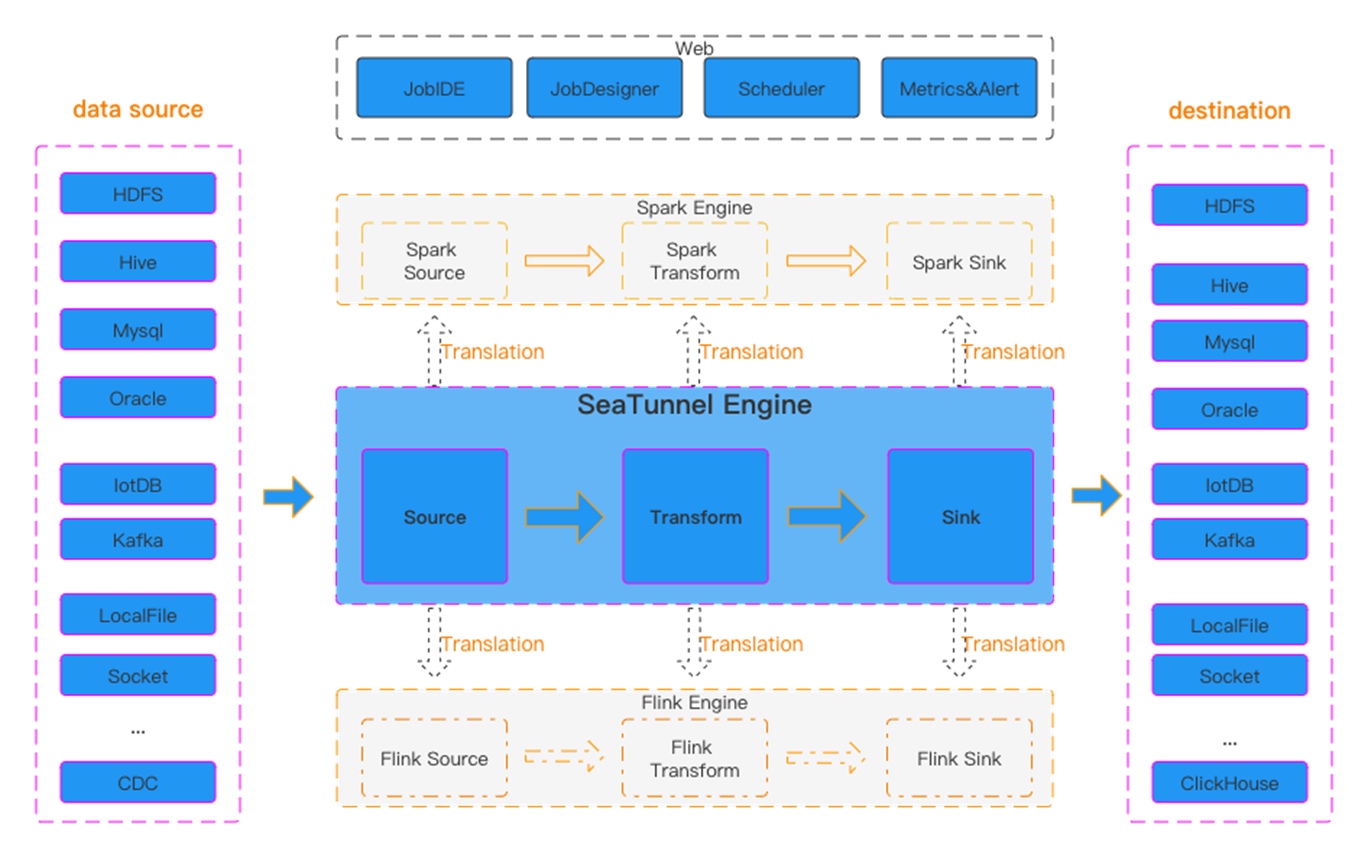 Figure 1 SeaTunnel Workflow
SeaTunnel's workflow is shown in the figure above. The user configures job information and selects the execution engine to submit the job. The Source Connector is responsible for reading source data in parallel and sending the data to the downstream Transform or directly to the Sink, and the Sink writes the data to the destination.
Build SeaTunnel from Source
git clone https://github.com/apache/seatunnel.git
cd seatunnel
sh ./mvnw clean install -DskipTests -Dskip.spotless=true
cp seatunnel-dist/target/apache-seatunnel-${version}-bin.tar.gz /The-Path-You-Want-To-Copy
cd /The-Path-You-Want-To-Copy
tar -xzvf "apache-seatunnel-${version}-bin.tar.gz"
After successfully building from source, all Connector plugins and some necessary dependencies (e.g., mysql driver) are included in the binary package. You can use the Connector plugins directly without installing them separately.
Configuration Example for Synchronizing MySQL Data to Aurora DSQL using SeaTunnel
env {
  parallelism = 1
  job.mode = "STREAMING"
  checkpoint.interval = 6000
  checkpoint.timeout = 1200000
}
source {
  MySQL-CDC {
    username = "user name"
    password = "password"
    table-names = ["db.table1"]
    url = "jdbc:mysql://dbhost:3306/db?useSSL=false&allowPublicKeyRetrieval=true&serverTimezone=UTC&connectTimeout=120000&socketTimeout=120000&autoReconnect=true&failOverReadOnly=false&maxReconnects=10"
    table-names-config = [
      {
        table = "db.table1"
        primaryKeys = ["id"]
      }
    ]
  }
}
transform {

}
sink {
    Jdbc {
        url="jdbc:postgresql://<dsql_endpoint>:5432/postgres"
        dialect="dsql"
        driver = "org.postgresql.Driver"
        username = "admin"
        access_key_id = "ACCESSKEYIDEXAMPLE"
        secret_access_key = "SECRETACCESSKEYEXAMPLE"
        region = "us-east-1"
        database = "postgres"
        generate_sink_sql = true
        primary_keys = ["id"]
        max_retries="3"
        batch_size =1000
    }
}
Run Data Synchronization Task
Save the above configuration as a mysql-to-dsql.conf file (please note that the values in the example need to be replaced with real parameters), store it in the config directory of apache-seatunnel-${version}, and execute the following command:
cd "apache-seatunnel-${version}"
./bin/seatunnel.sh --config ./config/mysql-to-dsql.conf -m local
 Figure 2 Data Synchronization Log Information
After the command is successfully executed, you can observe the task execution status through the newly generated logs. If an error occurs, you can also pinpoint it based on the exception information, such as database connection timeout or table not existing. Under normal circumstances, data will be successfully written to the target Aurora DSQL, as shown in the figure above.
Summary
Aurora DSQL is a highly secure, easily scalable, serverless infrastructure distributed database. Its authentication method combines with IAM identity, so currently, there is a lack of suitable tools to synchronize data to Aurora DSQL, especially in terms of real-time data synchronization. SeaTunnel is an excellent data integration and data synchronization tool. It currently supports data synchronization from a variety of data sources, and based on SeaTunnel, custom data synchronization requirements can be implemented very flexibly, such as full synchronization/incremental real-time synchronization. Based on this flexibility, the author developed a Sink Connector specifically for Aurora DSQL to meet the data synchronization needs for Aurora DSQL.
References
- SeaTunnel Deployment: https://seatunnel.apache.org/docs/start-v2/locally/deployment
- Developing a new SeaTunnel Connector: https://github.com/apache/seatunnel/blob/dev/seatunnel-connectors-v2/README.md
- Generating authentication tokens in Aurora DSQL: https://docs.aws.amazon.com/aurora-dsql/latest/userguide/SECTION_authentication-token.html
The aforementioned specific Amazon Web Services Generative AI-related services are currently available in Amazon Web Services overseas regions. Cloud services related to Amazon Web Services China Regions are operated by Sinnet and NWCD. Please refer to the official website of China Regions for specific information.
About the Author

Tan Zhiqiang, AWS Migration Solution Architect, is mainly responsible for enterprise customers' cloud migration or cross-cloud migration. He has more than ten years of experience in IT professional services and has served as a programmer, project manager, technical consultant, and solution architect.