 ⭐️
⭐️
About SeaTunnel



SeaTunnel is a multimodal, high-performance, distributed data integration platform. It helps teams move and synchronize data across databases, files, data lakes, and streaming systems with one unified job model.
Start Here
If this is your first time using SeaTunnel, follow this reading path:
- Getting Started Overview for the shortest path into the docs
- Quick Start With SeaTunnel Engine for the first local run
- Job Configuration Guide for writing real jobs
- How It Works for the execution model before going deeper
If you already operate Flink or Spark clusters, you can also jump directly to Quick Start With Flink or Quick Start With Spark.
What SeaTunnel Helps You Do
SeaTunnel is designed for the jobs data teams usually need to deliver first:
- Move data between many systems: databases, message queues, file systems, object storage, data lakes, and SaaS systems
- Handle both batch and streaming workloads: one connector model can serve full loads, incremental loads, CDC, and real-time synchronization
- Keep job definitions understandable: a SeaTunnel job is still mainly
env,source,transform, andsink - Reduce operational cost: SeaTunnel focuses on high throughput, lower dependency overhead, and practical observability
Why Teams Choose SeaTunnel
- Connector-first design: SeaTunnel provides a unified Connector API, so Source, Transform, and Sink plugins can be reused across engines
- Flexible engine choice: start with SeaTunnel Engine (Zeta), or run on Flink or Spark when that better fits your environment
- Built for data synchronization: multi-table sync, CDC scenarios, and large-scale job execution are first-class use cases
- Operational visibility: jobs expose runtime metrics and task information that help you understand throughput and stability
- Room to grow: teams can begin with a single local job and later move to larger clusters and more advanced deployments
Understand SeaTunnel In One Picture
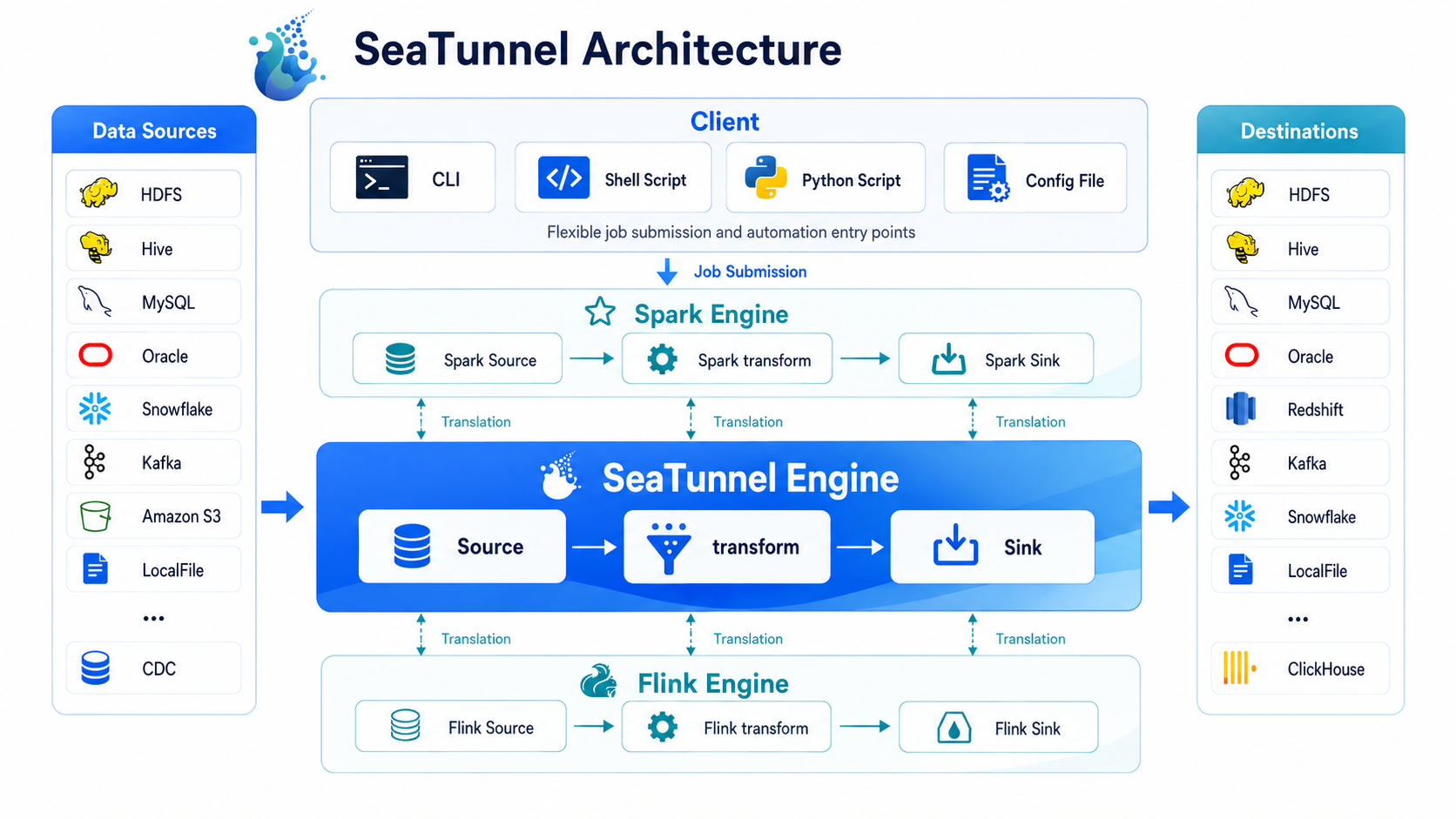
You can understand the runtime flow in three ideas:
1. A SeaTunnel job is a pipeline
You describe the job in a config file, then SeaTunnel runs a pipeline from Source to Transform to Sink.
2. Connectors define what you read and write
SeaTunnel supports a broad set of source connectors, sink connectors, and transforms. If you need custom behavior, you can also extend these plugin types.
3. The engine defines where the job runs
SeaTunnel Engine (Zeta) is the default choice and the recommended starting point for most new users. If you already rely on Flink or Spark, SeaTunnel can submit the same connector-based job model there as well.
Choose An Engine
| Engine | Best starting point | When to use it |
|---|---|---|
| SeaTunnel Engine (Zeta) | Recommended for most new users | You want the simplest path to run SeaTunnel jobs end to end |
| Apache Flink | Good for existing Flink users | You already operate Flink and want SeaTunnel to fit that platform |
| Apache Spark | Good for existing Spark users | You already run Spark for batch workloads and want to reuse that stack |
Continue Learning
- How It Works for the runtime model without the full architecture deep dive
- Intro To Config File for how to write real jobs
- Connector documentation for choosing the systems you want to read from and write to
- Architecture Overview for the deeper system design
- FAQ for common usage, CDC, and configuration questions
Get Help And Join The Community
- Developer Setup if you want to build or debug SeaTunnel locally
- Contribution Path if you want to start contributing with the smallest reasonable scope
- Contribute Plugin if you want to contribute a connector or transform
- GitHub Issues, Slack, and the dev mailing list if you need community help
Who Uses SeaTunnel
SeaTunnel has lots of users. You can find more information about them in Users.