Introduction
With the development of big data technology, the demand for data integration and data stream processing is increasing. Apache SeaTunnel, as an open-source data integration framework, not only supports multiple data sources and targets but also provides flexible APIs to meet various complex business requirements.
This article will deeply analyze the Apache SeaTunnel API to help developers better understand its usage scenarios and implementation methods.
Understanding SeaTunnel from Interface Definitions
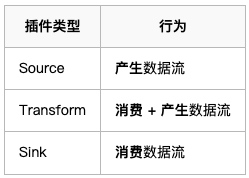
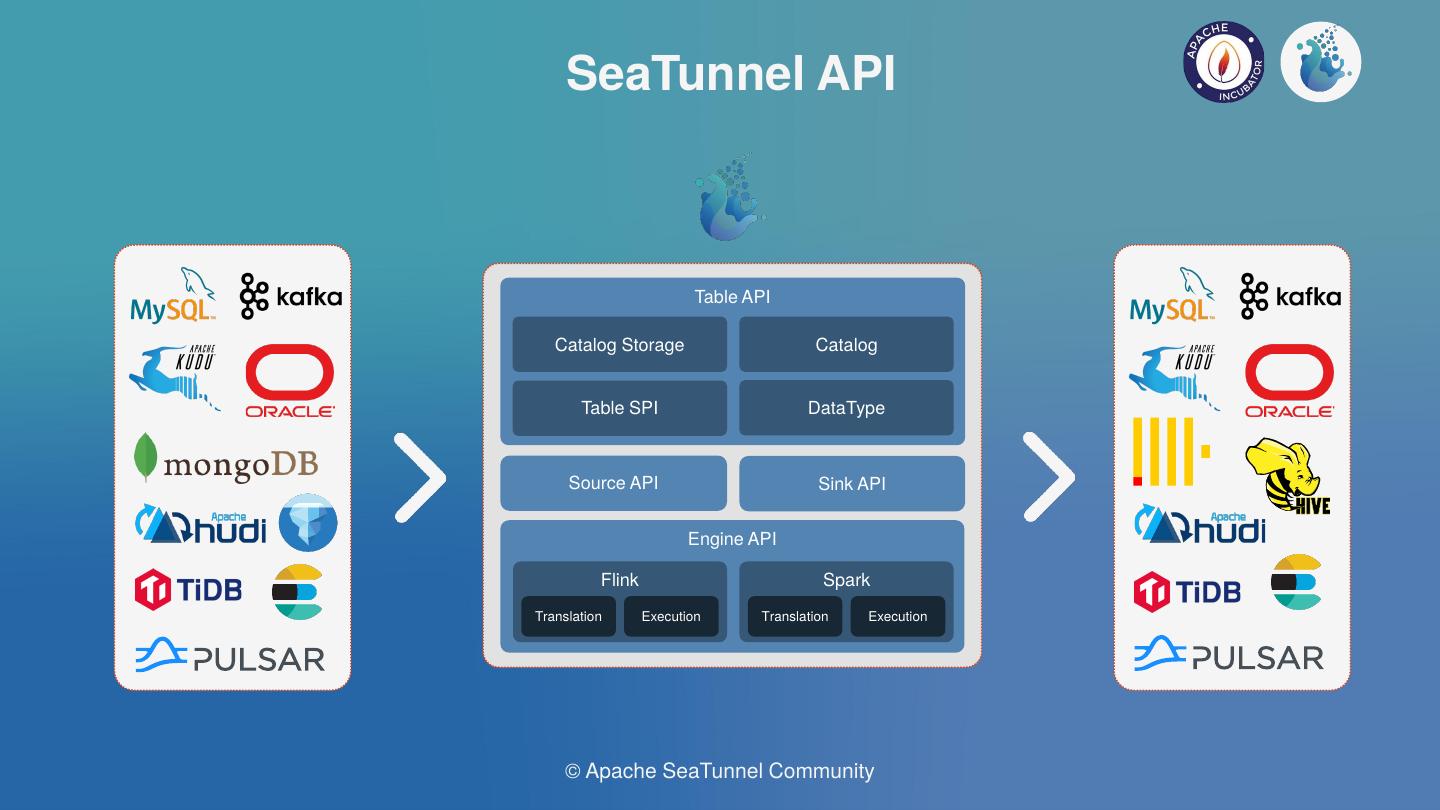
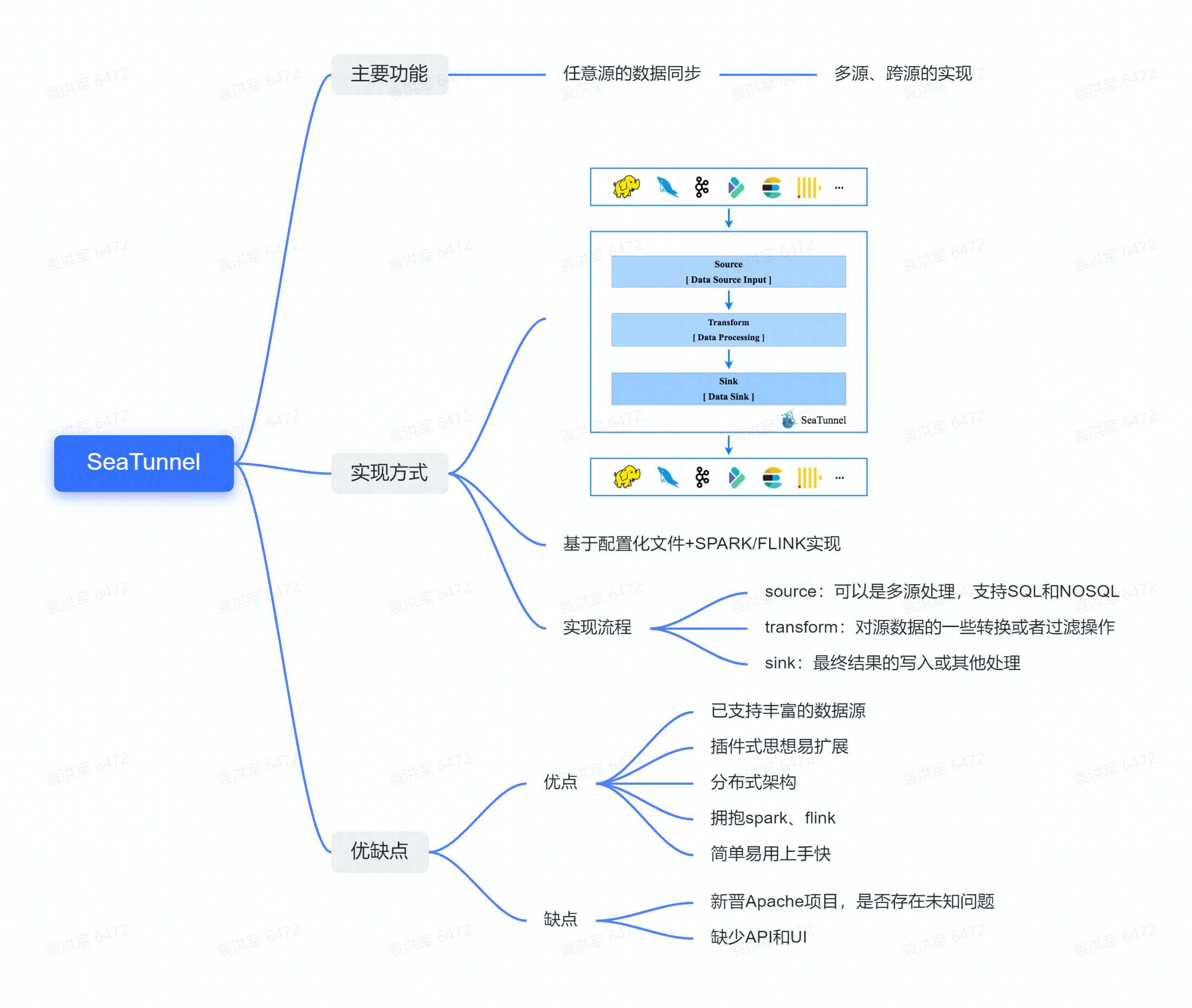
From the official diagram, we can see that SeaTunnel defines the following types:
- Source API: Used to define data input sources.
- Transform API: Used to process and transform data.
- Sink API: Used to define data output targets.
Three types of operators

So I want to start by looking at Apache SeaTunnel's design philosophy from the interface definitions.
SeaTunnelSource
SeaTunnelSource is the interface definition for data reading. In this interface, it defines how to extract data from a data source.
public interface SeaTunnelSource<T, SplitT extends SourceSplit, StateT extends Serializable>
extends Serializable,
PluginIdentifierInterface,
SeaTunnelPluginLifeCycle,
SeaTunnelJobAware {
/**
* Returns the type of current Source, whether it is [bounded batch data] or [unbounded stream data]
*/
Boundedness getBoundedness();
/**
* This method will be deprecated in the future
* Catalog will be used to represent data, allowing more metadata to describe the data
*/
default SeaTunnelDataType<T> getProducedType() {
return (SeaTunnelDataType) getProducedCatalogTables().get(0).getSeaTunnelRowType();
}
/**
* SeaTunnel currently supports multi-table reading, so this returns a list structure
* Each catalog contains metadata information about the table being read
*/
default List<CatalogTable> getProducedCatalogTables() {
throw new UnsupportedOperationException(
"getProducedCatalogTables method has not been implemented.");
}
/**
* Create Reader, which is the class that actually reads the data
*/
SourceReader<T, SplitT> createReader(SourceReader.Context readerContext) throws Exception;
/**
* These two methods are for creating/restoring SplitEnumerator
*/
SourceSplitEnumerator<SplitT, StateT> createEnumerator(
SourceSplitEnumerator.Context<SplitT> enumeratorContext) throws Exception;
SourceSplitEnumerator<SplitT, StateT> restoreEnumerator(
SourceSplitEnumerator.Context<SplitT> enumeratorContext, StateT checkpointState)
throws Exception;
/**
* These two methods are generally not modified, can be overridden if custom serialization is needed
*/
default Serializer<SplitT> getSplitSerializer() {
return new DefaultSerializer<>();
}
default Serializer<StateT> getEnumeratorStateSerializer() {
return new DefaultSerializer<>();
}
}
From this interface, we can see two main methods:
createReadercreateEnumerator
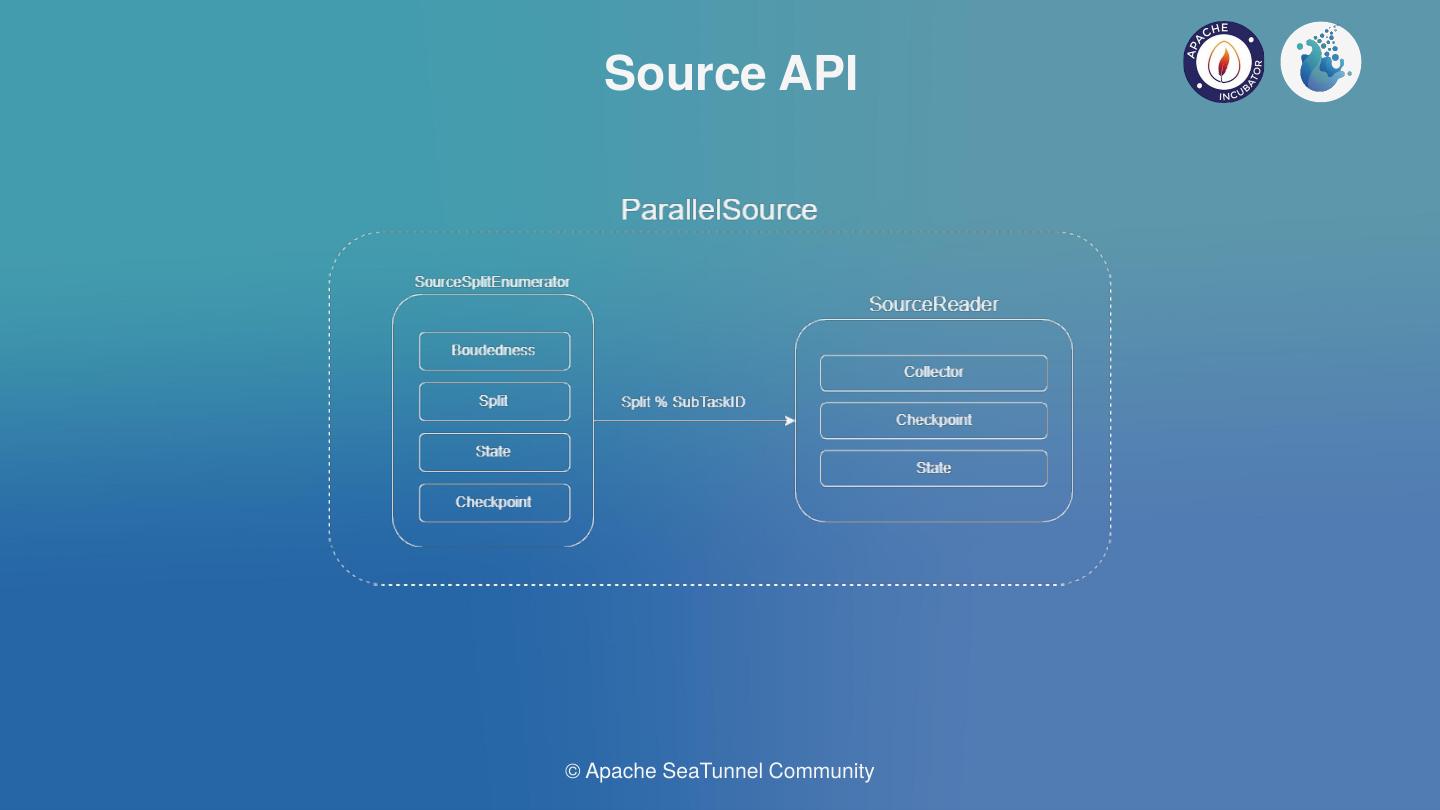
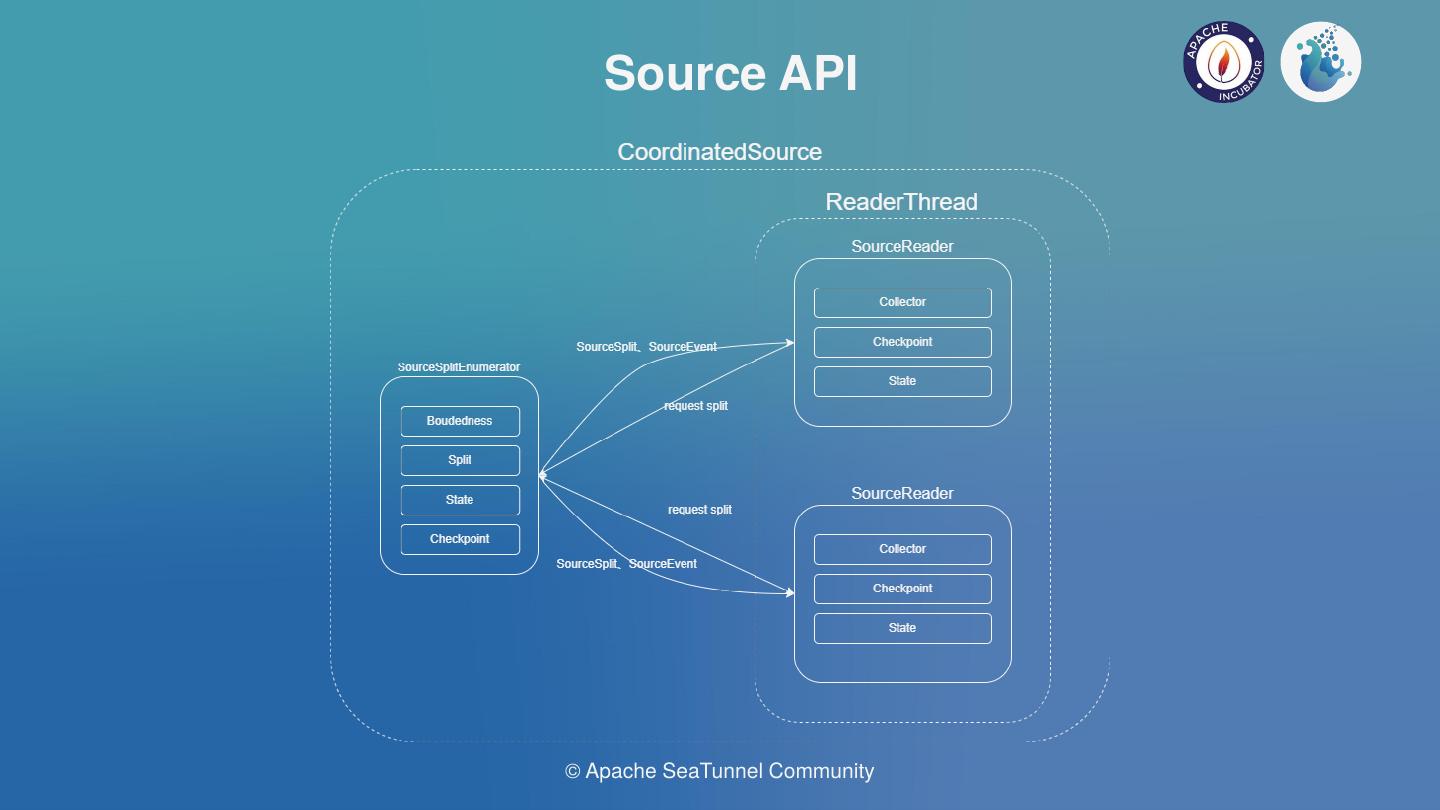
The SourceSplitEnumerator created by the createEnumerator method is responsible for splitting the data extraction tasks. The SourceReader created by the createReader method will perform the actual task reading based on these split tasks.
First, let's look at the code for SourceSplitEnumerator.
SourceSplitEnumerator
public interface SourceSplitEnumerator<SplitT extends SourceSplit, StateT> extends AutoCloseable, CheckpointListener {
void open();
void run() throws Exception;
@Override
void close() throws IOException;
void addSplitsBack(List<SplitT> splits, int subtaskId);
int currentUnassignedSplitSize();
void handleSplitRequest(int subtaskId);
void registerReader(int subtaskId);
StateT snapshotState(long checkpointId) throws Exception;
default void handleSourceEvent(int subtaskId, SourceEvent sourceEvent) {}
interface Context<SplitT extends SourceSplit> {
int currentParallelism();
Set<Integer> registeredReaders();
void assignSplit(int subtaskId, List<SplitT> splits);
default void assignSplit(int subtaskId, SplitT split) {
assignSplit(subtaskId, Collections.singletonList(split));
}
void signalNoMoreSplits(int subtask);
void sendEventToSourceReader(int subtaskId, SourceEvent event);
MetricsContext getMetricsContext();
EventListener getEventListener();
}
}
The SourceSplitEnumerator interface defines some methods and an inner class Context. First, let's look at its own methods. We can see there are 3 lifecycle-related methods: open(), run(), and close(). These methods require connectors to handle resource creation or cleanup based on their implementations.
registerReader(int subtaskId)method:readeractively registers with thesplit enumeratorhandleSplitRequest(int subtaskId):readeractively requests from thesplit enumeratorto get the extraction tasks it will execute.
(However, looking at the code implementation, this approach is less common; most of the time, theenumeratoractively pushes tasks toreader)addSplitsBack(List<SplitT> splits, int subtaskId): When a reader encounters an exception, its running tasks need to be reassigned. At this point, these tasks need to be added back to the queue for reassignment to other nodes for fault tolerance.
In the Context interface definition, there are two key methods:
assignSplit(int subtaskId, List<SplitT> splits):split enumeratoractively pushes tasks to a specificreadersignalNoMoreSplits(int subtaskId):split enumeratortells a specificreaderthat no more tasks will be assigned to it.
SourceReader
public interface SourceReader<T, SplitT extends SourceSplit>
extends AutoCloseable, CheckpointListener {
void open() throws Exception;
@Override
void close() throws IOException;
void pollNext(Collector<T> output) throws Exception;
List<SplitT> snapshotState(long checkpointId) throws Exception;
void addSplits(List<SplitT> splits);
void handleNoMoreSplits();
default void handleSourceEvent(SourceEvent sourceEvent) {}
interface Context {
int getIndexOfSubtask();
Boundedness getBoundedness();
void signalNoMoreElement();
void sendSplitRequest();
void sendSourceEventToEnumerator(SourceEvent sourceEvent);
MetricsContext getMetricsContext();
EventListener getEventListener();
}
}
In the Reader interface definition, there is also an inner class Context.
Let's look at some of the main methods:
pollNext(Collector<T> output): The main method for data extraction. In this method, each connector will implement extracting data from its corresponding data source, converting it to SeaTunnel's internal data structureSeaTunnelRow, and then adding it to theCollectoraddSplits(List<SplitT> splits):reader's handling after receiving tasks assigned by thesplit enumeratorsnapshotState(long checkpointId): This method is called duringcheckpoint, requiring thereaderto record some state for subsequent fault tolerance
Summary with a Diagram

Here, a Split represents a task for splitting data source reads. It can be a partition of a Hive table, a partition of Kafka, or a split of a JDBC query statement. In short, the core idea is to split data reading into multiple independent reading tasks that can be assigned to different reader instances for execution, thereby speeding up queries.
For example: In batch processing, data can be split into N parts, allowing data extraction to be executed in parallel to achieve speed improvement.
For stream processing, there are two approaches. One is to split data into limited unbounded data streams (e.g., Kafka splits by partition, one partition per task, each task being an unbounded data stream).
Another approach is to generate infinite bounded data streams (also using Kafka as an example, extracting part of the data from a partition each time, infinitely generating task definitions).
As for how many Splits a data reading task will ultimately be divided into and how to implement the splitting, it's up to each connector's implementation. Each connector can decide based on the actual partitions being read or parameters.
Next, let's look at the code related to Transform!
SeaTunnelTransform
public interface SeaTunnelTransform<T>
extends Serializable, PluginIdentifierInterface, SeaTunnelJobAware {
default void open() {}
default void setTypeInfo(SeaTunnelDataType<T> inputDataType) {
throw new UnsupportedOperationException("setTypeInfo method is not supported");
}
// Get the data structure after Transform processing
CatalogTable getProducedCatalogTable();
// From this, we can see that Transform in SeaTunnel only supports map operations
// Operations like Join involving multiple data sources are not supported
T map(T row);
default void close() {}
}
In transform, there is one key method T map(T row), which performs map processing on an original data record to get a new data record. The structure of the new data is consistent with getProducedCatalogTable().
This code is based on version 2.3.6. The community is currently working on multi-table read/write functionality for
Transform. Currently, only themapoperator (one-to-one) is supported. I've seen the community also discussing whether to support theflatMapoperator (one-to-many), which would allow data expansion operations during synchronization.
Now let's look at the Sink code!
SeaTunnelSink
public interface SeaTunnelSink<IN, StateT, CommitInfoT, AggregatedCommitInfoT>
extends Serializable,
PluginIdentifierInterface,
SeaTunnelPluginLifeCycle,
SeaTunnelJobAware {
@Deprecated
// These two methods are also marked as deprecated, will use Catalog for representation in the future
default void setTypeInfo(SeaTunnelRowType seaTunnelRowType) {
throw new UnsupportedOperationException("setTypeInfo method is not supported");
}
@Deprecated
default SeaTunnelDataType<IN> getConsumedType() {
throw new UnsupportedOperationException("getConsumedType method is not supported");
}
/**
* Create/restore SinkWriter, Writer is the class that actually performs data writing
*/
SinkWriter<IN, CommitInfoT, StateT> createWriter(SinkWriter.Context context) throws IOException;
default SinkWriter<IN, CommitInfoT, StateT> restoreWriter(
SinkWriter.Context context, List<StateT> states) throws IOException {
return createWriter(context);
}
default Optional<Serializer<StateT>> getWriterStateSerializer() {
return Optional.empty();
}
default Optional<SinkCommitter<CommitInfoT>> createCommitter() throws IOException {
return Optional.empty();
}
default Optional<Serializer<CommitInfoT>> getCommitInfoSerializer() {
return Optional.empty();
}
default Optional<SinkAggregatedCommitter<CommitInfoT, AggregatedCommitInfoT>
createAggregatedCommitter() throws IOException {
return Optional.empty();
}
default Optional<Serializer<AggregatedCommitInfoT>> getAggregatedCommitInfoSerializer() {
return Optional.empty();
}
}
In Sink, there are several key methods:
createWriter(SinkWriter.Context context): Create Writer instance. Similar to Source, the actual data writing is performed by theWriter.createCommitter(): Optional. When two-phase commit is needed, create aSinkCommitterto complete the two-phase commit. This approach is no longer recommended; it's recommended to usecreateAggregatedCommitter()for two-phase commit.createAggregatedCommitter(): Optional. Similar toSinkCommitter, used for two-phase commit during the commit phase.The difference is that
SinkAggregatedCommitterruns as a single instance, not multiple instances, concentrating all commit tasks in one place for execution. So if a connector needs two-phase commit, it's recommended to usecreateAggregatedCommitter()to create it.
SinkWriter
public interface SinkWriter<T, CommitInfoT, StateT> {
void write(T element) throws IOException;
default void applySchemaChange(SchemaChangeEvent event) throws IOException {}
Optional<CommitInfoT> prepareCommit() throws IOException;
default List<StateT> snapshotState(long checkpointId) throws IOException {
return Collections.emptyList();
}
void abortPrepare();
void close() throws IOException;
interface Context extends Serializable {
int getIndexOfSubtask();
default int getNumberOfParallelSubtasks() {
return 1;
}
MetricsContext getMetricsContext();
EventListener getEventListener();
}
}
We can see that the structure of SinkWriter is somewhat similar to SourceReader. Let's look at some key methods:
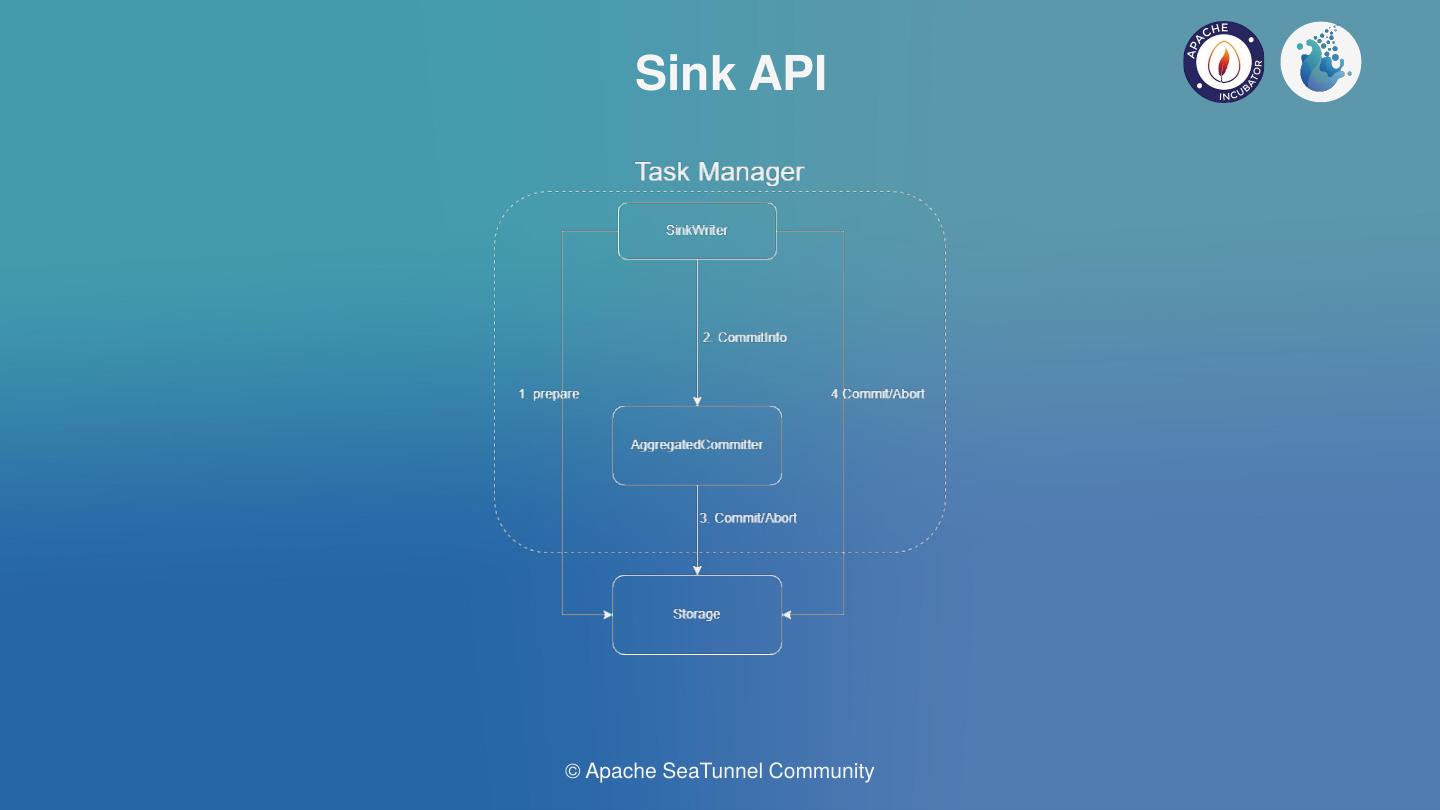
write(T element): Implementation of writing to the target database when receiving upstream data;applySchemaChange(SchemaChangeEvent event): How downstream handles when upstream data table structure changes, such as adding/removing fields, modifying field names. But this depends on the specific implementation;prepareCommit(): When two-phase commit is needed, generate information for this commit, which will be handed over toSinkCommitter/SinkAggregatedCommitterfor two-phase commit. This method is called duringcheckpoint, meaning information is committed to the target connector only during eachcheckpoint;snapshotState(): Duringcheckpoint, store some state of thewriterfor subsequent fault tolerance;
Summary with a Diagram

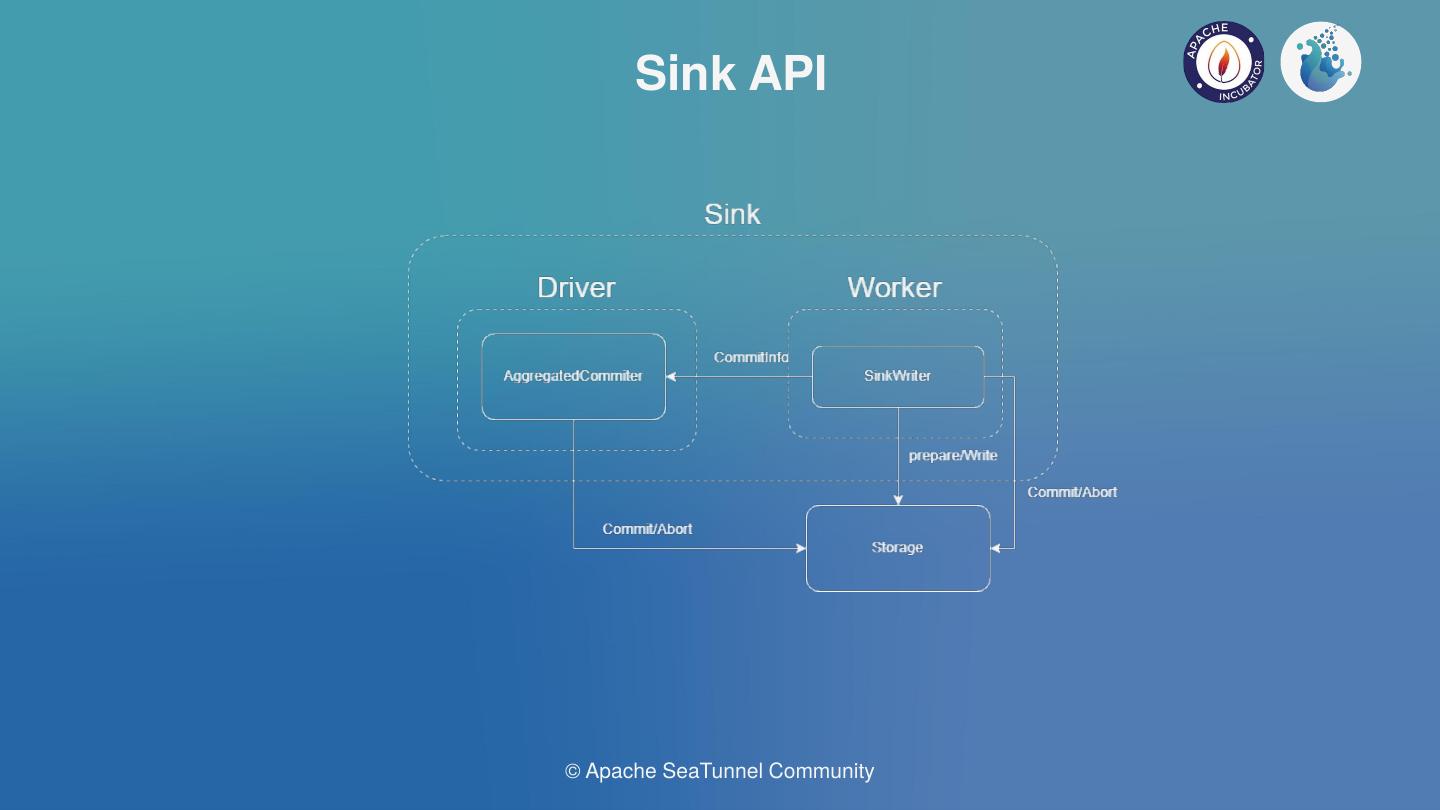
When data needs to be read from a data source, SourceSplitEnumerator first splits the tasks, then SourceReader executes the split data reading tasks. During reading, raw data needs to be converted to SeaTunnel's internal SeaTunnelRow, then passed downstream to Transform for data transformation. After transformation, it's handed to SinkWriter to write the SeaTunnelRow data to the corresponding connector. If two-phase commit is needed during writing, additional SinkCommitter related classes need to be implemented.
Collector
In the previous sections, we've described the functionality of source, transform, and sink.
But how is data passed between source, transform, and sink? If a source has multiple downstream components, how are messages distributed to all downstream components? This is where the Collector interface comes in.
From the data flow direction, only source to downstream or transform to downstream passes data, so we can see there are two Collector interface definitions, located in the source and transform packages respectively.
First, let's look at the Collector definition in source:
public interface Collector<T> {
void collect(T record);
default void markSchemaChangeBeforeCheckpoint() {}
default void collect(SchemaChangeEvent event) {}
default void markSchemaChangeAfterCheckpoint() {}
Object getCheckpointLock();
default boolean isEmptyThisPollNext() {
return false;
}
default void resetEmptyThisPollNext() {}
}
The Collector definition in transform is relatively simple:
public interface Collector<T> {
void collect(T record);
void close();
}
Collector decouples multiple operators. Each operator only needs to focus on how to process data, without worrying about who to send the result data to.
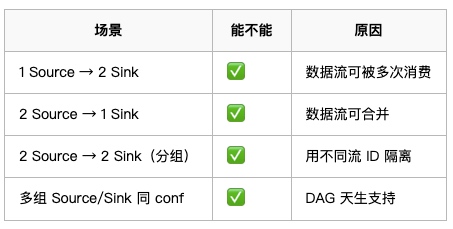
Updating the previous diagram (adding another Transform to show the multi-downstream scenario):


picture
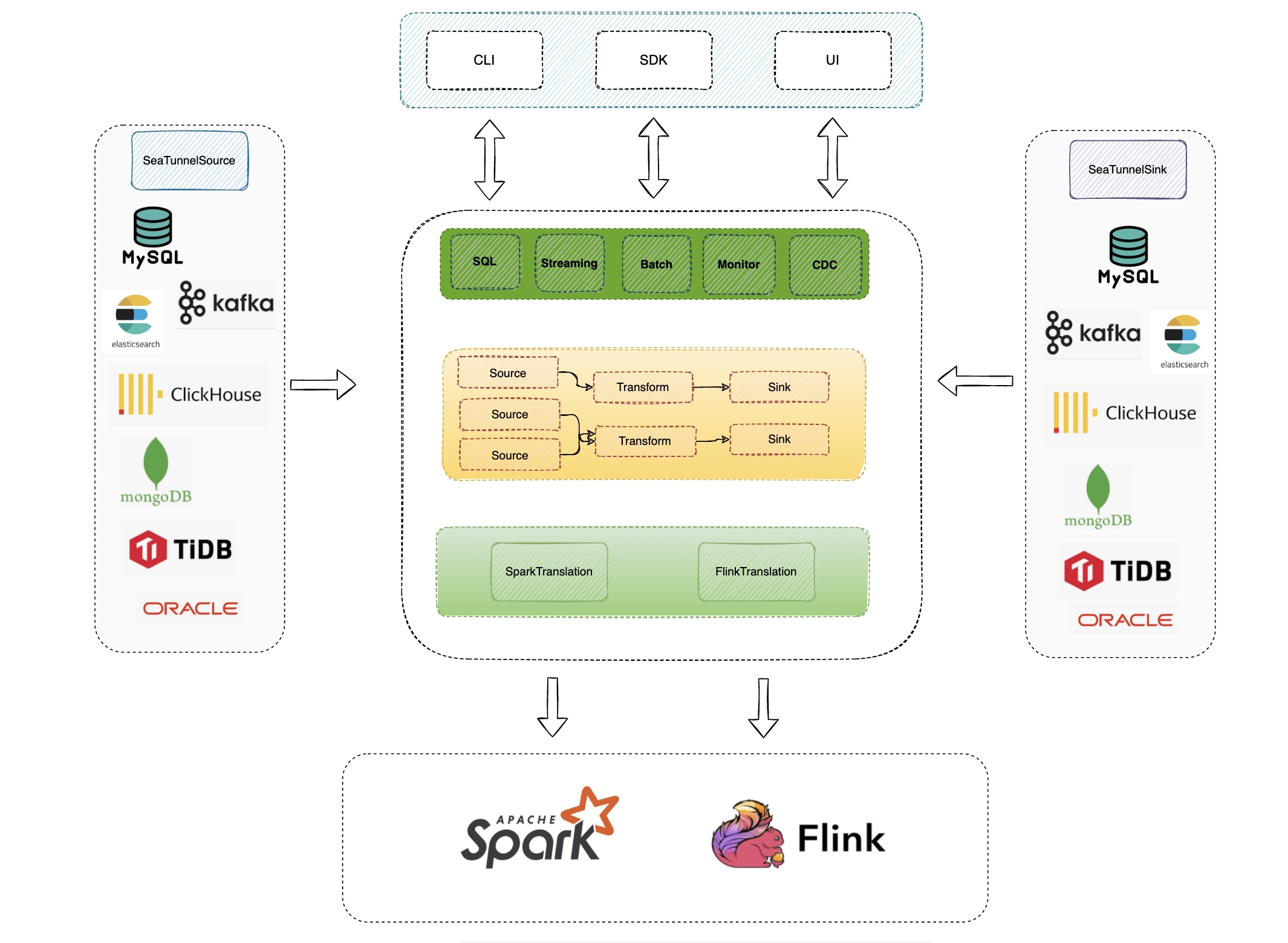
The left-hand side briefly lists the Source scenarios, for example, we abstract the Source’s API, Type, and State, to read the data source, unifying the data types of the various data sources to the abstract type defined in it, and some state recovery and retention of the read location during the reading process.
From the diagram above we see the different data sources, Source is responsible for reading data from the various data sources and transforming it into SeaTunnelRow abstraction layer and Type to form the abstraction layer, Sink is responsible for pulling data from the abstraction layer and writing it to the concrete data store to transform it into the store concrete format.
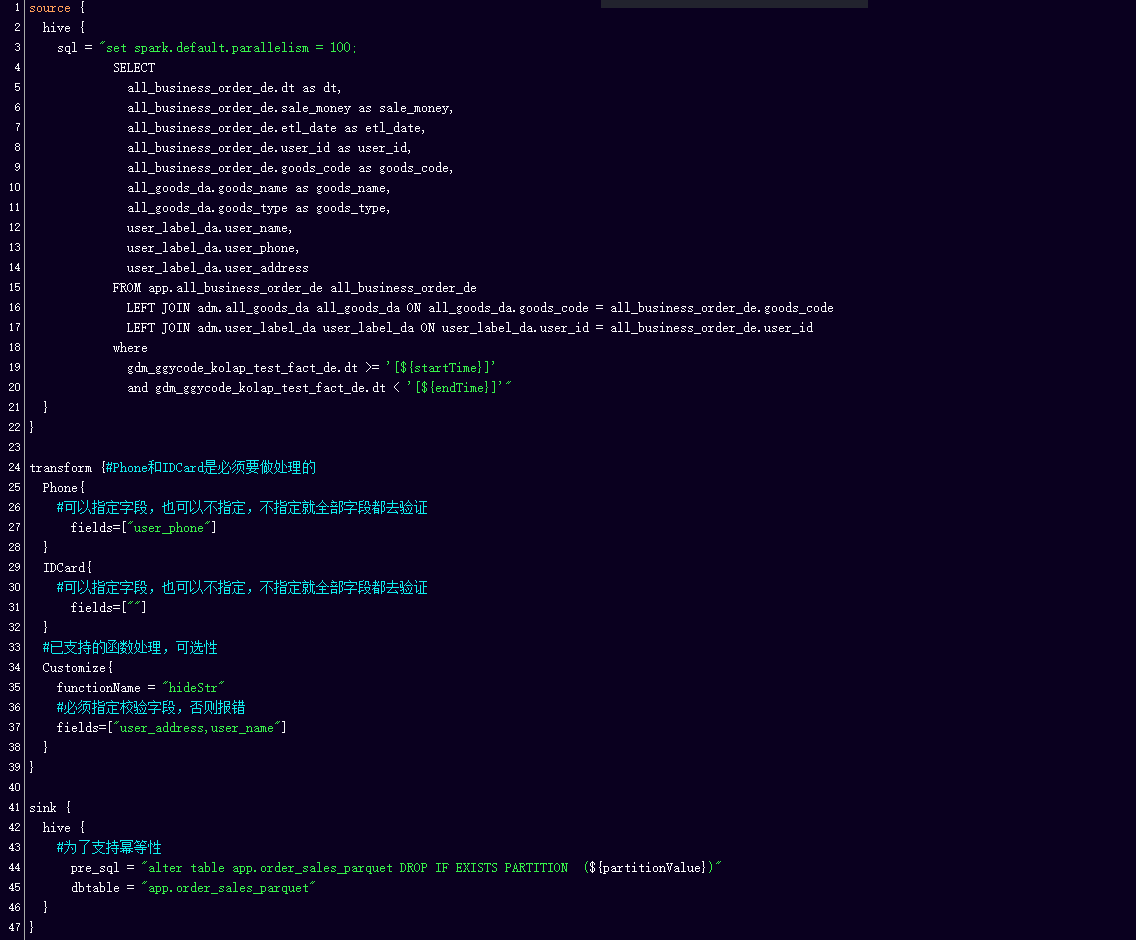
We can specify the number of Sources, Sink configuration file combinations through the configuration file The commands in the toolkit provided by SeaTunnel take the configuration file with them and when executed enable data handling.
This is the Connector ecosystem that is currently supported by SeaTunnel, such as the data sources supported by JBDC, HDFS, Hive, Pulsar, message queues, etc. are currently supported.
Firstly, there are the typical usage scenarios supported by Source, such as bulk reading of devices, field projection, data type mapping, parallel reading, etc.
The BOOLEAN, INT32, INT64, etc. listed here all have corresponding SeaTunnel data types. INT32 can be mapped according to the read type on the SeaTunnel, or to TINYINT, SMALLINT, or INT when the range of values is small.
This is the corresponding example code showing how the mapping is done where the type conversion is done.
The SQL extraction of column codes allows you to extract only some of the columns you need, and when used on SeaTunnel, you can specify the name, type, etc. of the column after it is mapped to SeaTunnel via fields. The final result of the data read on SeaTunnel is shown in the figure above.

Assuming there is a table in IoTDB, we project the device column onto SeaTunnel by making it data as well through syntax. After configuring the device name column and specifying the data type, we end up reading the data on SeaTunnel in the format shown above, containing the Time, device column, and the actual data value. This makes it possible to read data from the same device in bulk.


Another typical usage scenario is to import data from other data sources into IoTDB. suppose I have an external database table with columns like ts, temperature, humidity, etc. and we import it into IoTDB, requiring the columns of temperature and humidity, but the rest can be left out. The whole configuration is shown in the diagram above, you can refer to it.
Apache SeaTunnel Committer | Zongwen Li
When SeaTunnel entered the Apache incubator, the SeaTunnel community ushered in rapid growth.
For distributed streaming processing systems, high throughput and low latency are often the most important requirements. At the same time, fault tolerance is also very important in distributed systems. For scenarios that require high correctness, the implementation of exactly once is often very important.
The previous problem will cause a long-time recovery, and the business service may accept a certain degree of data delay.
The previous examples are cases regarding a small number of tables, but in real business service development, we usually need to synchronize thousands of tables, which may be divided into databases and tables at the same time;
Besides, according to the research report of Fivetran, 60% of the company’s schema will change every month, and 30% will change every week.
If our Source or Sink is of JDBC type, since the existing engine only supports one or more links per table, when there are many tables to be synchronized, more link resources will be occupied, which will bring a great burden to the database server.
In the existing engine, a buffer and other control operators are used to control the pressure, that is, the back pressure mechanism; since the back pressure is transmitted level by level, there will be pressure delay, and at the same time, the processing of data will not be smooth enough, increasing the GC time, fault-tolerant completion time, etc.
In the data integration case, there is a possibility that a job can synchronize hundreds of sheets, and the failure of one node or one table will lead to the failure of all tables, which is too costly.
For example, if the Source fails, the Sink does not need to restart. In the case of a single Source and multiple Sinks, if a single Sink fails, only the Sink and Source that failed will be restored; that is, only the node that failed and its upstream nodes will be restored.
For sink failure, when data cannot be written, a possible solution is to work two jobs at the same time.
Schema Evolution is a feature that allows users to easily change the current schema of a table to accommodate changing data over time. Most commonly, it is used when performing an append or overwrite operation, to automatically adjust the schema to include one or more new columns.
The Multi-table feature can reduce the use of some Source and Sink link resources. At the same time, we have implemented Dynamic Thread Resource Sharing in SeaTunnel Engine, reducing the resource usage of the engine on the server.
As for the problems that cannot be solved by the back pressure mechanism, we will optimize the Buffer and Checkpoint mechanism:
Bo Bi, data engineer at Mafengwo
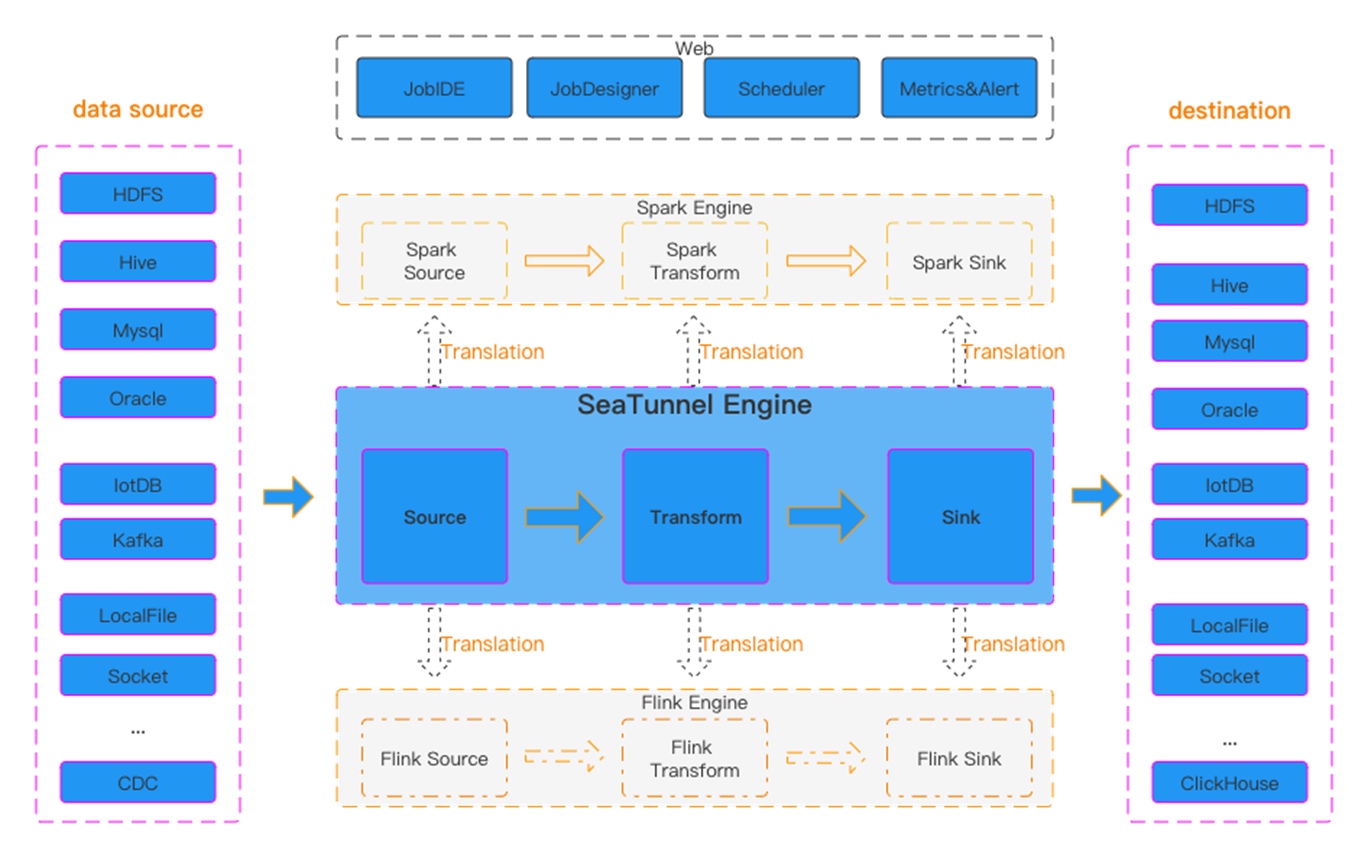
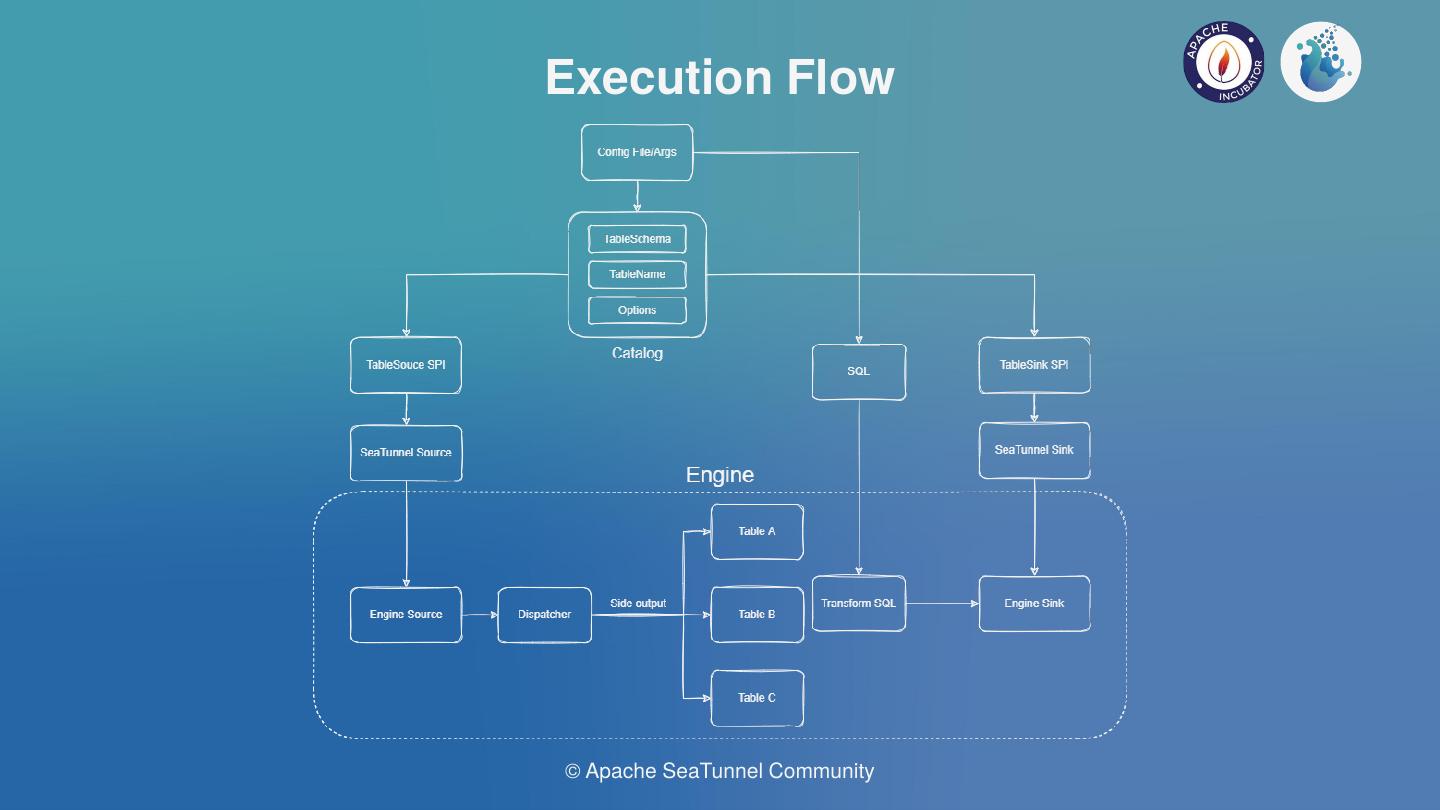
This shows that the core of SeaTunnel is the Source, Transform and Sink process definitions.
The above diagram shows the definition of the interface, the Plugin interface in SeaTunnel abstracts the various actions of data processing into a Plugin.
Execution, the data flow builder used to build the entire data flow based on the first three, is also part of the base API


SeaTunnel’s API consists of three main parts.
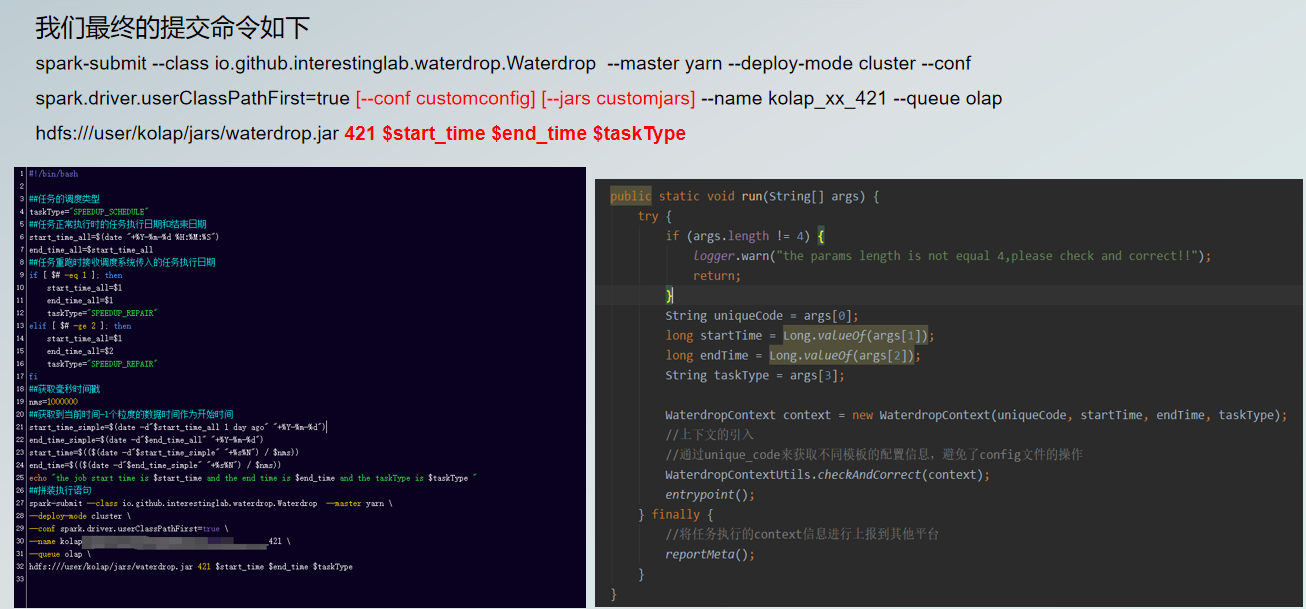
Then find the Connector path from the Connector plugin directory and stitch it into the Spark-submit launch command with — jar, so that the found Plugin jar package can be passed to the Spark cluster as a dependency.
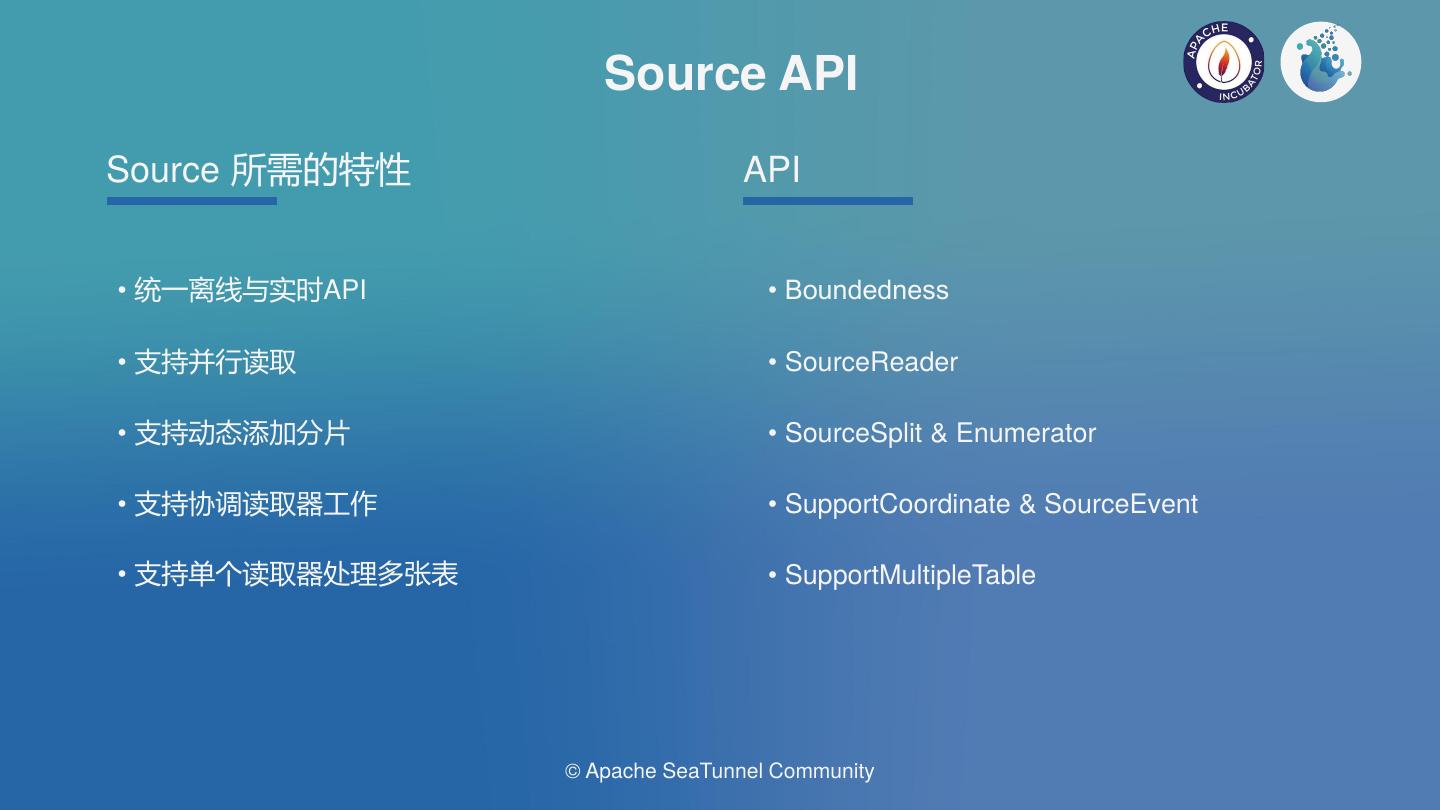
The core Source API interaction flow is shown above. In the case of concurrent reads, the enumerator SourceSplitEnumerator is required to split the task and send the SourceSplit down to the SourceReader, which receives the split and uses it to read the external data source.
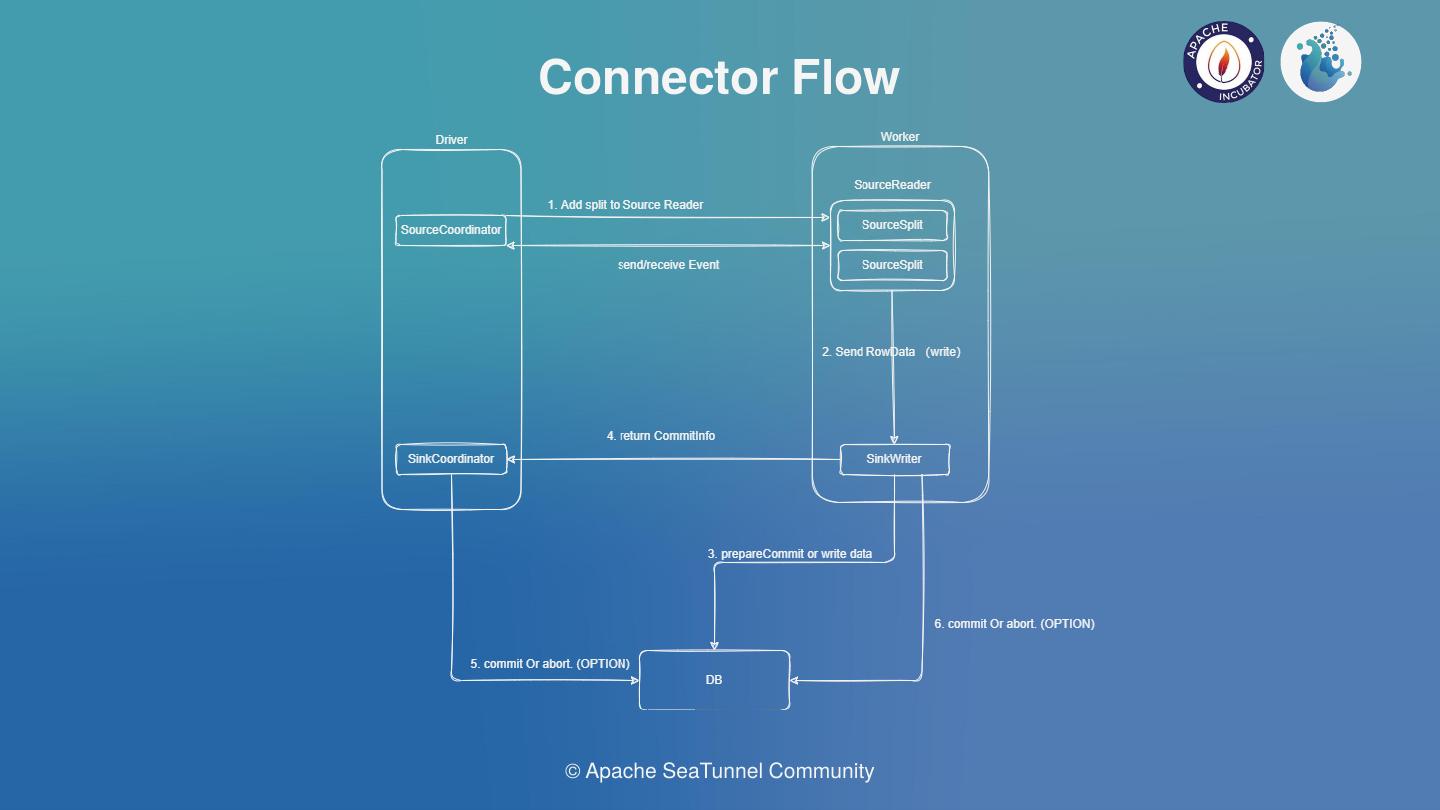
The overall Sink API interaction flow is shown in the diagram below. The SeaTunnel sink is currently designed to support distributed transactions, based on a two-stage transaction commit.
For the Kafka sink connector implementation, the first stage is to do a pre-commit by calling KafkaProducerSender.prepareCommit().
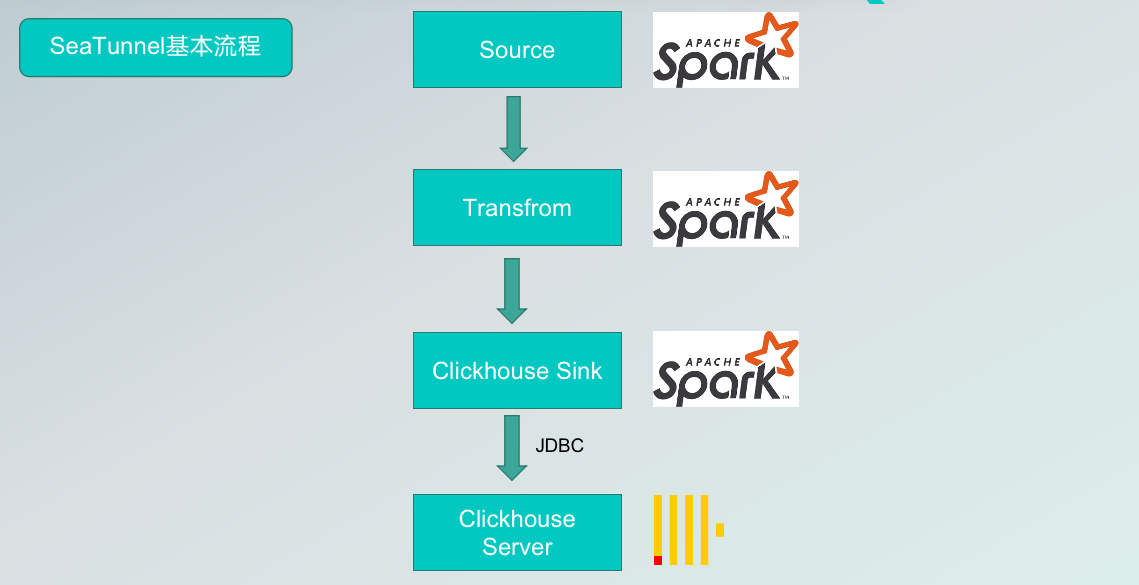
SeaTunnel V2: Thanks to the work of the engine translator, the Connector API, and the SeaTunnelRow, the data source of the SeaTunnel internal data structures accessed through the Connector, are translated by the translation layer into a runnable Spark API and spark dataset that is recognized inside the engine during data transformation.
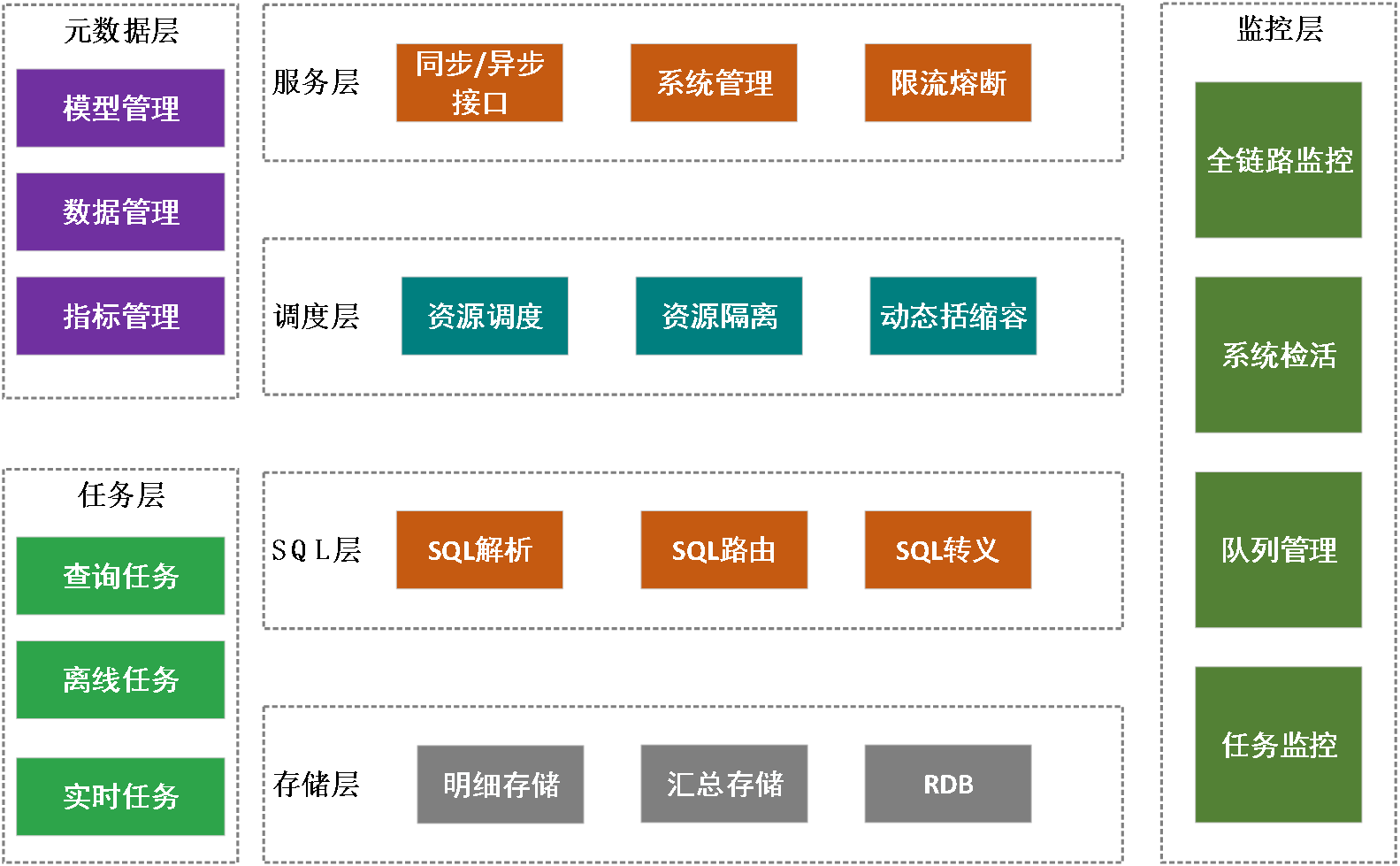
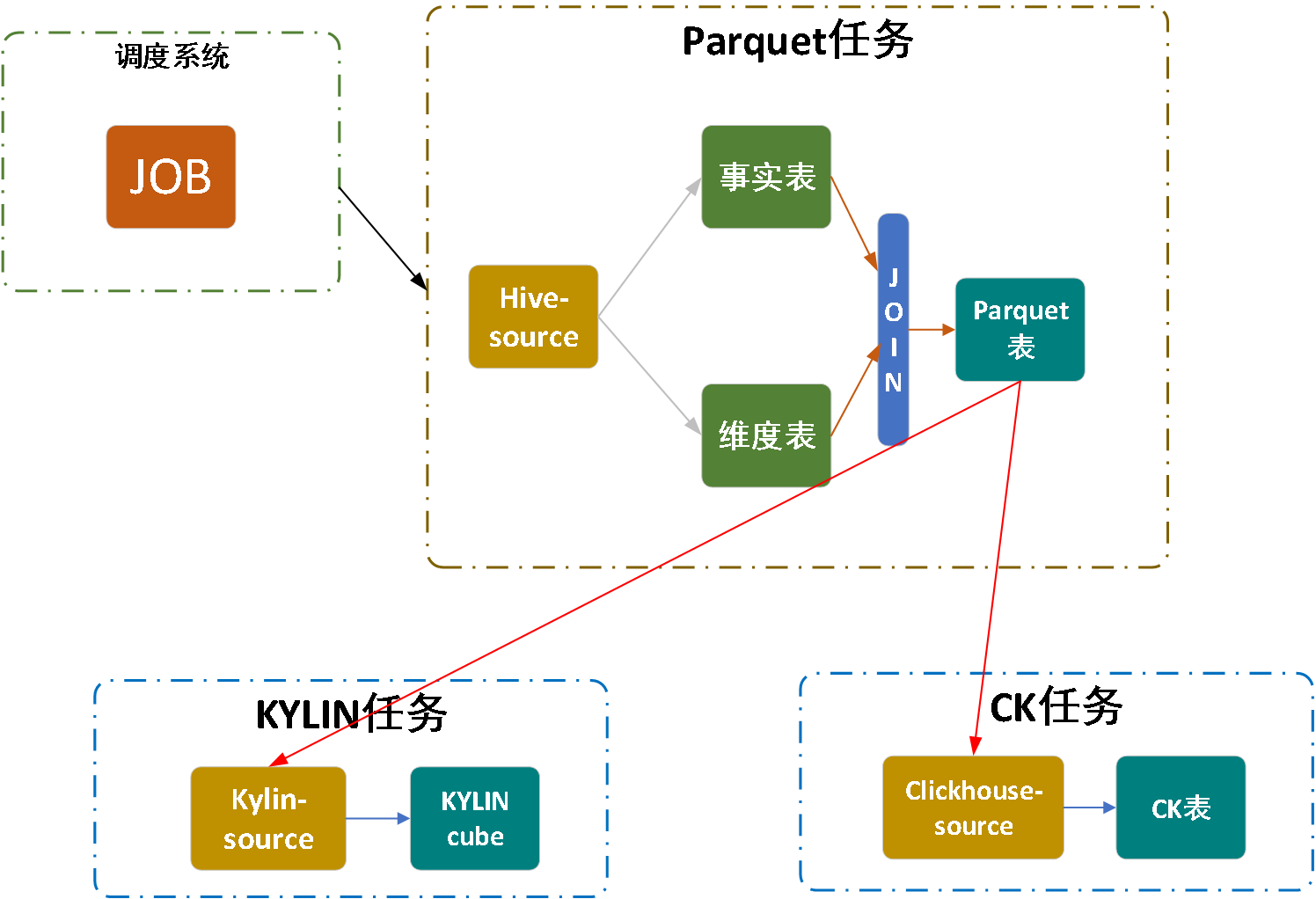
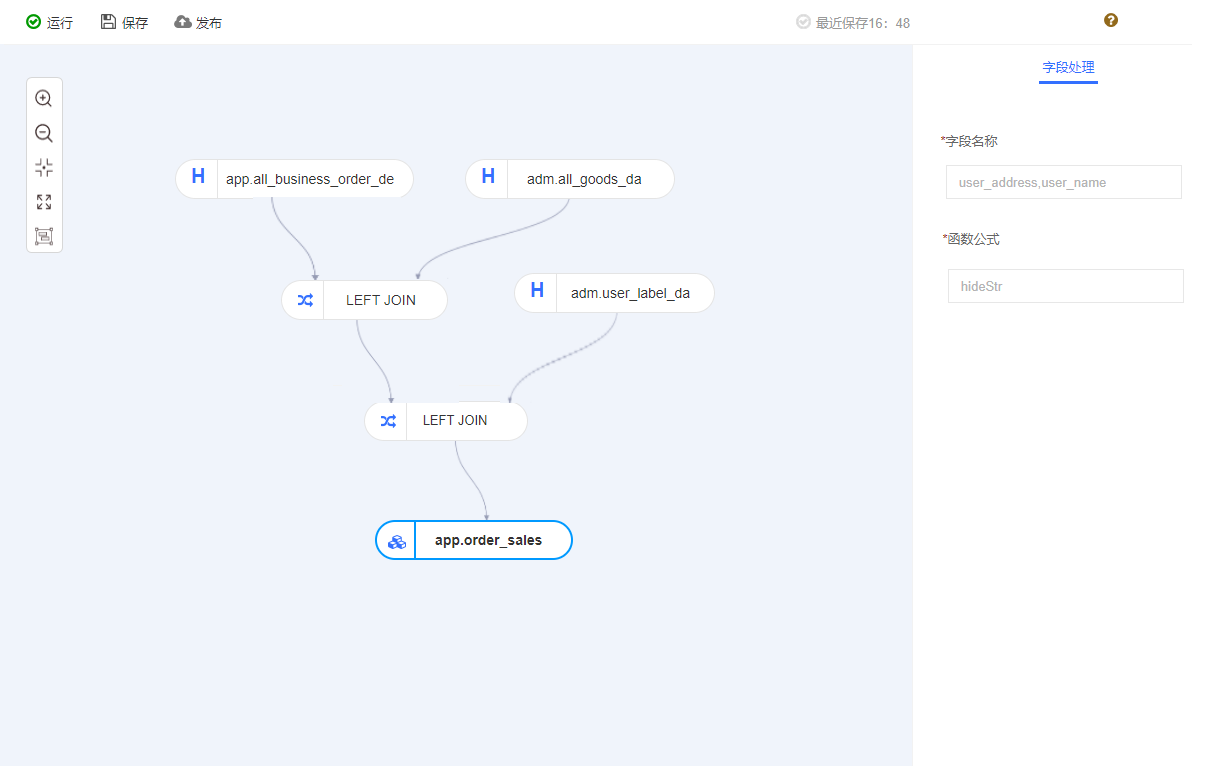
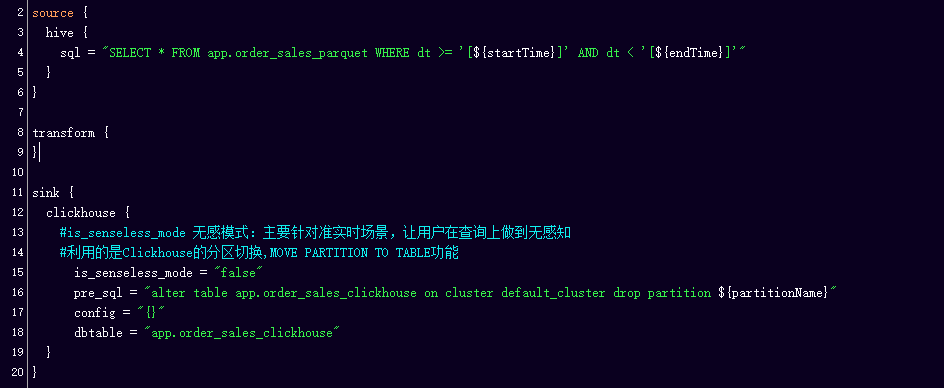
Hornet’s Nest Big Data Development Platform, which focuses on providing one-stop big data development and scheduling services, helps businesses solve complex problems such as data development management, task scheduling and task monitoring in offline scenarios.
The Hornet’s Nest Big Data Development and Scheduling Platform consists of four main modules: the task component layer, the scheduling layer, the service layer, and the monitoring layer.
To address the pain points mentioned above, we actively explored solutions and conducted a selection analysis of several mainstream data integration products in the industry. As you can see from the comparison above, Datax and SeaTunnel both offer good scalability, and high stability, support rich connector plugins, provide scripted, uniformly configurable usage, and have active communities.
StarRocks currently also supports Spark Load, based on the Spark bulk data import method, but our ETL is more complex, needs to support data conversion multi-table Join, data aggregation operations, etc., so temporarily can not meet.